


Summary
: in this tutorial, you will learn how to insert rows into a table in the SQLite database from a Python program using the
sqlite3
module.
Inserting a new row into a table from Python
To insert rows into a table in an SQLite database, you use the following steps:
First, import the built-in
sqlite3
module:
import sqlite3Code language: Python (python)
Second,
connect to an SQLite database file
by calling the
connect()
function from the
sqlite3
module:
with sqlite3.connect(database) as conn:Code language: Python (python)
The
connect()
function returns a
Connection
object that represents a database connection to the SQLite database file
database
.
Third, create a
Cursor
object by calling the
cursor()
method of the
Connection
object:
cursor = conn.cursor()Code language: Python (python)Fourth, execute an INSERT statement that inserts a row into a table:
cursor.execute(insert_statement)Code language: Python (python)
Fifth, apply the change permanently to the SQLite database by calling the
commit()
method of the
Connection
object:
conn.commit()Code language: Python (python)
If you want to pass arguments to the
INSERT
statement, use the question mark (
?
) as the placeholder for each. For example:
INSERT INTO table_name(c1, c2)
VALUES(?,?)Code language: Python (python)
In this statement,
c1
and
c2
are columns of the table
table_name
. The question mark (
?
) are placeholders for the
c1
and
c2
columns.
Inserting data into a table in Python example
We’ll use the
projects
and
tasks
tables created in the
creating tables tutorial
for the demonstration.
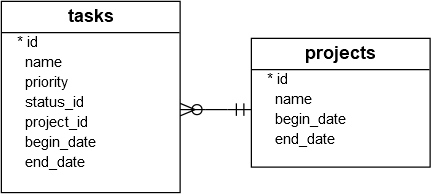
The following program inserts data into the
projects
and
tasks
tables:
import sqlite3
def add_project(conn, project):
# insert table statement
sql = ''' INSERT INTO projects(name,begin_date,end_date)
VALUES(?,?,?) '''
# Create a cursor
cur = conn.cursor()
# execute the INSERT statement
cur.execute(sql, project)
# commit the changes
conn.commit()
# get the id of the last inserted row
return cur.lastrowid
def add_task(conn, task):
# insert table statement
sql = '''INSERT INTO tasks(name,priority,status_id,project_id,begin_date,end_date)
VALUES(?,?,?,?,?,?) '''
# create a cursor
cur = conn.cursor()
# execute the INSERT statement
cur.execute(sql, task)
# commit the changes
conn.commit()
# get the id of the last inserted row
return cur.lastrowid
def main():
try:
with sqlite3.connect('my.db') as conn:
# add a project
project = ('Cool App with SQLite & Python', '2015-01-01', '2015-01-30')
project_id = add_project(conn, project)
print(f'Created a project with the id {project_id}
')
# add tasks to the project
tasks = [
('Analyze the requirements of the app', 1, 1, project_id, '2015-01-01', '2015-01-02'),
('Confirm with user about the top requirements', 1, 1, project_id, '2015-01-03', '2015-01-05')
for task in tasks:
task_id = add_task(conn, task)
print(f'Created task with the id {task_id}')
except sqlite3.Error as e:
print(e)
if __name__ == '__main__':
main()Code language: Python (python)
Step 1. Import the
sqlite3
module:
import sqlite3Code language: Python (python)
Step 2. Define a function called
add_project
that inserts a new row into the
projects
table:
def add_project(conn, project):
    # insert table statement
    sql = ''' INSERT INTO projects(name,begin_date,end_date)
              VALUES(?,?,?) '''
    # Create  a cursor
    cur = conn.cursor()
    # execute the INSERT statement
    cur.execute(sql, project)
    # commit the changes
    conn.commit()
    # get the id of the last inserted row
    return cur.lastrowidCode language: Python (python)
In this
add_project
function:
First, initialize an SQL
INSERT
statement that inserts a new row into the
projects
table:
sql = ''' INSERT INTO projects(name,begin_date,end_date)
          VALUES(?,?,?) '''Code language: Python (python)
The question marks (
?
) are placeholders that will be replaced by corresponding field values such as name, begin date, and end date.
Next, call the
cursor()
method of the
Connection
object to create a new cursor:
cur = conn.cursor()Code language: Python (python)
Then, execute the
INSERT
statement with values provided by the
project
tuple. The
project
variable can be a tuple or a list that includes three field values: name, begin date, and end date:
cur.execute(sql, project)Code language: Python (python)
After that, apply the change permanently to the database by calling the
commit()
method of the
Connection
object:
conn.commit()Code language: Python (python)
Finally, return the id in the inserted row using the
lastrowid
property of the
cursor
object:
return cur.lastrowidCode language: Python (python)
Step 3. Define another function named
add_task
that inserts a new row into the
tasks
table:
def add_task(conn, task):
    # insert table statement
    sql = '''INSERT INTO tasks(name,priority,status_id,project_id,begin_date,end_date)
             VALUES(?,?,?,?,?,?) '''
    # create a cursor
    cur = conn.cursor()
    # execute the INSERT statement
    cur.execute(sql, task)
    # commit the changes
    conn.commit()
    # get the id of the last inserted row
    return cur.lastrowidCode language: Python (python)
The
add_task()
function works the same as the
add_project()
function except for the
INSERT
statement.
Step 4. Define the
main()
function that opens a connection to the
my.db
file and inserts rows into the
projects
and
tasks
tables:
def main():
    try:
        with sqlite3.connect('my.db') as conn:
            # add  a project
            project = ('Cool App with SQLite & Python', '2015-01-01', '2015-01-30')
            project_id = add_project(conn, project)
            print(f'Created a project with the id {project_id}')
            # add tasks to the project
            tasks = [
                ('Analyze the requirements of the app', 1, 1, project_id, '2015-01-01', '2015-01-02'),
                ('Confirm with user about the top requirements', 1, 1, project_id, '2015-01-03', '2015-01-05')
            for task in tasks:
                task_id = add_task(conn, task)
                print(f'Created task with the id {task_id}')
    except sqlite3.Error as e:
        print(e)Code language: Python (python)
In the
main()
function:
First, open a connection to the
my.db
database using the
connect()
method of the
sqlite3
module:
with sqlite3.connect('my.db') as conn:Code language: Python (python)
Second, call the
add_project()
function to insert a new row into the
projects
table:
project = ('Cool App with SQLite & Python', '2015-01-01', '2015-01-30')
project_id = add_project(conn, project)
print(f'Created a project with the id {project_id}')Code language: Python (python)
The
add_project()
function uses the
Connection
object and a tuple that includes the name, beginning date, and ending date of the project.
Third, define a list of tuples representing the tasks and call the
add_tasks()
function to insert each task into the
tasks
table:
tasks = [
   ('Analyze the requirements of the app', 1, 1, project_id, '2015-01-01', '2015-01-02'),
   ('Confirm with user about the top requirements', 1, 1, project_id, '2015-01-03', '2015-01-05')
for task in tasks:
   task_id = add_task(conn, task)
   print(f'Created task with the id {task_id}')Code language: Python (python)
If any error occurs, display its message in the
except
block:
except sqlite3.OperationalError as e:
   print(e)Code language: Python (python)
Finally, run the program to insert rows into these tables:
python insert.pyCode language: Python (python)Output:
Created a project with the id 1
Created task with the id 1
Created task with the id 2Code language: Python (python)
Verifying inserts
First, open your terminal and connect to
my.db
database file using the
sqlite3
tool:
sqlite3 my.dbCode language: Python (python)Second, run the following commands to format the output:
.header on