


CSS flex 布局,头部和底部固定,中间出现滚动条

文章目录
原理说明
利用flex布局,很容易实现“左右两边固定,剩余100%”的布局模式
利用flex-direction: column;样式,就很容易实现“顶部和底部固定,中间100%”的情况
要设置html,body的高度为100%;否则设置的div高度为100%是0px;
必须要保证设置的控件高度从html>body>div>....>div 需要一层一层的继承下来
案例(原理说明)
<!DOCTYPE html>
<html lang="en">
  <meta charset="UTF-8">
  <title>Title</title>
</head>
<style>
  /*设置html和body的高度为显示屏的高度*/
  html, body {
    height: 100%;
    margin: 0;
  .wrap {
    display: -webkit-box;
    display: -webkit-flex;
    display: -ms-flexbox;
    display: flex;
    -webkit-box-orient: vertical;
    -webkit-flex-direction: column;
    -ms-flex-direction: column;
    /*布局方向是垂直的*/
    flex-direction: column;
    width: 100%;
    height: 100%;
  /*设置顶部和底部的高度*/
  .header, .footer {
    height: 40px;
    line-height: 40px;
    background-color: #D8D8D8;
    text-align: center;
  /*设置高度是跟父元素的高度一致,100%;*/
  /*实际高度是 100% 减去顶部高度和底部高度,左右两边固定,中间是剩余100%原理一致*/
  .main {
    -webkit-box-flex: 1;
    -webkit-flex: 1;
    -ms-flex: 1;
    flex: 1;
    width: 100%;
    overflow: auto;
</style>
<div class="wrap">
  <div class="header">header</div>
  <div class="main">
    <div style="height: 300%">弹性滚动区域</div>
  </div>
  <div class="footer">footer</div>
</div>
</body>
</html>

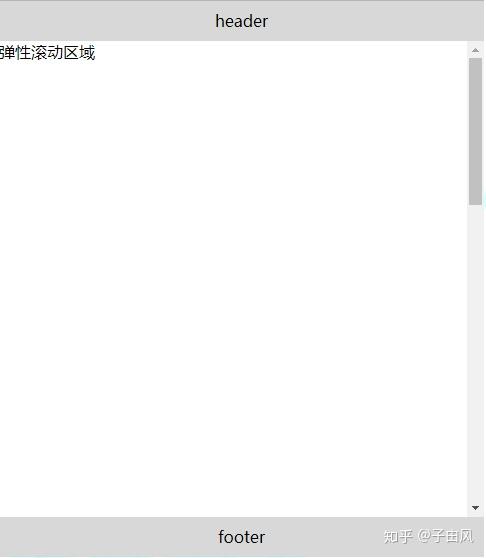
案例二(回字形布局)
利用
<!DOCTYPE html>
<html lang="en">
  <meta charset="UTF-8">
  <title>Title</title>
</head>
<style>
  html,body{
    height: 100%;
    margin: 0;
  .wrap{
    display: flex;
    flex-direction: column;
    height: 100%;
  .header{
    height: 50px;
    padding: 15px;
  .footer{
    height: 50px;
  .main{
    flex-grow: 1;
    overflow: auto;
    display: flex;
    align-items: flex-start;
  .left{
    width: 300px;
    background: yellowgreen;
  .right{
    width: 300px;
    background: greenyellow;
  .center{
    flex-grow: 1;
    background: aquamarine;
    height: 100%;
    overflow: auto;
</style>
<div class="wrap">
  <div class="header">header</div>
  <div class="main">
    <div class="left">
    </div>
    <div class="center">
      <div style="height: 300%">
        <div>center</div>
      </div>
    </div>
    <div class="right">
      right
    </div>
  </div>
  <div class="footer">footer</div>
</div>
</body>
</html>
设置html和body的高度为100%,则body的高度是显示器的高度
利用flex布局,头部和底部固定,中间设置为剩下的100%
中间部分,利用flex布局,左右两边固定,中间是剩下的100%
设置“中心”的高度为100%,则是参照父元素的高度,除去顶部和底部的高度的,剩下的100%高度


案例 (计算出中间组件的高度,剩下的百分百)
设置html和body的高度为100%,则body的高度为显示器的高度,则子元素的高度是参考body的
头部和底部固定,计算出中间的高度
利用flex布局,左右两边固定,中间为剩下的100%
高度设置为父元素的100%;中间如果内容过多,则设置overflow:auto就会出现滚动条
<!DOCTYPE html>
<html lang="en">
    <meta charset="UTF-8">
    <title>Title</title>
</head>
<style>
  html,body{
    margin: 0;
    height: 100%;
  .flex-study{
    line-height: 35px;
    height: calc(100% - 100px);
  .flex{
    display: flex;
  .header{
    width: 100%;
    background: #42a5f6;
  .content{
    width: 100%;
    background: bisque;
    align-items: flex-start;
    height: 100%;
    overflow: hidden;
  .left{
    width: 300px;
    background: yellowgreen;
  .right{
    width: 300px;
    background: greenyellow;
  .center{
    flex-grow: 1;
    background: aquamarine;
    height: 100%;
    overflow: auto;
  .footer{
    width: 100%;
    background: blueviolet;
</style>
<div class="flex-study">
  <div class="header">
    header
  </div>
  <div class="content flex">
    <div class="left">
    </div>
    <div class="center">
      <div style="height: 300%">
        <div>center</div>
      </div>
    </div>
    <div class="right">
      right
    </div>
  </div>
  <div class="footer">