


spark的一些学习记录(持续)

1 sparksession
【sparkSQL】SparkSession的认识 - zzhangyuhang - 博客园
在Spark的早期版本,sparkContext是进入Spark的切入点。我们都知道RDD是Spark中重要的API,然而它的创建和操作得使用sparkContext提供的API;对于RDD之外的其他东西,我们需要使用其他的Context。比如对于流处理来说,我们得使用StreamingContext;对于SQL得使用sqlContext;而对于hive得使用HiveContext。然而DataSet和Dataframe提供的API逐渐称为新的标准API,我们需要一个切入点来构建它们,所以在 Spark 2.0中我们引入了一个新的切入点(entry point):SparkSession,
我们在新版本中并不需要之前那么繁琐的创建很多对象,只需要创建一个SparkSession对象即可。
简单来说, sparksession类似于我们使用sklearn的时候,例如我们要使用preprocessing,cluster,classification等模块的功能,要先import sklearn然后才能继续使用,这里sparksession的功能类似,但是sparksession相对于import sklearn的概念更近一步,因为我们还可以通过sparksession来配置spark的环境例如使用多少内存,使用多少个机器等,从这一点上,sparksession又和tensorflow中早期的session功能类似,可以配置gpu的数量,最大显存使用量等等;

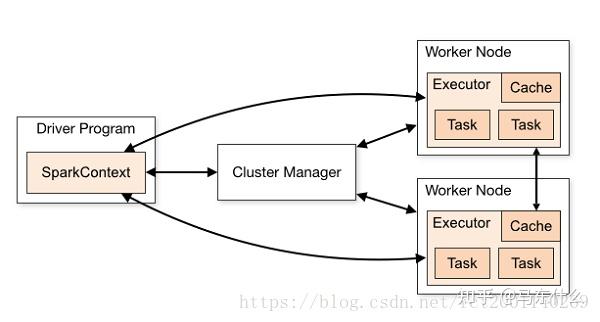
SparkSession内部封装了sparkContext,所以计算实际上是由sparkContext完成的,而SparkContext起到的是一个中介的作用,通过它来使用Spark其他的功能。每一个JVM都有一个对应的SparkContext,driver program通过SparkContext连接到集群管理器来实现对集群中任务的控制。Spark配置参数的设置以及对SQLContext、HiveContext和StreamingContext的控制也要通过SparkContext进行。
sparksession可以做什么?
sparksession的api如下:

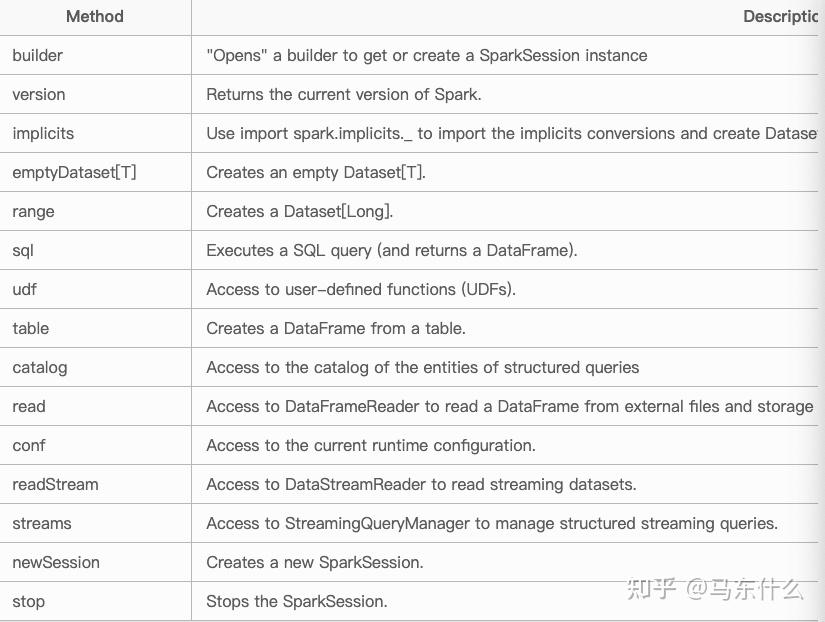
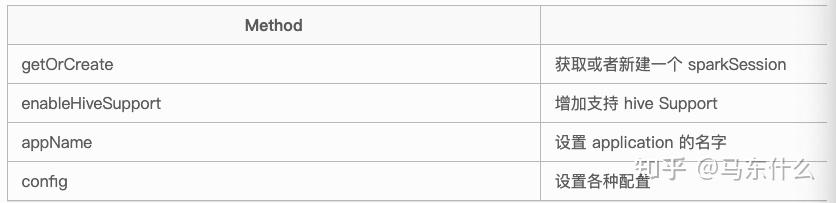
其中Builder 是最重要的一个api,是 SparkSession 的构造器。 通过 Builder, 可以添加各种配置。
Builder 的方法如下:

一个demo of pyspark
from pyspark.sql import SparkSession
spark = SparkSession.builder \
    .master("local") \
    .appName("Word Count") \
    .config("spark.some.config.option", "some-value") \
    .getOrCreate()
spark的官网列举了sparksession所有的可用功能:
2.pyspark rdd or pyspark dataframe???
RDD,弹性分布式数据集,抽象数据结构,通过sparksession.paralleize来创建, RDD的概念类似于python中的list,可以灵活的存放不同类型的数据,例如python中的list可以存在list,dict,字符串,panda dataframe等等,rdd中也可以存放不同类型的数据例如:
data=sc.paralleize(['1',2],{'2':3},['string'])
每当使用rdd执行pyspark程序时,需要巨大的开销来执行任务。
例如我们在pyspark中对rdd执行map的操作,map中的function用python来写例如这样:
def vals_concat(v1, v2):
  return v1 + ',' + v2
input5 = input4.reduceByKey(vals_concat)
整个过程大概是:
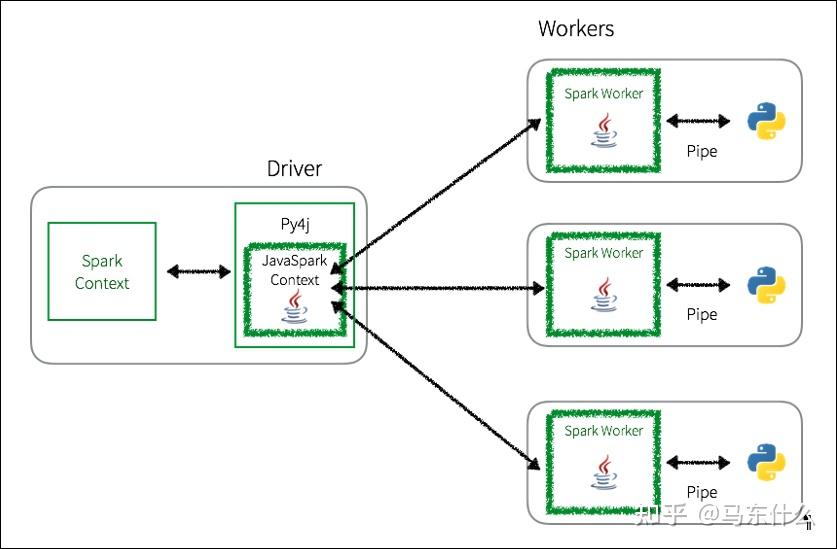
pyspark提交一个用户自己写的map的任务(例如上文的vals_concat),先通过py4j启动一个叫 javasparkcontext的jvm,然后映射到java中的python rdd对象。
接着 javasparkcontext 将我们在pyspark端定义的rdd上的任务分发到不同的机器(workers)上,这些机器对这些python rdd分别进行处理,
python rdd对象可以被python代码处理,通过vals_concat的逻辑进行处理之后返回结果,然后这个结果在原路返回回去。
开销发生在python和jvm之间的许多上下文切换和通信开销。

0运行spark前的环境配置工作
from: pyspark 使用时环境设置 - 庭明 - 博客园
import os
import sys
spark_name = os.
environ.get('SPARK_HOME',None)
# SPARK_HOME即spark的安装目录,不用到bin级别,一般为/usr/local/spark
if not spark_home:
raise ValueErrorError('spark 环境没有配置好')
# sys.path是Python的第三方包查找的路径列表,将需要导入的包的路径添加进入,避免 can't find modal xxxx
# 这个方法应该同 spark-submit提交时添加参数 --py_files='/path/to/my/python/packages.zip',将依赖包打包成zip 添加进去 效果一致
sys.path.insert(0,'/root/virtualenvs/my_envs/lib/python3.6/site-packages/')
sys.path.insert(0,os.path.join(spark_name,'python')
sys.path.insert(0,os.path.join(spark_name,'python/lib/py4j-0.10.7-src.zip'))
# sys.path.insert(0,os.path.join(spark_name,'libexec/python'))
# sys.path.insert(0,os.path.join(spark_name,'libexex/python/build'))
from pyspark import SparkConf, SparkContext
#这样就可以成功导入 SparkConf,SparkContext了,而不会出现找不到SparkConf和SparkContext的奇怪问题了。
import os
os.environ["PYSPARK_PYTHON"] = "./python36/pyspark_py3/bin/python"
os.environ["PYSPARK_DRIVER_PYTHON"] = "some conda python env"
1 spark所有功能的入口:SparkSession
Spark 中所有功能的入口点是
SparkSession
类。要创建一个基本的
SparkSession
,只需使用
SparkSession.builder
:
from pyspark.sql import SparkSession
spark = SparkSession \
    .builder \
    .appName("Python Spark SQL basic example") \
    .config("spark.some.config.option", "some-value") \
    .getOrCreate()
具体的配置根据实际的机器的地址和配置等等来,每个公司可能都不一样,这些我一般都让开发帮忙做好。。。。
2 创建数据帧
使用
SparkSession
,应用程序可以从href="
https://
spark.apache.org/docs/l
atest/sql-getting-started.html#interoperating-with-rdds
">现有的RDD、Hive 表或其它的常见的数据存储方式 (具体支持哪些数据源可见:
https://
spark.apache.org/docs/l
atest/sql-data-sources.html
)创建数据帧。
例如,以下内容基于 JSON 文件的内容创建一个 DataFrame:
# spark is an existing SparkSession
df = spark.read.json("examples/src/main/resources/people.json")
# Displays the content of the DataFrame to stdout
df.show()
# +----+-------+
# | age|   name|
# +----+-------+
# |null|Michael|
# |  30|   Andy|
# |  19| Justin|
# +----+-------+
3 无类型数据集操作(又名 DataFrame 操作)
DataFrames 为scala python r java 结构化数据操作提供了一种特定于领域的语言。
如上所述,在 Spark 2.0 中,DataFrame 只是
Row
Scala 和 Java API中s 的Dataset 。与强类型 Scala/Java 数据集附带的“类型转换”相比,这些操作也称为“无类型转换”。
这里我们包括一些使用 Datasets 进行结构化数据处理的基本示例:
在 Python 中,可以通过属性 (
df.age
) 或索引 (
df['age']
)来访问 DataFrame 的列。虽然前者便于交互式数据探索,但强烈建议用户使用后一种形式,避免了属性和方法的重名导致的各种使用问题。
# spark, df are from the previous example
# Print the schema in a tree format
df.printSchema()
# root
# |-- age: long (nullable = true)
# |-- name: string (nullable = true)
# Select only the "name" column
df.select("name").show()
# +-------+
# |   name|
# +-------+
# |Michael|
# |   Andy|
# | Justin|
# +-------+
# Select everybody, but increment the age by 1
df.select(df['name'], df['age'] + 1).show()
# +-------+---------+
# |   name|(age + 1)|
# +-------+---------+
# |Michael|     null|
# |   Andy|       31|
# | Justin|       20|
# +-------+---------+
# Select people older than 21
df.filter(df['age'] > 21).show()
# +---+----+
# |age|name|
# +---+----+
# | 30|Andy|
# +---+----+
# Count people by age
df.groupBy("age").count().show()
# +----+-----+
# | age|count|
# +----+-----+
# |  19|    1|
# |null|    1|
# |  30|    1|
# +----+-----+
有关可以在 DataFrame 上执行的操作类型的完整列表,可以看看《pyspark实战指南》,其中有非常详细的各种dataframe常用功能的描述和demo,不过pyspark目前只支持dataframe,无法支持dataset,dataframe是dataset的子集。
3 以编程方式运行 SQL 查询(sparksql)
# Register the DataFrame as a SQL temporary view
df.createOrReplaceTempView("people")
sqlDF = spark.sql("SELECT * FROM people")
sqlDF.show()
# +----+-------+
# | age|   name|
# +----+-------+
# |null|Michael|
# |  30|   Andy|
# |  19| Justin|
# +----+-------+
个人使用的习惯是尽量使用dataframe的api,如果存在复杂逻辑的时候可以考虑用spark sql,dataframe api和spark sql的api的关系类似于pandas的内置函数和pandas query的功能,并不冲突,互相补充,为用户提供了更多的实现特定功能的方法。
4 全局临时视图
Spark SQL 中的临时视图是会话范围的,如果创建它的会话终止,它就会消失。如果您希望有一个在所有会话之间共享的临时视图并在 Spark 应用程序终止之前保持活动状态,您可以创建一个全局临时视图。全局临时视图与系统保留的数据库相关联
global_temp
,我们必须使用限定名称来引用它,例如
SELECT * FROM global_temp.view1
.
df.createGlobalTempView("people")
# Global temporary view is tied to a system preserved database `global_temp`
spark.sql("SELECT * FROM global_temp.people").show()
# +----+-------+
# | age|   name|
# +----+-------+
# |null|Michael|
# |  30|   Andy|
# |  19| Justin|
# +----+-------+
# Global temporary view is cross-session
spark.newSession().sql("SELECT * FROM global_temp.people").show()
# +----+-------+
# | age|   name|
# +----+-------+
# |null|Michael|
# |  30|   Andy|
# |  19| Justin|
# +----+-------+
5 创建dataset
数据集类似于 RDD,但是,它们不使用 Java 序列化或 Kryo,而是使用专门的 编码器 来序列化对象以进行处理或通过网络传输。虽然编码器和标准序列化都负责将对象转换为字节,但编码器是动态生成的代码,使用的格式允许 Spark 执行许多操作,如过滤、排序和散列,而无需将字节反序列化回对象。
这个dataset的功能pyspark目前仍不支持,尴尬
6 与 RDD 的交互操作
简单来说就是把rdd转化为java或scala下的dataset,或python下的dataframe
使用自动类型推断模式
from pyspark.sql import Row
sc = spark.sparkContext
# Load a text file and convert each line to a Row.
lines = sc.textFile("examples/src/main/resources/people.txt")
parts = lines.map(lambda l: l.split(","))
people = parts.map(lambda p: Row(name=p[0], age=int(p[1])))
# Infer the schema, and register the DataFrame as a table.
schemaPeople = spark.createDataFrame(people)
schemaPeople.createOrReplaceTempView("people")
# SQL can be run over DataFrames that have been registered as a table.
teenagers = spark.sql("SELECT name FROM people WHERE age >= 13 AND age <= 19")
# The results of SQL queries are Dataframe objects.
# rdd returns the content as an :class:`pyspark.RDD` of :class:`Row`.
teenNames = teenagers.rdd.map(lambda p: "Name: " + p.name).collect()
for name in teenNames:
    print(name)
# Name: Justin
反射推断模式支持直接通过createdataframe将rdd数据转化为dataframe数据,类似于python中pd dataframe(list)数据的功能;
以编程方式指定架构
其实就是提前指定好数据类型,避免spark dataframe自动的类型推断,pandas中也有一样的功能,创建pandas dataframe时指定特定的列的类型是啥样的。
# Import data types
from pyspark.sql.types import StringType, StructType, StructField
sc = spark.sparkContext
# Load a text file and convert each line to a Row.
lines = sc.textFile("examples/src/main/resources/people.txt")
parts = lines.map(lambda l: l.split(","))
# Each line is converted to a tuple.
people = parts.map(lambda p: (p[0], p[1].strip()))
# The schema is encoded in a string.
schemaString = "name age"
fields = [StructField(field_name, StringType(), True) for field_name in schemaString.split()]
schema = StructType(fields)
# Apply the schema to the RDD.
schemaPeople = spark.createDataFrame(people, schema)
# Creates a temporary view using the DataFrame
schemaPeople.createOrReplaceTempView("people")
# SQL can be run over DataFrames that have been registered as a table.
results = spark.sql("SELECT name FROM people")
results.show()
# +-------+
# |   name|
# +-------+
# |Michael|
# |   Andy|
# | Justin|
# +-------+
7 标量函数和聚合函数
这块基本上就是常见的内置function和自定义function了,没啥好说的
用到的时候去查就可以了。pyspark中主要是两部分,一部分是dataframe api自带的,一部分是pyspark.sql.functions中带的。
pyspark dataframe 和 pandas dataframe的互相转换
df.toPandas()即可
如果要将pandas dataframe转化为 pyspark dataframe以便写入hive表则:
sparkDF=spark.createDataFrame(pandasDF)
sparkDF.printSchema()
sparkDF.show()
类型一般会自动推断,非常方便简单,如果要强制改变类型则在pandas侧改或通过
from pyspark.sql.types 中的类型进行制定
from pyspark.sql.types import StructType,StructField, StringType, IntegerType
#Create User defined Custom Schema using StructType
mySchema = StructType([ StructField("First Name", StringType(), True)\
                       ,StructField("Age", IntegerType(), True)])
#Create DataFrame by changing schema
sparkDF2 = spark.createDataFrame(pandasDF,schema=mySchema)
sparkDF2.printSchema()
sparkDF2.show()
pyspark dataframe 写入hive表,第一次写入则用overwrite会自动创建一个新的表,然后后面再用insert into就可以了,pyspark侧可以进行分区等操作非常方便。
pyspark写hive表有两种方式:
(1)通过SQL语句生成表 在python中使用pyspark读写Hive数据操作_python_脚本之家 (1)通过SQL语句生成表
from pyspark.sql import SparkSession, HiveContext
_SPARK_HOST = "spark://spark-master:7077"
_APP_NAME = "test"
spark = SparkSession.builder.master(_SPARK_HOST).appName(_APP_NAME).getOrCreate()
data = [
 (1,"3","145"),
 (1,"4","146"),
 (1,"5","25"),
 (1,"6","26"),
 (2,"32","32"),
 (2,"8","134"),
 (2,"8","134"),
 (2,"9","137")
df = spark.createDataFrame(data, ['id', "test_id", 'camera_id'])
# method one,default是默认数据库的名字,write_test 是要写到default中数据表的名字
df.registerTempTable('test_hive')
sqlContext.sql("create table default.write_test select * from test_hive")
这种方式没有第二种方便,第二种api太好用。
df.write.format("hive").mode("overwrite").saveAsTable('default.write_test')更完整的代码
df_write.write.format("parquet").mode("overwrite")
.saveAsTable("course_table") ## 第一次构建的时候这么写会自动创建新表,后面insertinto
更更完整的代码:
df.write.format('parquet').mode('overwrite').\
partitionBy("channel","event_day","event_hour")\  # 分区字段逗号分割,跟建表顺序一致
.saveAsTable("table_name")  # 如果首次执行不存在这个表,会自动创建分区表,不指定分区即创建不带分区的表
四种存储的模式,用append比较方便
| 斯卡拉/Java | 任何语言 | 意义 |
|---|---|---|
| SaveMode.ErrorIfExists (默认) | "error" or "errorifexists" (默认) | 将DataFrame保存到数据源时,如果数据已经存在,预计会抛出异常。 |
| SaveMode.Append | "append" | 将 DataFrame 保存到数据源时,如果数据/表已存在,则希望将 DataFrame 的内容附加到现有数据中。 |
| SaveMode.Overwrite | "overwrite" | 覆盖模式是指在将DataFrame保存到数据源时,如果data/table已经存在,则现有的数据会被DataFrame的内容覆盖。 |
| SaveMode.Ignore | "ignore" | 忽略模式是指在将DataFrame 保存到数据源时,如果数据已经存在,则保存操作预计不会保存DataFrame 的内容,也不会更改现有数据。这类似于CREATE TABLE IF NOT EXISTSSQL 中的 a。 |
除此之外:
# 可动态分区设置
spark.sql("set hive.exec.dynamic.partition.mode=nonstrict;")
# df 按照字段+分区的顺序对应hive顺序
df.write\
.insertInto("table_name")  # 如果执行不存在这个表,会报错
pyspark之DataFrame写hive表方式_SummerHmh的博客-CSDN博客# 可动态分区设置
spark.sql("set hive.exec.dynamic.partition.mode=nonstrict;")
# df 按照字段+分区的顺序对应hive顺序
df.write\
.insertInto("table_name")  # 如果执行不存在这个表,会报错
insertinto和save append的区别,建议使用后者,前者很慢
pyspark dataframe 读取和写入本地csv
data.repartition(1).write.csv(path='file:///home/wangbingnan/wangbingnan/纯注册场景/register_data',mode='ignore',header=True)多看api,另外记住了,本地文件的读写,路径一定要加file:// 然后加路径!否则保存到远程的excutor上了
    spark = SparkSession.builder \
        .appName("graph_fraud_detections") \
        .config('spark.driver.memory', '2g') # driver最终执行的内存大小,例如to csv
这类操作,最终是collect到driver上然后to csv的,所以设定这里就是设定最终driver的计算结果的大小 \
        .config("spark.executor.memory", "2g") \
        .config("spark.driver.maxResultSize","50g") \
        .config("spark.default.parallelism", "20") \
        .enableHiveSupport() \
        .getOrCreate()
配置部分的一些作用,记得看这些东西
spark中数据要to pandas需要先对数据进行序列化,然后才能传输
在Spark的架构中,在网络中传递的或者缓存在内存、硬盘中的对象需要进行序列化操作,序列化的作用主要是利用时间换空间:
- 分发给Executor上的Task
- 需要缓存的RDD(前提是使用序列化方式缓存)
- 广播变量
- Shuffle过程中的数据缓存
- 使用receiver方式接收的流数据缓存
- 算子函数中使用的外部变量
spark write csv出现问题则需要增大缓冲区大小
pyspark的cache和persist
cashe是一种特殊的persist,直接存到内存中
spark在运行时修改配置:
spark.conf.set('spark.kryoserializer.buffer.max','512m')
完全转pandas databricks.koalas.frame - Koalas 1.8.1 documentation 完全转pandas
res=df.apply(text_preprocessing,axis=1) ##
其他功能都正常,自定义需要注意,axis=1对行逐行转换 切记切记
koalas 的内置函数的使用都没有太大问题,但是自定义的function使用的时候比较麻烦,这个回去要好好研究一下用法
databricks 官方的用法,koalas简直好用到爆炸,速度飞起,api简单简直跟pandas的api一毛一样!!!
pyspark udf的使用
针对特定的列需要通过sql里面的col来选择
pyspark中的一些types,自定义function的时候需要这些东西
with column的用法,对列定义操作需要data.select('某个列')或使用 data.select(col(某个列))
col是pyspark.sql.functions里面的
spark的环境配置问题,总是搞不清楚气死,看了文档问了大佬大概明白了:
from pyspark.sql import SparkSession
spark = SparkSession.builder \
    .appName("address_fraud_detection") \
    .master("yarn") \
    .config("spark.submit.deployMode", "client") \
    .config("spark.yarn.queue", "XXX") \
目前pyspark的配置可以通过这种方式来在notebook中配置。
初次之外,spark的一些配置在python中也可以通过os的环境变量配置:
os.environ["PYSPARK_PYTHON"] = "./python36/xxxxxx"
os.environ["ARROW_PRE_0_15_IPC_FORMAT"]="1"
os.environ['PYARROW_IGNORE_TIMEZONE']='1'
spark的配置有不同方面的,面向不同功能的,先看下最少的:
spark的环境变量配置:
环境变量
| 环境变量 | 意义 |
|---|---|
| JAVA_HOME | 安装 Java 的位置(如果它不在您的默认位置PATH)。 |
| PYSPARK_PYTHON | 用于驱动程序和工作线程中 PySpark 的 Python 二进制可执行文件(python3如果可用,则默认为,否则为python)。spark.pyspark.python如果设置,则属性优先 |
| PYSPARK_DRIVER_PYTHON | 仅在驱动程序中用于 PySpark 的 Python 二进制可执行文件(默认为PYSPARK_PYTHON)。spark.pyspark.driver.python如果设置,则属性优先 |
| SPARKR_DRIVER_R | 用于 SparkR shell 的 R 二进制可执行文件(默认为R)。spark.r.shell.command如果设置,则属性优先 |
| SPARK_LOCAL_IP | 要绑定到的机器的 IP 地址。 |
| SPARK_PUBLIC_DNS | 您的 Spark 程序将向其他机器通告的主机名。 |
java_home java的安装路径,spark架构与hadoop之上,hadoop用java写的,所以java要先安装才能用。
pyspark python,driver节点和excutor
除了上述之外,还有用于设置 Spark 独立集群脚本的选项 ,例如每台机器上使用的内核数和最大内存。
由于
spark-env.sh
是一个 shell 脚本,其中一些可以通过编程方式设置——例如,您可以
SPARK_LOCAL_IP
通过查找特定网络接口的 IP 进行计算。
注意:在 YARN
cluster
模式下运行 Spark 时,需要使用文件中的
spark.yarn.appMasterEnv.[EnvironmentVariableName]
属性设置环境变量
conf/spark-defaults.conf
。
spark-env.sh
在
cluster
模式中设置的环境变量不会反映在 YARN Application Master 进程中。有关更多信息,请参阅
YARN 相关的 Spark 属性
。
.config("spark.submit.deployMode", "client") \
这里设置 两种模式
Spark的Yarn CLuster与Yarn Client区别
一、Yarn Cluster模式
二、Yarn Client模式
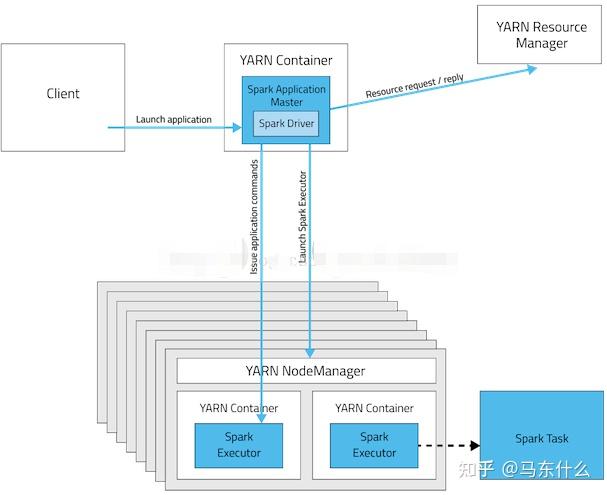
一、Yarn Cluster模式

二、Yarn Client模式

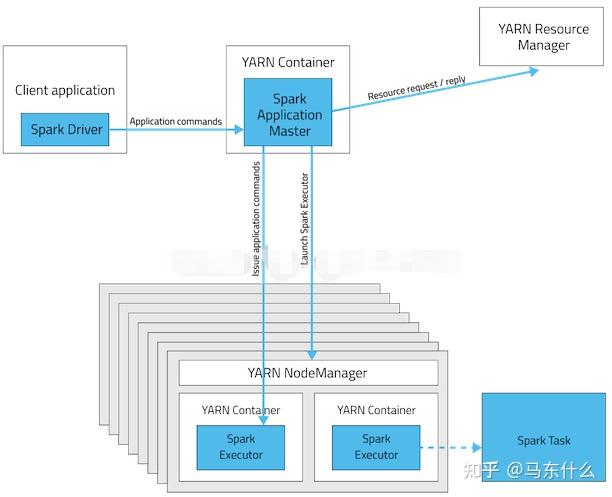
对比两种模式的架构图,可以看出,两者的本质区别:AM进程 application master的区别。
Cluster模式下,driver运行在AM中,负责向Yarn(RM)申请资源,并监督Application的运行情况,
当Client(这里的Client指的是Master节点)提交作业后,就会关掉Client
,作业会继续在yarn上运行,这也是Cluster模式不适合交互类型作业的原因。而Client模式,AM仅向Yarn(RM)申请executor资源,之后Client会和请求的Container通信来进行任务的调度,即
Client不能被关闭
。
在工作当中,常常采用的工作方式是,先在Client模式下调通项目,然后再将项目提交到Cluster下运行。所以,跑一些SparkSQL程序的时候,经常会遇到类似的问题:为什么Client可以跑通程序,而放到Cluster上,就报错呢?
上面也提到过,Client模式下,
如果Master提交任务,那么Driver运行在Master上
,数据一般存在于Hive或者Mysql上,Master节点都会有它们的访问权限,在任务交互过程中,Driver可以通过Master获取数据的元信息,然后直接从数据库获取相关数据;
相反,Cluster模式下,Driver运行在AM上,即运行在NodeManager(从节点)上,往往从节点是没有数据库的访问权限,所以造成Client可以跑通程序,而放到Cluster上,就报错。解决的方法就是将数据库的而访问权限也赋给从节点的机器。
善于使用spark ui,定位性能问题,故障排查等等;
数据倾斜问题处理(同样适用于hive)
hive对json的支持
如果hive表中某个字段是json格式的,可以使用hive中的各类json相关函数来解析
1 get_json_object(string json_string, string path)
select get_json_object('{"movie":"594","rate":"4","timeStamp":"978302268","uid":"1"}','$.movie');
适合用于提取简单的,非嵌套的json结构,$.variable ,其中variable表示你要提取的json中的某个key;
2 json_tuple(jsonStr, k1, k2, ...)
select b.b_movie,b.b_rate,b.b_timeStamp,b.b_uid from json as a
lateral view json_tuple(a.data,'movie','rate','timeStamp','uid') b as b_movie,b_rate,b_timeStamp,b_uid;
适用于提取简单的,非嵌套的json结构,相对于get_json_object而言,可以一次性抽取多个字段
其它部分可见原链接
spark-submit
Usage: spark-submit [options] <app jar | python file | R file> [app arguments]
Usage: spark-submit --kill [submission ID] --master [spark://...]
Usage: spark-submit --status [submission ID] --master [spark://...]
Usage: spark-submit run-example [options] example-class [example args]
Options:
  --master MASTER_URL         spark://host:port, mesos://host:port, yarn,
                              k8s://https://host:port, or local (Default: local[*]).
用于指定master,如果是本地环境直接执行使用local[*],否则根据具体使用的分布式调度系统来决定配置,如上所示,如果是yarn
则直接指定yarn即可,否则需要指定spark自带的分布式调度系统的ip地址和端口或k8s的ip地址和端口
  --deploy-mode DEPLOY_MODE   Whether to launch the driver program locally ("client") or
                              on one of the worker machines inside the cluster ("cluster")
                              (Default: client).
执行模式,client或cluster模式
  --class CLASS_NAME          Your application's main class (for Java / Scala apps).
执行的main函数的名字,一般java中的主运行函数就是main
  --name NAME                 A name of your application.
执行的应用的名字可以自己自由定义
  --jars JARS                 Comma-separated list of jars to include on the driver
                              and executor classpaths.
spark运行的时候需要加载的额外的jar包,比如在pyspark的py文件中,引入分布式xgb和lgb需要配置其对应的jar包则需要从这里导入
  --packages                  Comma-separated list of maven coordinates of jars to include
                              on the driver and executor classpaths. Will search the local
                              maven repo, then maven central and any additional remote
                              repositories given by --repositories. The format for the
                              coordinates should be groupId:artifactId:version.
仍旧是引jar包,不过这里的jar包是直接从maven或gradle的中央仓库拉下来的,即运行的时候直接从远程下载,一般是下载下来
通过--jars来使用
  --exclude-packages          Comma-separated list of groupId:artifactId, to exclude while
                              resolving the dependencies provided in --packages to avoid
                              dependency conflicts.
为了避免package的命名冲突引入的参数,指--package的情况下,不引入哪些依赖
  --repositories              Comma-separated list of additional remote repositories to
                              search for the maven coordinates given with --packages.
选择中央仓库的地址,国内使用阿里云上的或其它国内云会快不少
  --py-files PY_FILES         Comma-separated list of .zip, .egg, or .py files to place
                              on the PYTHONPATH for Python apps.
spark-submit pyspark的py文件的应用的时候,通过这个参数指定py文件路径
  --files FILES               Comma-separated list of files to be placed in the working
                              directory of each executor. File paths of these files
                              in executors can be accessed via SparkFiles.get(fileName).
如果运行过程中需要使用到多个文件则可以使用上述的接口api来指定
  --conf PROP=VALUE           Arbitrary Spark configuration property.
--spark的conf设定,可以写多行,例如
    --conf spark.pyspark.python=ZIP_ENV/pyspark_py3/bin/python \
    --conf spark.pyspark.driver.python=/usr/bin/python \
    --conf spark.sql.catalogImplementation=hive \
  --properties-file FILE      Path to a file from which to load extra properties. If not
                              specified, this will look for conf/spark-defaults.conf.
--其它的一些preperties文件
  --driver-memory MEM         Memory for driver (e.g. 1000M, 2G) (Default: 1024M).
driver端的memory的内存资源申请配置
  --driver-java-options       Extra Java options to pass to the driver.
  --driver-library-path       Extra library path entries to pass to the driver.
  --driver-class-path         Extra class path entries to pass to the driver. Note that
                              jars added with --jars are automatically included in the
                              classpath.
--上述三个都是java相关的配置
  --executor-memory MEM       Memory per executor (e.g. 1000M, 2G) (Default: 1G).
--每个excutor端的内存资源申请配置
  --proxy-user NAME           User to impersonate when submitting the application.
                              This argument does not work with --principal / --keytab.
--执行任务的时候用户的名字
  --help, -h                  Show this help message and exit.
  --verbose, -v               Print additional debug output.
  --version,                  Print the version of current Spark.
 Cluster deploy mode only:
  --driver-cores NUM          Number of cores used by the driver, only in cluster mode
                              (Default: 1).
仅在cluster模式下才可以使用,即指定driver端使用的内核的数量
 Spark standalone or Mesos with cluster deploy mode only:
  --supervise                 If given, restarts the driver on failure.
  --kill SUBMISSION_ID        If given, kills the driver specified.
  --status SUBMISSION_ID      If given, requests the status of the driver specified.
 Spark standalone and Mesos only:
  --total-executor-cores NUM  Total cores for all executors.
 Spark standalone和mesos模式下使用的命令,没用过这两种模式
 Spark standalone and YARN only:
  --executor-cores NUM        Number of cores per executor. (Default: 1 in YARN mode,
                              or all available cores on the worker in standalone mode)
 Spark standalone 和 YARN 模式下使用的,用于指定每个excutor使用的内核的数量
 YARN-only:
  --queue QUEUE_NAME          The YARN queue to submit to (Default: "default").
  --num-executors NUM         Number of executors to launch (Default: 2).
                              If dynamic allocation is enabled, the initial number of
                              executors will be at least NUM.
  --archives ARCHIVES         Comma separated list of archives to be extracted into the
                              working directory of each executor.
这里需要详细展开说明以下,
在pyspark中,有三种参数
--archives,-files,py-files
--py-files PY_FILES:逗号隔开的的.zip、.egg、.py文件,这些文件会放置在PYTHONPATH下,该参数仅针对python应用程序
这里主要用于我们submit py文件的时候会import的其它的附属文件,这些文件会放置在PYTHONPATH下以便于submit执行py文件的时候
py文件能够import这些附属文件
注意submit的主py文件不可以通过py files设定,具体可见:
https://stackoverflow.com/questions/34209299/cannot-load-main-class-from-jar-file-in-spark-submit
--archives 主要用于定义python执行的env环境,env环境一般需要打包成zip文件。
--files FILES:逗号隔开的文件列表,这些文件将存放于每一个工作节点进程目录下
这里files和archives的作用基本类似:
https://www.codenong.com/38066318/ 下面解释部分来自于这个连接
通常,通过--files或--archives添加数据文件,并通过--py-files添加代码文件。
--py-files 将python文件 添加到类路径,以便您导入和使用。
http://spark.apache.org/docs/latest/programming-guide.html
Behind the scenes, pyspark invokes the more general spark-submit script.
You can add Python .zip, .egg or .py files to the runtime path by passing a comma-separated list to --py-files
http://spark.apache.org/docs/latest/running-on-yarn.html
The --files and --archives options support specifying file names with the # similar to Hadoop.
 For example you can specify: --files localtest.txt#appSees.txt and this will upload the file
 you have locally named localtest.txt into HDFS but this will be linked to by the name appSees.txt,
 and your application should use the name as appSees.txt to reference it when running on YARN.
http://spark.apache.org/docs/latest/api/python/pyspark.html?highlight=addpyfile#pyspark.SparkContext.addPyFile
addFile(path) Add a file to be downloaded with this Spark job on every node.
The path passed can be either a local file, a file in HDFS (or other Hadoop-supported filesystems),
 or an HTTP, HTTPS or FTP URI.
addPyFile(path) Add a .py or .zip dependency for
 all tasks to be executed on this SparkContext in the future.
 The path passed can be either a local file, a file in HDFS (or other Hadoop-supported filesystems),
 or an HTTP, HTTPS or FTP URI.
其中addfile和addpyfile是notebook或py文件中定义的,而不带add的是在命令行中定义的,在notebook或者py文件中
定义archives则通过spark.yarn.dist.archives(yarn模式下,其它模式没用过,暂时不知道怎么设置。。。)
https://spark.apache.org/docs/latest/api/python/user_guide/python_packaging.html?highlight=pyspark_python 详细可见,pyfile
原来也可以上传环境包的。。。
  --principal PRINCIPAL       Principal to be used to login to KDC, while running on
                              secure HDFS.
  --keytab KEYTAB             The full path to the file that contains the keytab for the
                              principal specified above. This keytab will be copied to
                              the node running the Application Master via the Secure
                              Distributed Cache, for renewing the login tickets and the
                              delegation tokens periodically.
上述都是yarn模式下专有的参数,--queue提交的队列名称  --num-executors 指定excutor的数量,--archives 重要,详细见上