本文内容由阿里云实名注册用户自发贡献,版权归原作者所有,阿里云开发者社区不拥有其著作权,亦不承担相应法律责任。具体规则请查看《
又是一道关于 RecyclerView 面试题:“RecyclerView 滚动时,新表项是如何一个个被填充进来的?旧表项是如何一个个被回收的?”这篇以走读源码的方式,解答这个问题。
这是 RecyclerView 面试系列的第九篇,系列文章目录如下:
RecyclerView 缓存机制 | 如何复用表项?
RecyclerView 缓存机制 | 回收些什么?
RecyclerView 缓存机制 | 回收到哪去?
RecyclerView 缓存机制 | scrap view 的生命周期
RecyclerView 动画原理 | 换个姿势看源码(pre-layout)
RecyclerView 动画原理 | pre-layout,post-layout 与 scrap 缓存的关系
RecyclerView 动画原理 | 如何存储并应用动画属性值?
RecyclerView 面试题 | 列表滚动时,表项是如何被填充或回收的?
RecyclerView 面试题 | 哪些情况下表项会被回收到缓存池?
触发滚动的源头
手指在屏幕滑动,列表随之滚动,触发滚动的源头必然在触摸事件中:
public class RecyclerView {
// RecyclerView 重载 onTouchEvent()
@Override
public boolean onTouchEvent(MotionEvent e) {
switch (action) {
// RecyclerView 对滑动事件的处理
case MotionEvent.ACTION_MOVE: {
if (scrollByInternal(
canScrollHorizontally ? dx : 0,
canScrollVertically ? dy : 0,
e)) {...}
RecyclerView 在处理滑动事件时调用了scrollByInternal(),并且把滚动位移作为参数传入:
public class RecyclerView {
boolean scrollByInternal(int x, int y, MotionEvent ev) {
scrollStep(x, y, mReusableIntPair);
// 真正地实现滚动
dispatchNestedScroll(consumedX, consumedY, unconsumedX, unconsumedY, mScrollOffset,TYPE_TOUCH, mReusableIntPair);
在真正实现滚动之前,调用了scrollStep(),位移继续作为参数传递:
public class RecyclerView {
LayoutManager mLayout;
void scrollStep(int dx, int dy, @Nullable int[] consumed) {
if (dx != 0) {
consumedX = mLayout.scrollHorizontallyBy(dx, mRecycler, mState);
if (dy != 0) {
consumedY = mLayout.scrollVerticallyBy(dy, mRecycler, mState);
scrollStep()分别处理了两个方向上的滚动,并将其委托给了LayoutManager,以LinearLayoutManager中的垂直滚动为例:
public class LinearLayoutManager {
@Override
public int scrollVerticallyBy(int dy, RecyclerView.Recycler recycler, RecyclerView.State state) {
if (mOrientation == HORIZONTAL) { return 0; }
return scrollBy(dy, recycler, state);
垂直方向的位移作为参数传入,并传递给scrollBy():
public class LinearLayoutManager {
int scrollBy(int delta, RecyclerView.Recycler recycler, RecyclerView.State state) {
// 填充表项
final int consumed = mLayoutState.mScrollingOffset + fill(recycler, mLayoutState, state, false);
发现了一个关键方法fill(),看名字有“填充”的意思,难道列表滚动之前会把即将出现的表项先填充进来?
带着疑问,点开fill():
public class LinearLayoutManager {
// 根据剩余空间填充表项
int fill(RecyclerView.Recycler recycler, LayoutState layoutState,RecyclerView.State state, boolean stopOnFocusable) {
// 计算剩余空间 = 可用空间 + 额外空间(=0)
int remainingSpace = layoutState.mAvailable + layoutState.mExtraFillSpace;
// 循环,当剩余空间 > 0 时,继续填充更多表项
while ((layoutState.mInfinite || remainingSpace > 0) && layoutState.hasMore(state)) {
// 填充单个表项
layoutChunk(recycler, state, layoutState, layoutChunkResult)
填充表项是一个while循环,循环结束条件是“列表剩余空间是否 > 0”,每次循环调用layoutChunk()将单个表项填充到列表中:
public class LinearLayoutManager {
// 填充单个表项
void layoutChunk(RecyclerView.Recycler recycler, RecyclerView.State state,LayoutState layoutState, LayoutChunkResult result) {
// 1.获取下一个该被填充的表项视图
View view = layoutState.next(recycler);
// 2.使表项成为 RecyclerView 的子视图
addView(view);
// 3.测量表项视图(把 RecyclerView 内边距和表项装饰考虑在内)
measureChildWithMargins(view, 0, 0);
// 获取填充表项视图需要消耗的像素值
result.mConsumed = mOrientationHelper.getDecoratedMeasurement(view);
// 4.布局表项
layoutDecoratedWithMargins(view, left, top, right, bottom);
layoutChunk()先从缓存池中获取下一个该被填充新表项的视图,之所以称之为新表项,是因为在滚动发生之前,这些表项还未显示在屏幕上。(关于复用的详细分析可以移步RecyclerView 缓存机制 | 如何复用表项?)。
紧接着调用了addView()使表项视图成为 RecyclerView 的子视图,调用链如下:
public class RecyclerView {
ChildHelper mChildHelper;
public abstract static class LayoutManager {
public void addView(View child) {
addView(child, -1);
public void addView(View child, int index) {
addViewInt(child, index, false);
private void addViewInt(View child, int index, boolean disappearing) {
// 委托给 ChildHelper
mChildHelper.attachViewToParent(child, index, child.getLayoutParams(), false);
class ChildHelper {
final Callback mCallback;
void attachViewToParent(View child, int index, ViewGroup.LayoutParams layoutParams,boolean hidden) {
mCallback.attachViewToParent(child, offset, layoutParams);
调用链从RecyclerView到LayoutManager再到ChildHelper,最后又回到了RecyclerView:
public class RecyclerView {
ChildHelper mChildHelper;
private void initChildrenHelper() {
mChildHelper = new ChildHelper(new ChildHelper.Callback() {
@Override
public void attachViewToParent(View child, int index,ViewGroup.LayoutParams layoutParams) {
RecyclerView.this.attachViewToParent(child, index, layoutParams);
addView()的最终落脚点是ViewGroup.attachViewToParent():
public abstract class ViewGroup {
protected void attachViewToParent(View child, int index, LayoutParams params) {
// 将子视图添加到数组中
addInArray(child, index);
// 子视图和父亲关联
child.mParent = this;
attachViewToParent()中包含了“添加子视图”最具标志性的两个动作:1. 将子视图添加到数组中 2. 子视图和父亲关联。
表项成为 RecyclerView 子视图之后,对其进行了测量:
public class LinearLayoutManager {
// 填充单个表项
void layoutChunk(RecyclerView.Recycler recycler, RecyclerView.State state,LayoutState layoutState, LayoutChunkResult result) {
// 1.获取下一个该被填充的表项视图
View view = layoutState.next(recycler);
// 2.使表项成为 RecyclerView 的子视图
addView(view);
// 3.测量表项视图(把 RecyclerView 内边距和表项装饰考虑在内)
measureChildWithMargins(view, 0, 0);
// 获取填充表项视图需要消耗的像素值
result.mConsumed = mOrientationHelper.getDecoratedMeasurement(view);
// 4.布局表项
layoutDecoratedWithMargins(view, left, top, right, bottom);
测量得到子视图的尺寸,就可以知道填充该表项会消耗掉多少像素值,将该数值存储在LayoutChunkResult.mConsumed中。
有了尺寸后,也就可以布局表项了,即确定表项上下左右四个点相对于 RecyclerView 的位置:
public class RecyclerView {
public abstract static class LayoutManager {
public void layoutDecoratedWithMargins(View child, int left, int top, int right,int bottom) {
final LayoutParams lp = (LayoutParams) child.getLayoutParams();
final Rect insets = lp.mDecorInsets;
// 定位子表项
child.layout(left + insets.left + lp.leftMargin, top + insets.top + lp.topMargin,
right - insets.right - lp.rightMargin,
bottom - insets.bottom - lp.bottomMargin);
调用控件的layout()方法即是为控件定位,关于定位子控件的详细介绍可以移步Android自定义控件 | View绘制原理(画在哪?)。
填充完一个表项后,会从remainingSpace中扣除它所占用的空间(这样 while 循环才能结束)
public class LinearLayoutManager {
// 根据剩余空间填充表项
int fill(RecyclerView.Recycler recycler, LayoutState layoutState,RecyclerView.State state, boolean stopOnFocusable) {
// 计算剩余空间 = 可用空间 + 额外空间(=0)
int remainingSpace = layoutState.mAvailable + layoutState.mExtraFillSpace;
// 循环,当剩余空间 > 0 时,继续填充更多表项
while ((layoutState.mInfinite || remainingSpace > 0) && layoutState.hasMore(state)) {
// 填充单个表项
layoutChunk(recycler, state, layoutState, layoutChunkResult)
// 从剩余空间中扣除新表项占用像素值
layoutState.mAvailable -= layoutChunkResult.mConsumed;
remainingSpace -= layoutChunkResult.mConsumed;
至此可以得出结论:
RecyclerView 在滚动发生之前,会有一个填充新表项的动作,填充的是当前还未显示的表项。
RecyclerView 填充表项是通过while循环实现的,当列表没有剩余空间时,填充表项也就结束了。
那到底要填充几个新表项?回看一眼while循环的退出条件:
public class LinearLayoutManager {
// 根据剩余空间填充表项
int fill(RecyclerView.Recycler recycler, LayoutState layoutState,RecyclerView.State state, boolean stopOnFocusable) {
// 计算剩余空间 = 可用空间 + 额外空间(=0)
int remainingSpace = layoutState.mAvailable + layoutState.mExtraFillSpace;
// 循环,当剩余空间 > 0 时,继续填充更多表项
while ((layoutState.mInfinite || remainingSpace > 0) && layoutState.hasMore(state)) {...}
填充表项的个数取决于remainingSpace的大小,它的值有两个变量相加所得,其中layoutState.mExtraFillSpace的值为 0(断点调试告诉我的),而layoutState.mAvailable是由传入参数layoutState决定的,沿着调用链网上搜索它被赋值的地方:
public class LinearLayoutManager {
int scrollBy(int delta, RecyclerView.Recycler recycler, RecyclerView.State state) {
// 取滑动位移绝对值
final int absDelta = Math.abs(delta);
// 更新 LayoutState (将位移绝对值传入)
updateLayoutState(layoutDirection, absDelta, true, state);
// 填充表项
final int consumed = mLayoutState.mScrollingOffset + fill(recycler, mLayoutState, state, false);
private void updateLayoutState(int layoutDirection, int requiredSpace, boolean canUseExistingSpace, RecyclerView.State state) {
mLayoutState.mAvailable = requiredSpace;
在填充表项之前,mLayoutState.mAvailable的值被置为滚动位移的绝对值。
至此可以进一步细化之前的结论:
RecyclerView 在滚动发生之前,会根据滚动位移大小来决定需要向列表中填充多少新的表项。
有新表项被填充到列表,就有旧表项被回收,就好比随着滚动,新表项移入屏幕,旧表项移出屏幕。
那如何决定回收哪些表项呢?
RecyclerView 通过Recycler.recycleView()回收表项,以它为切入点,向上查找调用链中是否存在和滚动相关的地方:
public class RecyclerView {
public final class Recycler {
public void recycleView(@NonNull View view) {...}
public abstract static class LayoutManager {
public void removeAndRecycleViewAt(int index, @NonNull Recycler recycler) {
final View view = getChildAt(index);
removeViewAt(index);
recycler.recycleView(view);
public class LinearLayoutManager {
private void recycleChildren(RecyclerView.Recycler recycler, int startIndex, int endIndex) {
// 2:回收索引值为 endIndex -1 到 startIndex 的表项
for (int i = endIndex - 1; i >= startIndex; i--) {
removeAndRecycleViewAt(i, recycler);
private void recycleViewsFromStart(RecyclerView.Recycler recycler, int scrollingOffset,int noRecycleSpace) {
for (int i = 0; i < childCount; i++) {
View child = getChildAt(i);
if (mOrientationHelper.getDecoratedEnd(child) > limit|| mOrientationHelper.getTransformedEndWithDecoration(child) > limit) {
recycleChildren(recycler, 0, i);
private void recycleByLayoutState(RecyclerView.Recycler recycler, LayoutState layoutState) {
recycleViewsFromStart(recycler, scrollingOffset, noRecycleSpace);
int fill(RecyclerView.Recycler recycler, LayoutState layoutState,RecyclerView.State state, boolean stopOnFocusable) {
// 循环填充表项
while ((layoutState.mInfinite || remainingSpace > 0) && layoutState.hasMore(state)) {
// 填充单个表项
layoutChunk(recycler, state, layoutState, layoutChunkResult);
if (layoutState.mScrollingOffset != LayoutState.SCROLLING_OFFSET_NaN) {
layoutState.mScrollingOffset += layoutChunkResult.mConsumed;
// 5:回收表项
recycleByLayoutState(recycler, layoutState);
沿着调用链一直往上查找(注释中的0-5),居然在填充表项的fill()方法中找到了回收表项的操作。而且是在每次循环填充一个新表项之后,立马执行了回收操作。
那到底回收哪些表项呢?
要回答这个问题,刚才那段代码中套在recycleChildren(recycler, 0, i)外面的判断逻辑是关键:
public class LinearLayoutManager {
private void recycleViewsFromStart(RecyclerView.Recycler recycler, int scrollingOffset,int noRecycleSpace) {
// 遍历列表中当前所有表项
for (int i = 0; i < childCount; i++) {
View child = getChildAt(i);
// 若该子表项满足某个条件,则回收索引从 0 到 i-1 的表项
if (mOrientationHelper.getDecoratedEnd(child) > limit|| mOrientationHelper.getTransformedEndWithDecoration(child) > limit) {
recycleChildren(recycler, 0, i);
回收表项的关键判断条件是mOrientationHelper.getDecoratedEnd(child) > limit。
其中的mOrientationHelper.getDecoratedEnd(child)代码如下:
// 屏蔽方向的抽象接口,用于减少关于方向的 if-else
public abstract class OrientationHelper {
// 获取当前表项相对于列表顶部的距离
public abstract int getDecoratedEnd(View view);
// 垂直布局对该接口的实现
public static OrientationHelper createVerticalHelper(RecyclerView.LayoutManager layoutManager) {
return new OrientationHelper(layoutManager) {
@Override
public int getDecoratedEnd(View view) {
final RecyclerView.LayoutParams params = (RecyclerView.LayoutParams)view.getLayoutParams();
return mLayoutManager.getDecoratedBottom(view) + params.bottomMargin;
mOrientationHelper.getDecoratedEnd(child) 表示当前表项的底部相对于列表顶部的距离,OrientationHelper这层抽象屏蔽了列表的方向,所以这句话在纵向列表中可以翻译成“当前表项的底部相对于列表顶部的纵坐标”。
判断条件mOrientationHelper.getDecoratedEnd(child) > limit中的limit又是什么意思?
在纵向列表中,“表项底部纵坐标 > 某个值”意味着表项位于某条线的下方,即 limit 是列表中隐形的线,所有在这条线上方的表项都应该被回收。
那这条limit 隐形线是如何计算的?
public class LinearLayoutManager extends RecyclerView.LayoutManager {
private void recycleViewsFromStart(RecyclerView.Recycler recycler, int scrollingOffset,int noRecycleSpace) {
// 计算隐形线的值
final int limit = scrollingOffset - noRecycleSpace;
for (int i = 0; i < childCount; i++) {
View child = getChildAt(i);
// 若该子表项满足某个条件,则回收索引从 0 到 i 的表项
if (mOrientationHelper.getDecoratedEnd(child) > limit|| mOrientationHelper.getTransformedEndWithDecoration(child) > limit) {
recycleChildren(recycler, 0, i);
limit的值由 2 个变量决定,其中noRecycleSpace的值为 0(这是断点告诉我的,详细过程可移步RecyclerView 动画原理 | 换个姿势看源码(pre-layout))
而scrollingOffset的值由外部传入:
public class LinearLayoutManager {
private void recycleByLayoutState(RecyclerView.Recycler recycler, LayoutState layoutState) {
int scrollingOffset = layoutState.mScrollingOffset;
recycleViewsFromStart(recycler, scrollingOffset, noRecycleSpace);
limit 的值即是layoutState.mScrollingOffset的值,问题转换为layoutState.mScrollingOffset的值由什么决定?全局搜索下它被赋值的地方:
public class LinearLayoutManager {
private void updateLayoutState(int layoutDirection, int requiredSpace,boolean canUseExistingSpace, RecyclerView.State state) {
int scrollingOffset;
// 获取列表末尾的表项视图
final View child = getChildClosestToEnd();
// 计算在不往列表里填充新表项的情况下,列表最多可以滚动多少像素
scrollingOffset = mOrientationHelper.getDecoratedEnd(child) - mOrientationHelper.getEndAfterPadding();
// mLayoutState.mScrollingOffset 被赋值
mLayoutState.mScrollingOffset = scrollingOffset;
int scrollBy(int delta, RecyclerView.Recycler recycler, RecyclerView.State state) {
// 滑动位移绝对值
final int absDelta = Math.abs(delta);
// 更新 LayoutState
updateLayoutState(layoutDirection, absDelta, true, state);
// 滑动前,填充新表项,回收旧表项
final int consumed = mLayoutState.mScrollingOffset + fill(recycler, mLayoutState, state, false);
在滑动还未发生并准备填充新表项之前,调用了updateLayoutState(),该方法先获取了列表末尾表项的视图,并通过mOrientationHelper.getDecoratedEnd(child)计算出该表项底部到列表顶部的距离,然后在减去列表长度。这个差值可以理解为在不往列表里填充新表项的情况下,列表最多可以滚动多少像素。略抽象,图示如下:
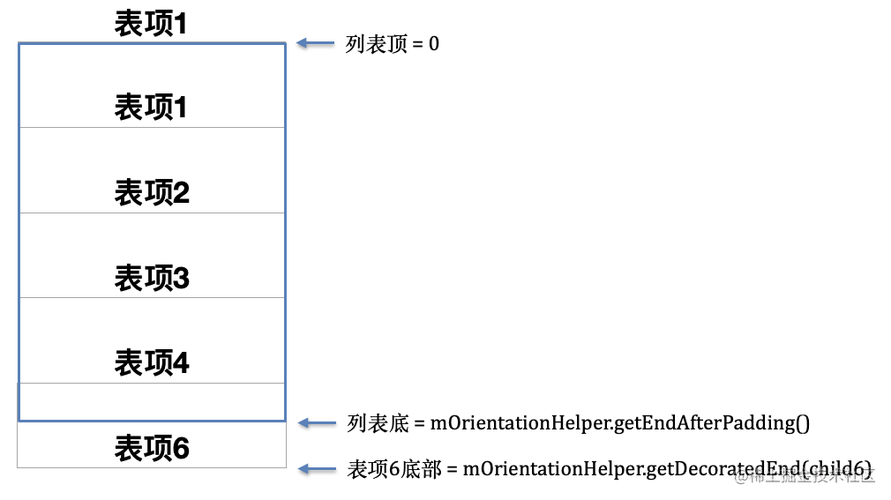
图中蓝色边框表示列表,灰色矩形表示表项。
LayoutManager只会加载可见表项,图中表项 6 有一半露出了屏幕,所以它会被加载到列表中,完全不可见的表项 7 不会被加载。这种情况下,如果不继续往列表中填充表项 7,那列表最多滑动的距离就是半个表项 6 的长度,表现在代码中即是mLayoutState.mScrollingOffset的值。
假设表项 6 之后没有更多的数据,即列表只能滑动到表项 6 的底部。在这个场景下limit的值 = 半个表项 6 的长度。也就是说limit 隐形线应该在如下位置:
回看一下,回收表项的代码:
public class LinearLayoutManager {
private void recycleViewsFromStart(RecyclerView.Recycler recycler, int scrollingOffset,int noRecycleSpace) {
final int limit = scrollingOffset - noRecycleSpace;
//从头开始遍历 LinearLayoutManager,以找出应该被回收的表项
final int childCount = getChildCount();
for (int i = 0; i < childCount; i++) {
View child = getChildAt(i);
// 如果表项的下边界 > limit 隐形线
if (mOrientationHelper.getDecoratedEnd(child) > limit
|| mOrientationHelper.getTransformedEndWithDecoration(child) > limit) {
//回收索引为 0 到 i-1 的表项
recycleChildren(recycler, 0, i);
return;
回收逻辑从头开始遍历 LinearLayoutManager,当遍历到表项 1 的时候,发现它的下边界 > limit,所以触发表项回收,回收表项的索引区间为 0 到 0 - 1,即没有任何表项被回收。(想想也是,表项 1 还未完整地被移出屏幕)。
至此可以得出结论:
RecyclerView 滑动发生之前,会计算出一条
limit 隐形线,它是决定哪些表项该被回收的重要依据。触发回收逻辑时,会遍历当前所有表项,若某表项的底部位于
limit 隐形线下方,则该表项上方的所有表项都会被回收。
把刚才假设的场景更一般化,若表项 6 之后还有数据,且滑动距离很大时会发生什么?
计算limit值的方法updateLayoutState()在scrollBy()中被调用:
public class LinearLayoutManager {
int scrollBy(int delta, RecyclerView.Recycler recycler, RecyclerView.State state) {
// 将滚动距离的绝对值传入 updateLayoutState()
final int absDelta = Math.abs(delta);
updateLayoutState(layoutDirection, absDelta, true, state);
private void updateLayoutState(int layoutDirection, int requiredSpace,boolean canUseExistingSpace, RecyclerView.State state) {
// 计算在不往列表里填充新表项的情况下,列表最多可以滚动多少像素
scrollingOffset = mOrientationHelper.getDecoratedEnd(child)- mOrientationHelper.getEndAfterPadding();
// 将列表因滚动而需要的额外空间存储在 mLayoutState.mAvailable
mLayoutState.mAvailable = requiredSpace;
mLayoutState.mScrollingOffset = scrollingOffset;
两个重要的值被依次存储在mLayoutState.mScrollingOffset和mLayoutState.mAvailable,分别是“在不往列表里填充新表项的情况下,列表最多可以滚动多少像素”,及“预计滚动像素值”。前者是回收多少旧表项的依据,后者是填充多少新表项的依据。
srollBy()在调用updateLayoutState()存储了这两个重要的值之后,立马进行了填充表项的操作:
public class LinearLayoutManager {
int scrollBy(int delta, RecyclerView.Recycler recycler, RecyclerView.State state) {
final int absDelta = Math.abs(delta);
updateLayoutState(layoutDirection, absDelta, true, state);
// 填充表项
final int consumed = mLayoutState.mScrollingOffset + fill(recycler, mLayoutState, state, false);
存储着两个重要值的mLayoutState作为参数传入了fill():
public class LinearLayoutManager {
int fill(RecyclerView.Recycler recycler, LayoutState layoutState, RecyclerView.State state, boolean stopOnFocusable) {
// 将预计滑动距离作为填充多少新表项的依据
int remainingSpace = layoutState.mAvailable + layoutState.mExtraFillSpace;
while ((layoutState.mInfinite || remainingSpace > 0) && layoutState.hasMore(state)) {
// 填充单个表项
layoutChunk(recycler, state, layoutState, layoutChunkResult);
// 在 layoutState.mScrollingOffset 上追加因新表项填充消耗的像素值
layoutState.mScrollingOffset += layoutChunkResult.mConsumed;
// 回收表项
recycleByLayoutState(recycler, layoutState);
在循环填充新表项时,新表项占用的像素值每次都会追加到layoutState.mScrollingOffset,即它的值在不断增大(limit 隐形线在不断下移)。在一次while循环的最后,会调用recycleByLayoutState()根据当前limit 隐形线的位置回收表项:
public class LinearLayoutManager {
private void recycleByLayoutState(RecyclerView.Recycler recycler, LayoutState layoutState) {
recycleViewsFromStart(recycler, scrollingOffset, noRecycleSpace);
private void recycleViewsFromStart(RecyclerView.Recycler recycler, int scrollingOffset,int noRecycleSpace) {
final int limit = scrollingOffset - noRecycleSpace;
final int childCount = getChildCount();
// 从头遍历表项
for (int i = 0; i < childCount; i++) {
View child = getChildAt(i);
// 当某表项底部位于 limit 隐形线之后时,回收它以上的所有表项
if (mOrientationHelper.getDecoratedStart(child) > limit || mOrientationHelper.getTransformedStartWithDecoration(child) > limit) {
recycleChildren(recycler, 0, i);
return;
每向列表尾部填充一个表项,limit隐形线的位置就往下移动表项占用的像素值,这样列表头部也就有更多的表项符合被回收的条件。
关于回收细节的分析,可以移步RecyclerView 缓存机制 | 回收到哪去?。
用一张图来总结limit 隐形线(图中红色虚线):
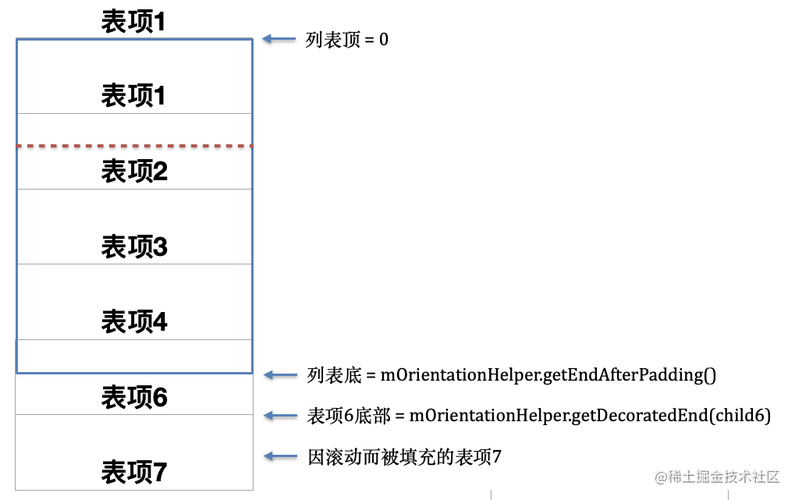
limit的值表示这一次实际滚动的总距离。(图中是一种理想情况,即当滚动结束后新插入表项 7 的底部正好和列表底部重叠)
limit 隐形线可以理解为:隐形线当前所在位置,在滚动完成后会和列表顶部重叠
RecyclerView 在滚动发生之前,会根据预计滚动位移大小来决定需要向列表中填充多少新的表项。
RecyclerView 填充表项是通过while循环一个一个实现的,当列表没有剩余空间时,填充表项也就结束了。
RecyclerView 滑动发生之前,会计算出一条limit 隐形线,它是决定哪些表项该被回收的重要依据。它可以理解为:隐形线当前所在位置,在滚动完成后会和列表顶部重叠
limit 隐形线的初始值 = 列表当前可见表项的底部到列表底部的距离,即列表在不填充新表项时,可以滑动的最大距离。每一个新填充表项消耗的像素值都会被追加到 limit 值之上,即limit 隐形线会随着新表项的填充而不断地下移。
触发回收逻辑时,会遍历当前所有表项,若某表项的底部位于limit 隐形线下方,则该表项上方的所有表项都会被回收。
RecyclerView 系列文章目录如下:
RecyclerView 缓存机制 | 如何复用表项?
RecyclerView 缓存机制 | 回收些什么?
RecyclerView 缓存机制 | 回收到哪去?
RecyclerView缓存机制 | scrap view 的生命周期
读源码长知识 | 更好的RecyclerView点击监听器
代理模式应用 | 每当为 RecyclerView 新增类型时就很抓狂
更好的 RecyclerView 表项子控件点击监听器
更高效地刷新 RecyclerView | DiffUtil二次封装
换一个思路,超简单的RecyclerView预加载
RecyclerView 动画原理 | 换个姿势看源码(pre-layout)
RecyclerView 动画原理 | pre-layout,post-layout 与 scrap 缓存的关系
RecyclerView 动画原理 | 如何存储并应用动画属性值?
RecyclerView 面试题 | 列表滚动时,表项是如何被填充或回收的?
RecyclerView 面试题 | 哪些情况下表项会被回收到缓存池?
RecyclerView 性能优化 | 把加载表项耗时减半 (一)
RecyclerView 性能优化 | 把加载表项耗时减半 (二)
RecyclerView 性能优化 | 把加载表项耗时减半 (三)
RecyclerView 的滚动是怎么实现的?(一)| 解锁阅读源码新姿势
RecyclerView 的滚动时怎么实现的?(二)| Fling
RecyclerView 刷新列表数据的 notifyDataSetChanged() 为什么是昂贵的?


