添加链接
link之家
链接快照平台
  • 输入网页链接,自动生成快照
  • 标签化管理网页链接

今天我们要学习的是consul在soringcloud中的使用。首先学习consul之前,我们应该看看consul的官网,对它有一个初步的认识。

1. consul 官网 ( https://www.consul.io 2. consul 简介

consul是google开源的一个使用go语言开发的服务发现、配置管理中心服务。内置了服务注册与发现框 架、分布一致性协议实现、健康检查、Key/Value存储、多数据中心方案,不再需要依赖其他工具(比如ZooKeeper等)。服务部署简单,只有一个可运行的二进制的包。每个节点都需要运行agent,他有两种运行模式server和client。每个数据中心官方建议需要3或5个server节点以保证数据安全,同时保证server-leader的选举能够正确的进行。

3.consul基本概念
  • client
  • CLIENT表示consul的client模式,就是客户端模式。是consul节点的一种模式,这种模式下,所有注册到当前节点的服务会被转发到SERVER,本身是不持久化这些信息。

  • server
  • SERVER表示consul的server模式,表明这个consul是个server,这种模式下,功能和CLIENT都一样,唯一不同的是,它会把所有的信息持久化的本地,这样遇到故障,信息是可以被保留的。

  • server-leader
  • 中间那个SERVER下面有LEADER的字眼,表明这个SERVER是它们的老大,它和其它SERVER不一样的一点是,它需要负责同步注册的信息给其它的SERVER,同时也要负责各个节点的健康监测。

    server节点之间的数据一致性保证,一致性协议使用的是raft,而zookeeper用的paxos,etcd采用的也是taft。

  • 服务发现协议
  • consul采用http和dns协议,etcd只支持http

    consul支持两种方式实现服务注册,一种是通过consul的服务注册http API,由服务自己调用API实现注册,另一种方式是通过json个是的配置文件实现注册,将需要注册的服务以json格式的配置文件给出。consul官方建议使用第二种方式。

    consul支持两种方式实现服务发现,一种是通过http API来查询有哪些服务,另外一种是通过consul agent 自带的DNS(8600端口),域名是以NAME.service.consul的形式给出,NAME即在定义的服务配置文件中,服务的名称。DNS方式可以通过check的方式检查服务。

  • 服务间的通信协议
  • Consul使用gossip协议管理成员关系、广播消息到整个集群,他有两个gossip pool(LAN pool和WAN pool),LAN pool是同一个数据中心内部通信的,WAN pool是多个数据中心通信的,LAN pool有多个,WAN pool只有一个。

    4.consul架构图 5.Consul常用命令 5.1 agent 运行一个consul agent
    consul agent -dev
    5.2 join	将agent加入到consul集群
    
    consul join IP
    5.3 members	列出consul cluster的members
    
    consul members
    5.4 leave	将节点移除所在集群
    
    consul leave
    6.consul安装和启动
    

    点击“download”下载:使用命令启动

     consul agent -dev
    

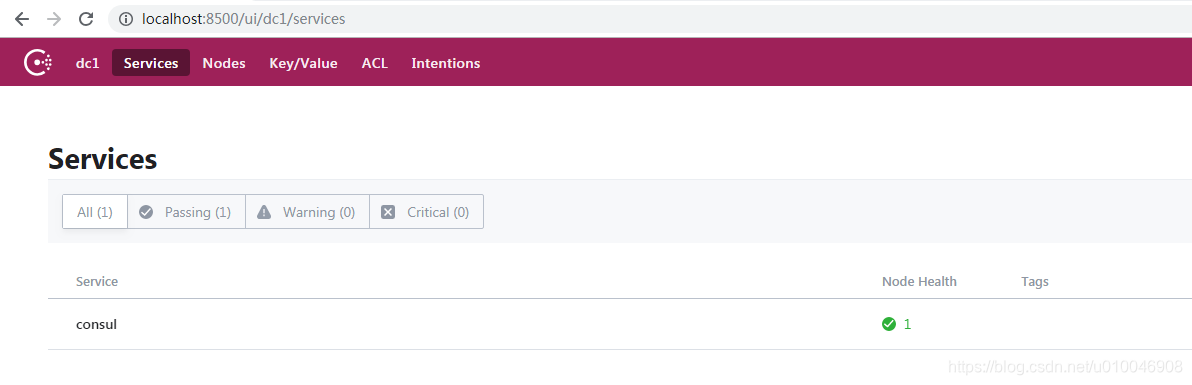
    启动成功之后在地址:http://localhost:8500在这里插入图片描述

    7.consul服务的发现与注册 7.1 注册服务

    使用HTTP API 注册个服务,使用[接口API](https://www.consul.io/api/agent/service.html API)调用

    调用 http://localhost:8500/v1/agent/service/register PUT 注册一个服务。request body:

    "ID": "userServiceId", //服务id "Name": "userService", //服务名 "Tags": [ //服务的tag,自定义,可以根据这个tag来区分同一个服务名的服务 "primary", "Address": "127.0.0.1",//服务注册到consul的IP,服务发现,发现的就是这个IP "Port": 9000, //服务注册consul的PORT,发现的就是这个PORT "EnableTagOverride": false, "Check": { //健康检查部分 "DeregisterCriticalServiceAfter": "90m", "HTTP": "http://www.baidu.com", //指定健康检查的URL,调用后只要返回20X,consul都认为是健康的 "Interval": "10s" //健康检查间隔时间,每隔10s,调用一次上面的URL

    使用curl调用

    curl http://127.0.0.1:8500/v1/agent/service/register -X PUT -i -H "Content-Type:application/json" -d '{
      "ID": "userServiceId",  
      "Name": "userService",
      "Tags": [
        "primary",
      "Address": "127.0.0.1",
      "Port": 8000,
      "EnableTagOverride": false,
      "Check": {
        "DeregisterCriticalServiceAfter": "90m",
        "HTTP": "http://www.baidu.com",
        "Interval": "10s"
    
      % Total    % Received % Xferd  Average Speed   Time    Time     Time  Current
                                     Dload  Upload   Total   Spent    Left  Speed
    100   288    0     0  100   288      0  18000 --:--:-- --:--:-- --:--:-- 18000HTTP/1.1 200 OK
    Vary: Accept-Encoding
    Date: Wed, 26 Dec 2018 05:11:32 GMT
    Content-Length: 0
    7.2 发现个服务
    

    刚刚注册了名为userService的服务,我们现在发现(查询)下这个服务

    curl http://127.0.0.1:8500/v1/catalog/service/userService
    

    返回的响应:

     curl http://127.0.0.1:8500/v1/catalog/service/userService
      % Total    % Received % Xferd  Average Speed   Time    Time     Time  Current
                                     Dload  Upload   Total   Spent    Left  Speed
    100   891  100   891    0     0  28741      0 --:--:-- --:--:-- --:--:-- 28741[
            "ID": "9b831a00-ae68-d575-5e51-df193897b834",
            "Node": "vip-PC",
            "Address": "127.0.0.1",
            "Datacenter": "dc1",
            "TaggedAddresses": {
                "lan": "127.0.0.1",
                "wan": "127.0.0.1"
            "NodeMeta": {
                "consul-network-segment": ""
            "ServiceKind": "",
            "ServiceID": "userServiceId",
            "ServiceName": "userService",
            "ServiceTags": [
                "primary",
            "ServiceAddress": "127.0.0.1",
            "ServiceWeights": {
                "Passing": 1,
                "Warning": 1
            "ServiceMeta": {},
            "ServicePort": 8000,
            "ServiceEnableTagOverride": false,
            "ServiceProxyDestination": "",
            "ServiceProxy": {},
            "ServiceConnect": {},
            "CreateIndex": 88,
            "ModifyIndex": 88
    

    基本的服务发现和注册我们已经弄清楚了。接下来我来看看Spring Cloud 整合consul的使用。

    8. consul服务提供者 8.1创建一个项目:spring-cloud-consul-provider
    <?xml version="1.0" encoding="UTF-8"?>
    <project xmlns="http://maven.apache.org/POM/4.0.0" xmlns:xsi="http://www.w3.org/2001/XMLSchema-instance"
             xsi:schemaLocation="http://maven.apache.org/POM/4.0.0 http://maven.apache.org/xsd/maven-4.0.0.xsd">
        <modelVersion>4.0.0</modelVersion>
        <parent>
            <groupId>org.springframework.boot</groupId>
            <artifactId>spring-boot-starter-parent</artifactId>
            <version>2.1.1.RELEASE</version>
            <relativePath/> <!-- lookup parent from repository -->
        </parent>
        <groupId>com.lidong</groupId>
        <artifactId>spring-cloud-consul-producer</artifactId>
        <version>1.0.0</version>
        <name>spring-cloud-consul-producer</name>
        <description>Demo project for Spring Boot</description>
        <properties>
            <java.version>1.8</java.version>
            <spring-cloud.version>Greenwich.RC2</spring-cloud.version>
        </properties>
        <dependencies>
            <dependency>
                <groupId>org.springframework.boot</groupId>
                <artifactId>spring-boot-starter-actuator</artifactId>
            </dependency>
            <dependency>
                <groupId>org.springframework.cloud</groupId>
                <artifactId>spring-cloud-starter-consul-discovery</artifactId>
            </dependency>
            <dependency>
                <groupId>org.springframework.boot</groupId>
                <artifactId>spring-boot-starter-web</artifactId>
            </dependency>
            <dependency>
                <groupId>org.springframework.boot</groupId>
                <artifactId>spring-boot-starter-test</artifactId>
                <scope>test</scope>
            </dependency>
        </dependencies>
        <dependencyManagement>
            <dependencies>
                <dependency>
                    <groupId>org.springframework.cloud</groupId>
                    <artifactId>spring-cloud-dependencies</artifactId>
                    <version>${spring-cloud.version}</version>
                    <type>pom</type>
                    <scope>import</scope>
                </dependency>
            </dependencies>
        </dependencyManagement>
        <build>
            <plugins>
                <plugin>
                    <groupId>org.springframework.boot</groupId>
                    <artifactId>spring-boot-maven-plugin</artifactId>
                </plugin>
            </plugins>
        </build>
        <repositories>
            <repository>
                <id>spring-milestones</id>
                <name>Spring Milestones</name>
                <url>https://repo.spring.io/milestone</url>
            </repository>
        </repositories>
    </project>
    

    对配置文件做一个简单的介绍,我们使用的是最新版的springboot2.1.1,springcloud.Greenwich.RC2版本。

    spring-boot-starter-actuator   健康检查依赖于此包。
    spring-cloud-starter-consul-discovery   Spring Cloud consul的服务发现支持。
    8.2 提供者添加配置(application.yml)
    
    server:
      port: 9001 #提供者的端口
    spring:
      application:
        name: spring-cloud-consul-producer
      cloud:
        consul:
          host: localhost
          port: 8500
          discovery:
            tags: dev
            serviceName: spring-cloud-consul-producer   # 注册到consul的服务名称
            healthCheckPath: /actuator/health
            healthCheckInterval: 15s
            healthCheckUrl: http://127.0.0.1:9001/actuator/health
            register: true
            prefer-ip-address: false
    

    consul的地址和端口号默认是127.0.0.1:8500,如果没有配置hosts,默认的地址localhost,consul服务会占用8500端口
    server.port :9001 服务的提供者的端口
    spring.application.name 是指注册到 consul的服务名称,后期客户端会根据这个名称来进行服务调用。
    spring.application.cloud.discovery.discovery.host: localhost
    spring.application.cloud.discovery.discovery. port:8500

    8.3 修改启动类

    添加 @EnableDiscoveryClient 注解,开启服务发现支持。

    package com.lidong.provider;
    import org.springframework.boot.SpringApplication;
    import org.springframework.boot.autoconfigure.SpringBootApplication;
    import org.springframework.cloud.client.discovery.EnableDiscoveryClient;
     * 开启服务发现
    @EnableDiscoveryClient
    @SpringBootApplication
    public class SpringCloudLidongProviderApplication {
        public static void main(String[] args) {
            SpringApplication.run(SpringCloudLidongProviderApplication.class, args);
    8.4新建服务
    

    新建 ConsulProducerController,提供 sayHello 接口, 返回一个hello—>字符串。

    package com.lidong.provider.service;
    import org.springframework.web.bind.annotation.RequestMapping;
    import org.springframework.web.bind.annotation.RestController;
     * 创建服务
    @RestController
    public class ConsulProducerController {
        @Value("${server.port}")
        private Integer port;
         * 服务接口
         * @param name
         * @return
        @RequestMapping("/hello")
        public String sayHello(@RequestParam("name")String name) {
            return "hello ---> "+name+" port -->"+port;
    

    启动项目:

    2018-12-26 13:21:42.984  INFO 20248 --- [           main] o.s.b.w.embedded.tomcat.TomcatWebServer  : Tomcat started on port(s): 9001 (http) with context path ''
    2018-12-26 13:21:42.994  INFO 20248 --- [           main] o.s.c.c.s.ConsulServiceRegistry          : Registering service with consul: NewService{id='spring-cloud-consul-producer-9001', name='spring-cloud-consul-producer', tags=[dev, secure=false], address='vip-PC', meta=null, port=9001, enableTagOverride=null, check=Check{script='null', interval='15s', ttl='null', http='http://127.0.0.1:9001/actuator/health', method='null', header={}, tcp='null', timeout='null', deregisterCriticalServiceAfter='null', tlsSkipVerify=null, status='null'}, checks=null}
    2018-12-26 13:21:43.008  INFO 20248 --- [           main] l.p.SpringCloudLidongProviderApplication : Started SpringCloudLidongProviderApplication in 4.09 seconds (JVM running for 4.755)
    

    服务提供者发布成功。
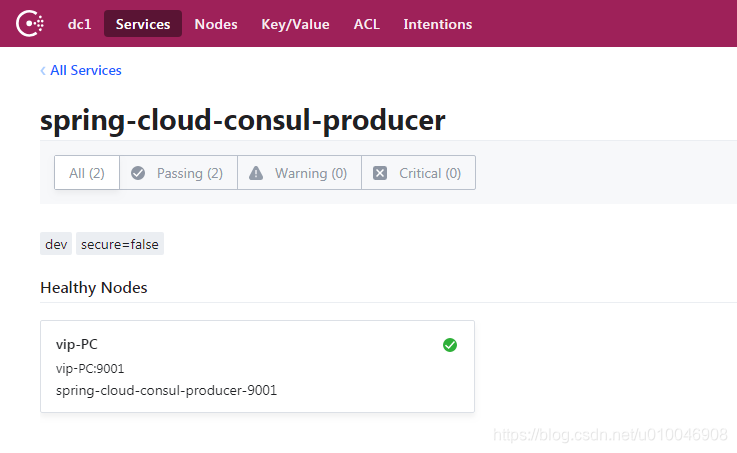
    这时候,我们在控制台会发现服务列表中有一个名字为spring-cloud-consul-producer的服务

    点击详情会发现服务的详细信息
    在这里插入图片描述

    9. Consul服务消费者 9.1创建一个项目:spring-cloud-consul-consumer

    <?xml version="1.0" encoding="UTF-8"?>
    <project xmlns="http://maven.apache.org/POM/4.0.0" xmlns:xsi="http://www.w3.org/2001/XMLSchema-instance"
             xsi:schemaLocation="http://maven.apache.org/POM/4.0.0 http://maven.apache.org/xsd/maven-4.0.0.xsd">
        <modelVersion>4.0.0</modelVersion>
        <parent>
            <groupId>org.springframework.boot</groupId>
            <artifactId>spring-boot-starter-parent</artifactId>
            <version>2.1.1.RELEASE</version>
            <relativePath/> <!-- lookup parent from repository -->
        </parent>
        <groupId>com.lidong</groupId>
        <artifactId>spring-cloud-consul-consumer</artifactId>
        <version>0.0.1-SNAPSHOT</version>
        <name>spring-cloud-consul-consumer</name>
        <description>Demo project for Spring Boot</description>
        <properties>
            <java.version>1.8</java.version>
            <spring-cloud.version>Greenwich.RC2</spring-cloud.version>
        </properties>
        <dependencies>
            <dependency>
                <groupId>org.springframework.boot</groupId>
                <artifactId>spring-boot-starter-actuator</artifactId>
            </dependency>
            <dependency>
                <groupId>org.springframework.cloud</groupId>
                <artifactId>spring-cloud-starter-consul-discovery</artifactId>
            </dependency>
            <dependency>
                <groupId>org.springframework.boot</groupId>
                <artifactId>spring-boot-starter-web</artifactId>
            </dependency>
            <dependency>
                <groupId>org.springframework.boot</groupId>
                <artifactId>spring-boot-starter-test</artifactId>
                <scope>test</scope>
            </dependency>
            <dependency>
                <groupId>org.springframework.cloud</groupId>
                <artifactId>spring-cloud-starter-netflix-ribbon</artifactId>
            </dependency>
            <dependency>
                <groupId>org.springframework.cloud</groupId>
                <artifactId>spring-cloud-starter-openfeign</artifactId>
            </dependency>
        </dependencies>
        <dependencyManagement>
            <dependencies>
                <dependency>
                    <groupId>org.springframework.cloud</groupId>
                    <artifactId>spring-cloud-dependencies</artifactId>
                    <version>${spring-cloud.version}</version>
                    <type>pom</type>
                    <scope>import</scope>
                </dependency>
            </dependencies>
        </dependencyManagement>
        <build>
            <plugins>
                <plugin>
                    <groupId>org.springframework.boot</groupId>
                    <artifactId>spring-boot-maven-plugin</artifactId>
                </plugin>
            </plugins>
        </build>
        <repositories>
            <repository>
                <id>spring-milestones</id>
                <name>Spring Milestones</name>
                <url>https://repo.spring.io/milestone</url>
            </repository>
        </repositories>
    </project>
            register: false    #设置不需要注册到 consul 中
            healthCheckPath: /actuator/health
            healthCheckInterval: 15s
            healthCheckUrl: http://127.0.0.1:9002/actuator/health
    

    consul的地址和端口号默认是 127.0.0.1:8500,如果没有配置hosts,默认的地址localhost,consul服务会占用8500接口
    server.port :9006 服务的消费者的端口
    spring.application.cloud.consul.discovery.register: false

    9.3配置启动类
    package com.lidong.consumer;
    import org.springframework.beans.factory.annotation.Autowired;
    import org.springframework.boot.SpringApplication;
    import org.springframework.boot.autoconfigure.SpringBootApplication;
    import org.springframework.boot.web.client.RestTemplateBuilder;
    import org.springframework.cloud.client.discovery.EnableDiscoveryClient;
    import org.springframework.cloud.client.loadbalancer.LoadBalanced;
    import org.springframework.context.annotation.Bean;
    import org.springframework.web.bind.annotation.PathVariable;
    import org.springframework.web.bind.annotation.RequestMapping;
    import org.springframework.web.bind.annotation.RequestMethod;
    import org.springframework.web.bind.annotation.RequestParam;
    import org.springframework.web.client.RestTemplate;
    @SpringBootApplication
    @EnableDiscoveryClient
    public class SpringCloudConsulConsumerApplication {
        @Autowired
        private RestTemplateBuilder builder;
        @LoadBalanced
        @Bean// 添加负载均衡支持,很简单,只需要在RestTemplate上添加@LoadBalanced注解,那么RestTemplate即具有负载均衡的功能,如果不加@LoadBalanced注解的话,会报java.net.UnknownHostException:springboot-h2异常,此时无法通过注册到Eureka Server上的服务名来调用服务,因为RestTemplate是无法从服务名映射到ip:port的,映射的功能是由LoadBalancerClient来实现的。
        public RestTemplate restTemplate() {
            return builder.build();
        public static void main(String[] args) {
            SpringApplication.run(SpringCloudConsulConsumerApplication.class, args);
    9.4创建消费服务
    
    package com.lidong.consumer.controller;
    import org.springframework.beans.factory.annotation.Autowired;
    import org.springframework.cloud.client.ServiceInstance;
    import org.springframework.cloud.client.discovery.DiscoveryClient;
    import org.springframework.cloud.client.loadbalancer.LoadBalancerClient;
    import org.springframework.web.bind.annotation.RequestMapping;
    import org.springframework.web.bind.annotation.RequestParam;
    import org.springframework.web.bind.annotation.RestController;
    import org.springframework.web.client.RestTemplate;
     * 创建服务的消费者
    @RestController
    public class ConsumerController {
        private static final String SERVICE_NAME = "spring-cloud-consul-producer";
        @Autowired
        private DiscoveryClient discoveryClient;
         * 获取所有服务
        @RequestMapping("/services")
        public Object services() {
            return discoveryClient.getInstances(SERVICE_NAME);
         * 消费服务
        @RequestMapping("/callSayHello")
        public String services(@RequestParam("name") String name) {
            ServiceInstance serviceInstance = (ServiceInstance) discoveryClient.getInstances(SERVICE_NAME);
            String callServiceResult = new RestTemplate().getForObject(serviceInstance.getUri().toString() + "/hello", String.class);
            System.out.println(callServiceResult);
            return callServiceResult;
    

    http://localhost:9002/services

    获取服务列表的结果

    [{"instanceId":"spring-cloud-consul-producer-9001","serviceId":"spring-cloud-consul-producer","host":"vip-PC","port":9001,"secure":false,"metadata":{"dev":"dev","secure":"false"},"uri":"http://vip-PC:9001","scheme":null}]
    

    测试请求的url
    http://localhost:9002/callSayHello?name=9002
    消费的结果

    hello ---> 9002 port -->9001
    

    源码地址
    https://download.csdn.net/download/u010046908/10877868

    从零开始创建微服务系统四 - 第一部分
    好吧,标题似乎是一个大胆的陈述,所以让我们澄清一下我所说的微服务系统是什么意思。我不是指要在生产中使用的任何类型的框架,只是一个了解微服务架构的挑战以及它如何在幕后工作的项目。 我不打算将这个系列作为分步指南,因为到最后它可能至少有 100 篇文章。相反,我将尝试写关于设计选择、如何编写一些机制并突出一些有趣的问题(从全栈开发人员的角度来看)我在此过程中偶然发现。
    【深入浅出SpringCloud原理及实战】「SpringCloud-Alibaba系列」微服务模式搭建系统基础架构实战指南及版本规划踩坑分析
    【深入浅出SpringCloud原理及实战】「SpringCloud-Alibaba系列」微服务模式搭建系统基础架构实战指南及版本规划踩坑分析
    1、大促时瞬间洪峰流量导致系统超出最大负载,load 飙高,系统崩溃导致用户无法下单 2、“黑马”热点商品击穿缓存,DB 被打垮,挤占正常流量 3、调用端被不稳定服务拖垮,线程池被占满,导致整个调用链路卡死 这些不稳定的场景可能会导致严重后果。大家可能想问:如何做到均匀平滑的用户访问?如何预防流量过大或服务不稳定带来的影响? 38531 亿级流量电商详情页系统实战:缓存架构+高可用服务架构+微服务架构
    亿级流量电商详情页系统的完整大型架构。同时最重要的是,在完全真实的大型电商详情页系统架构下,全流程实战了整套微服务架构,包含了基于领域驱动设计进行微服务建模、Spring Cloud、基于DevOps的持续交付流水线与自动化测试套件、基于Docker的自动化部署。此外,还包含了大型电商详情页系统架构中的多种复杂架构设计的详细介绍。
    SpringCloud微服务实战——搭建企业级开发框架(四十一):扩展JustAuth+SpringSecurity+Vue实现多租户系统微信扫码、钉钉扫码等第三方登录
      如果我们自己的系统需要调用第三方登录,那么我们就需要实现单点登录客户端,然后跟需要对接的平台调试登录SDK。JustAuth是第三方授权登录的工具类库,对接了国外内数十家第三方登录的SDK,我们在需要实现第三方登录时,只需要集成JustAuth工具包,然后配置即可实现第三方登录,省去了需要对接不同SDK的麻烦。   JustAuth官方提供了多种入门指南,集成使用非常方便。但是如果要贴合我们自有开发框架的业务需求,还是需要进行整合优化。下面根据我们的系统需求,从两方面进行整合:一是支持多租户功能,二是和自有系统的用户进行匹配。
    【分布式集群】微服务电商应用系统的集群构建
    基于Spring系列的框架开发的微服务业务站点在当下应该是最流行的开发模式之一,通过一系列分布式高可用的系统架构,我们将完成对电商应用的构建部署。
    设计稳定的微服务系统时不得不考虑的场景
    本文将介绍两种方式,是在面对流量不稳定因素时常见的两种方案,也是我们在设计高可用的系统前不得不考虑的两种能力,是服务流量治理中非常关键的一环。
    SpringCloud微服务实战——搭建企业级开发框架(四十):使用Spring Security OAuth2实现单点登录(SSO)系统
    目前每家企业或者平台都存在不止一套系统,由于历史原因每套系统采购于不同厂商,所以系统间都是相互独立的,都有自己的用户鉴权认证体系,当用户进行登录系统时,不得不记住每套系统的用户名密码,同时,管理员也需要为同一个用户设置多套系统登录账号,这对系统的使用者来说显然是不方便的。我们期望的是如果存在多个系统,只需要登录一次就可以访问多个系统,只需要在其中一个系统执行注销登录操作,则所有的系统都注销登录,无需重复操作,这就是单点登录(Single Sign On 简称SSO)系统实现的功能。