tar -xzvf
apache-hive-2.2.0-bin.tar.gz -C Documents/install/
2、配置,进入和Hive的配置目录conf
(1)配置hive.env.sh运行环境, 先将hive-env.sh.template重命名为hive.env.sh。
mv hive-env.sh.template hive-env.sh
HADOOP_HOME=/home/bxp/Documents/install/hadoop-2.6.5
export HIVE_CONF_DIR=/home/bxp/Documents/install/hive-2.2.0-bin/conf
(2)配置hive-site.xml,此时文件下没有hive-site.xml,需要拷贝一份hive-default.xml.template命名为hive-site.xml,并将hive-default.xml.template重命名为hive-default.xml。将hive-site.xml文件中的配置全部删除,只需要添加以下配置即可。
<?xml version="1.0"?>
<?xml-stylesheet type="text/xsl" href="configuration.xsl"?>
<configuration>
<property>
<name>javax.jdo.option.ConnectionURL</name>
<value>jdbc:mysql://localhost:3306/hive2?createDatabaseIfNotExist=true</value>
<description>JDBC connect string for a JDBC metastore</description>
</property>
<property>
<name>javax.jdo.option.ConnectionDriverName</name>
<value>com.mysql.jdbc.Driver</value>
<description>Driver class name for a JDBC metastore</description>
</property>
<property>
<name>javax.jdo.option.ConnectionUserName</name>
<value>admin</value>
<description>username to use against metastore database</description>
</property>
<property>
<name>javax.jdo.option.ConnectionPassword</name>
<value>admin</value>
<description>password to use against metastore database</description>
</property>
<property>
<name>hive.cli.print.header</name>
<value>true</value>
<description>Whether to print the names of the columns in query output.</description>
</property>
<property>
<name>hive.cli.print.current.db</name>
<value>true</value>
<description>Whether to include the current database in the Hive prompt.</description>
</property>
</configuration>
(3)将hive-log4j2.properties.template重命名为hive-log4j2.properties
3、下载mysql数据库连接驱动
默认情况下Hive的lib目录下没有mysql的驱动,所以需要去
下载mysql驱动jar
包放于Hive的lib目录下。如果没有驱动,在hive启动的时候会报错,当然根据报错提示很容易就能够发现。
4、在HDFS创建目录
启动已经安装好的hadoop,启动,并在hdfs文件系统上创建/tmp和/user/hive/warehouse目录,并为创建的目录添加同组写权限
bin/hdfs dfs -mkdir -p /tmp
bin/hdfs dfs -mkdir -p /user/hive/warehouse
dfs -chmod g+w /tmp
dfs -chmod g+w /user/hive/warehouse
5、初始化metadata
bin/schematool -dbType mysql -initSchema
bin/hive
启动失败解决方案
配置过程中细节很重要,下面就看看我在配置结束后,启动时遇到的问题以及解决方案,通过异常提示能够看出来的问题,这里就不再强调说明。
(1)问题一:与数据库建立连接时候没有权限的问题,无法连接的问题
Caused by: java.sql.SQLException: Unable to open a test connection to the given database. JDBC url = jdbc:mysql://192.168.1.103:3306/hivemetastore, username = admin. Terminating connection pool (set lazyInit to true if you expect to start your database after your app). Original Exception:
java.sql.SQLException: Access denied for user 'admin'@'hadoop-series.bxp.com' (using password: YES)
这个问题我查了很多说法,都是众说纷纭,最后发现,最简单的解决办法就是,不要去尝试创建一个新的数据库用户用于连接,直接使用mysql root用户连接即可。
但是使用root用户连接的时候,发只能够使用localhost(jdbc:mysql://localhost:3306) 才能够连接成功,而无法使用IP(jdbc:mysql://192.168.1.103:3306)进行连接。实际中hive和mysql不一定在一台主机上,所以必须要使用IP进行连接,要解决这个问题,只需要修改mysql root用户权限即可。具体步骤如下:
//登陆mysql
sudo mysql -uroot -p
//对mysql表进行操作
use mysql
//查看表中的信息
select user,host from user;
//修改root用户权限,默认是只能够本地登陆(localhost,127.0.0.1),修改为"%"就可以远程登陆
update user set host='%' where user='root' and host='localhost';
//将root本地登陆权限删除,具体的看表中的信息
delete from user where user='root' and host='::1';
delete from user where user='root' and host='127.0.0.1';
delete from user where user='root' and host='localhost.localdomain';
//刷新权限
flush privileges;
此时就可以通过IP(jdbc:mysql://192.168.1.103:3306)进行连接。
本人尝试过创建用户时使用主机IP(CREATE USER user1@IP ),此时连接时也使用IP(jdbc:mysql://IP:3306),也尝试过给创建的用户赋予”%”权限,但是还是相同的错误无法连接。新创建的用户只能够使用localhost权限,并且只能在本地进行登陆。所以初步断定这是Mysql为用户分配权限的原因。具体的原因没有深究,想了解更多的可以去查阅相关的资料进行解决。
(2)问题二:无法找到metadata
Caused by: org.apache.hadoop.hive.ql.metadata.HiveException: java.lang.RuntimeException: Unable to instantiate org.apache.hadoop.hive.ql.metadata.SessionHiveMetaStoreClient
Caused by: java.lang.RuntimeException: Unable to instantiate org.apache.hadoop.hive.ql.metadata.SessionHiveMetaStoreClient
Caused by: java.lang.reflect.InvocationTargetException
Caused by: MetaException(message:Version information not found in metastore. )
这个问题我也查了很多资料,也是有各种的说法,最后选择低版本(hive-0.13.1-bin)按照上面的的配置进行一系列的配置,居然正常启动了。最后就觉得是版本问题。最终发现在Hive2以后,安装启动hive之前需要对hive metadata进行初始化。使用如下命令:
bin/schematool -dbType mysql -initSchema
初始化完成之后就能够正常启动了。
(3)问题三:9000端口无法访问
Caused by: java.net.ConnectException: Call From hadoop-series.bxp.com/192.168.1.103 to hadoop-series.bxp.com:9000 failed on connection exception: java.net.ConnectException: Connection refused
首先是防火墙,如果你的防火墙已经关闭了,那就是hdfs没有启动成功或者没有启动导致的,因为9000是hdfs其中一个服务的端口。这里有必要说一下,我使用hive-0.13.1-bin版本进行启动的时候,不需要开启hdfs也能够启动。但是2.0后必须依赖hdfs。
1.1.hive错误1.1.1. hive2.3初始化mysql不起作用[root@localhost65bin]#schematool-initSchema-dbTypemysql--verbos...
来自: 奋斗的小鸟专栏
问题1:Call From localhost/127.0.0.1 to localhost:9000 failed on connection exception: java.net.Connect...
来自: ge_gewu的博客
问题1:Caused by: javax.jdo.JDODataStoreException: Required table missing : "`VERSION`" in Catalog "" S...
来自: 冰河的专栏
hadoop执行start-all后,显示正常启动。starting namenode, logging to /opt/hadoop-0.20.2-cdh3u0/logs/hadoop-hadoop...
来自: weixin_30252155的博客
java.sql.SQLException: Unable to open a test connection to the given database. JDBC url = jdbc:mysql
10-30
执行hive命令,启动终端,会报错先进入mysqlmysql -uroot -p如何解决哪?依次执行下面的3条mysql命令:1、drop database metastore;2、create da...
来自: 码放南山
我的mysql是装在本地机器win7操作系统下的,服务正常,本地登录正常。
hive装在linux虚拟机上,虚拟机与本机网络没有问题,防火墙已关,hadoop安装也没有问题。
我在liunx虚拟机上安装了mysql的客户端,通过命令mysql -uhive -paxx1314 -h192.168.120.1 正常登录,信息如下
[root@zchlinux conf]# mysql -uhive -paxx1314 -h192.168.120.1
Welcome to the MySQL monitor. Commands end with ; or \g.
Your MySQL connection id is 9 to server version: 5.0.18-nt
Type 'help;' or '\h' for help. Type '\c' to clear the buffer.
mysql> show databases;
+--------------------+
| Database |
+--------------------+
| information_schema |
| hivedb |
| test |
+--------------------+
3 rows in set (0.03 sec)
mysql>
但当我启动hive时报错,报错信息如下:
[root@zchlinux conf]# hive
Logging initialized using configuration in jar:file:/opt/apache-hive-0.13.0-bin/lib/hive-common-0.13.0.jar!/hive-
log4j.properties
Exception in thread "main" java.lang.RuntimeException: java.lang.RuntimeException: Unable to instantiate
org.apache.hadoop.hive.metastore.HiveMetaStoreClient
at org.apache.hadoop.hive.ql.session.SessionState.start(SessionState.java:344)
at org.apache.hadoop.hive.cli.CliDriver.run(CliDriver.java:681)
at org.apache.hadoop.hive.cli.CliDriver.main(CliDriver.java:625)
at sun.reflect.NativeMethodAccessorImpl.invoke0(Native Method)
at sun.reflect.NativeMethodAccessorImpl.invoke(NativeMethodAccessorImpl.java:57)
at sun.reflect.DelegatingMethodAccessorImpl.invoke(DelegatingMethodAccessorImpl.java:43)
at java.lang.reflect.Method.invoke(Method.java:601)
at org.apache.hadoop.util.RunJar.main(RunJar.java:160)
Caused by: java.lang.RuntimeException: Unable to instantiate org.apache.hadoop.hive.metastore.HiveMetaStoreClient
at org.apache.hadoop.hive.metastore.MetaStoreUtils.newInstance(MetaStoreUtils.java:1412)
at org.apache.hadoop.hive.metastore.RetryingMetaStoreClient.<init>(RetryingMetaStoreClient.java:62)
at org.apache.hadoop.hive.metastore.RetryingMetaStoreClient.getProxy(RetryingMetaStoreClient.java:72)
at org.apache.hadoop.hive.ql.metadata.Hive.createMetaStoreClient(Hive.java:2444)
at org.apache.hadoop.hive.ql.metadata.Hive.getMSC(Hive.java:2456)
at org.apache.hadoop.hive.ql.session.SessionState.start(SessionState.java:338)
... 7 more
Caused by: java.lang.reflect.InvocationTargetException
at sun.reflect.NativeConstructorAccessorImpl.newInstance0(Native Method)
at sun.reflect.NativeConstructorAccessorImpl.newInstance(NativeConstructorAccessorImpl.java:57)
at sun.reflect.DelegatingConstructorAccessorImpl.newInstance(DelegatingConstructorAccessorImpl.java:45)
at java.lang.reflect.Constructor.newInstance(Constructor.java:525)
at org.apache.hadoop.hive.metastore.MetaStoreUtils.newInstance(MetaStoreUtils.java:1410)
... 12 more
Caused by: javax.jdo.JDOFatalDataStoreException: Unable to open a test connection to the given database. JDBC url =
jdbc:mysql://192.168.120.1:3306/hivedb?createDatabaseIfNotExist=true&useUnicode=true&characterEncoding=UTF-8, username =
hive. Terminating connection pool (set lazyInit to true if you expect to start your database after your app). Original
Exception: ------
java.sql.SQLException: Access denied for user 'hive'@'192.168.120.128' (using password: YES)
at com.mysql.jdbc.SQLError.createSQLException(SQLError.java:1073)
at com.mysql.jdbc.MysqlIO.checkErrorPacket(MysqlIO.java:3609)
at com.mysql.jdbc.MysqlIO.checkErrorPacket(MysqlIO.java:3541)
.........
.....
hive的配置文件hivehive-site.xml内容如下:
<?xml version="1.0"?>
<?xml-stylesheet type="text/xsl" href="configuration.xsl"?>
<configuration>
<property>
<name>javax.jdo.option.ConnectionURL</name>
<value>jdbc:mysql://192.168.120.1:3306/hivedb?
createDatabaseIfNotExist=true&useUnicode=true&characterEncoding=UTF-8</value>
</property>
<property>
<name>javax.jdo.option.ConnectionDriverName</name>
<value>com.mysql.jdbc.Driver</value>
</property>
<property>
<name>javax.jdo.option.ConnectionUserName</name>
<value>hive</value>
</property>
<property>
<name>javax.jdo.option.ConnectionPassWord</name>
<value>axx1314</value>
</property>
</configuration>
NestedThrowables:java.sql.SQLException: Unable to open a test connection to the given database. JDBC...
来自: 盖世英雄来了
~$ hive --service metastore -hiveconf hbase.zookeeper.quorum=master,slave1,slave2 -hiveconf hbase.zo
这次只是简单记录一下困扰了我两天的一个问题: 起初,我按照网上的步骤安装好了MySQL5.6,又安装了hive2.3,成功初始化启动,但是进入了命令行之后,不管是执行什么命令,sql命令...
来自: yukuaifeng的博客
我已经namenode format 。搭建的是2个节点。还是报这样的错误: Total MapReduce jobs = 1 Launching Job 1 out of 1 Number of r
安装了mysql,并且成功创建hive用户和hive数据库后下载hive apache-hive-0.13.1-bin.tar.gz 版本,解压,并配置hive-site.xml和hive-env.x...
来自: lda_ming的专栏
一、错误java.lang.OutOfMemoryError: Java heap space at java.net.ServerSocket.accept(ServerSocket.java:51...
来自: IT Baicn的博客
平时用的Hive的时候,总是坚挺的活着,今天竟然莫名其妙的就死给我看shell>hiveException in thread "main" java.lang.RuntimeException...
来自: Joseph25的博客
今天上班时打开CM管理界面,看到Hive Metastore Server 运行状况 不良:查看日志Retrying creating default database after error: Un...
来自: fengyuanshen的专栏
最好先启动 metasotre 然后再启动hive serverhive --service metastore-----------Startup Hive Embeddedhive --servi...
来自: 踢人空间
1 启动hive出现ls: 无法访问’/usr/local/spark/lib/spark-assembly-.jar’: 没有那个文件或目录解决:修改//bin/hive文件,将加载原来的lib/...
来自: boom的博客
进入hive 执行show databases时报错,利用/usr/local/Cellar/hive/2.3.1/libexec/bin目录下的hive进入hive,再执行show database...
来自: 记录
Exception in thread "main" java.lang.RuntimeException: org.apache.hadoop.hive.ql.metadata.HiveExcept
hive在启动过程中报出:Cannot create directory Name node is in safe mode错误,这时只需要在作为master的节点上的命令行输入如下命令即可:#tur...
来自: Steve.D.Chan
问题1:Exception in thread "main" java.lang.RuntimeException: org.apache.hadoop.ipc.RemoteException(org...
来自: 达达2敖雷的专栏
转载:http://blog.csdn.net/namelessml/article/details/52688955感谢博主!!异常:WARN conf.HiveConf: DEPRECATED: ...
来自: 似水流年
hive突然就不能启动了,之前明明是好的,莫名其妙的报如下错误:解决方法: 杀掉一个run jar 进程,莫名其妙的就好.后来了解到可能是因为hive的元数据库是Derby,不支持同时多用户操作...
来自: baidu_35310727的博客
Logging initialized using configuration in jar:file:/apps/hive-1.2.1/lib/hive-jdbc-1.2.1-standalone.
安装完hive时,运行没问题,后来再次开启时出现如下问题:hive> show databases;FAILED: Error in metadata: javax.jdo.JDOFatalDataS...
来自: 岸芷汀兰
$beeline -u jdbc:hive2://192.168.141.142:10000
Connecting to jdbc:hive2://192.168.141.142:10000
17/07/11 23:37:38 INFO jdbc.Utils: Supplied authorities: 192.168.141.142:10000
17/07/11 23:37:38 INFO jdbc.Utils: Resolved authority: 192.168.141.142:10000
17/07/11 23:37:38 INFO jdbc.HiveConnection: Will try to open client transport with JDBC Uri: jdbc:hive2://192.168.141.142:10000
17/07/11 23:37:39 ERROR jdbc.HiveConnection: Error opening session
org.apache.thrift.TApplicationException: Required field 'client_protocol' is unset! Struct:TOpenSessionReq(client_protocol:null, configuration:{use:database=default})
at org.apache.thrift.TApplicationException.read(TApplicationException.java:111)
at org.apache.thrift.TServiceClient.receiveBase(TServiceClient.java:71)
at org.apache.hive.service.cli.thrift.TCLIService$Client.recv_OpenSession(TCLIService.java:156)
at org.apache.hive.service.cli.thrift.TCLIService$Client.OpenSession(TCLIService.java:143)
at org.apache.hive.jdbc.HiveConnection.openSession(HiveConnection.java:583)
at org.apache.hive.jdbc.HiveConnection.<init>(HiveConnection.java:192)
at org.apache.hive.jdbc.HiveDriver.connect(HiveDriver.java:105)
at java.sql.DriverManager.getConnection(DriverManager.java:571)
at java.sql.DriverManager.getConnection(DriverManager.java:187)
at org.apache.hive.beeline.DatabaseConnection.connect(DatabaseConnection.java:142)
at org.apache.hive.beeline.DatabaseConnection.getConnection(DatabaseConnection.java:207)
at org.apache.hive.beeline.Commands.connect(Commands.java:1149)
at org.apache.hive.beeline.Commands.connect(Commands.java:1070)
at sun.reflect.NativeMethodAccessorImpl.invoke0(Native Method)
at sun.reflect.NativeMethodAccessorImpl.invoke(NativeMethodAccessorImpl.java:57)
at sun.reflect.DelegatingMethodAccessorImpl.invoke(DelegatingMethodAccessorImpl.java:43)
at java.lang.reflect.Method.invoke(Method.java:606)
at org.apache.hive.beeline.ReflectiveCommandHandler.execute(ReflectiveCommandHandler.java:52)
at org.apache.hive.beeline.BeeLine.dispatch(BeeLine.java:970)
at org.apache.hive.beeline.BeeLine.initArgs(BeeLine.java:707)
at org.apache.hive.beeline.BeeLine.begin(BeeLine.java:757)
at org.apache.hive.beeline.BeeLine.mainWithInputRedirection(BeeLine.java:484)
at org.apache.hive.beeline.BeeLine.main(BeeLine.java:467)
Error: Could not establish connection to jdbc:hive2://192.168.141.142:10000: Required field 'client_protocol' is unset! Struct:TOpenSessionReq(client_protocol:null, configuration:{use:database=default}) (state=08S01,code=0)
Beeline version 1.6.2 by Apache Hive
0: jdbc:hive2://192.168.141.142:10000 (closed)>
Hive只在一个节点上安装即可1.上传tar包 2.解压tar -zxvf hive-0.9.0.tar.gz -C /cloud/3.配置mysql metastore(切换到root用户)配置HI...
来自: yuxiang1014的专栏
1.上传Hive的安装包2.解压到指定目录 tar -zxvf hive-0.9.0.tar.gz -C /..........3.安装mysql 注:使用roo...
来自: qq_40471761的博客
2018-02-01T09:46:28,400 WARN [9a4cc1b4-8396-471b-8df0-b1eb3ca1fd82 main] ql.Driver: Caught exception attempting to write metadata call information org.apache.hadoop.hive.ql.metadata.HiveException: java.lang.RuntimeException: Unable to instantiate org.apache.hadoop.hive.ql.metadata.SessionHiveMetaStoreClient
org.apache.hadoop.hive.ql.metadata.HiveException: java.lang.RuntimeException: Unable to instantiate org.apache.hadoop.hive.ql.metadata.SessionHiveMetaStoreClient
at org.apache.hadoop.hive.ql.metadata.Hive.registerAllFunctionsOnce(Hive.java:236) ~[hive-exec-2.3.2.jar:2.3.2]
at org.apache.hadoop.hive.ql.metadata.Hive.<init>(Hive.java:388) ~[hive-exec-2.3.2.jar:2.3.2]
at org.apache.hadoop.hive.ql.metadata.Hive.create(Hive.java:332) ~[hive-exec-2.3.2.jar:2.3.2]
at org.apache.hadoop.hive.ql.metadata.Hive.getInternal(Hive.java:312) ~[hive-exec-2.3.2.jar:2.3.2]
at org.apache.hadoop.hive.ql.metadata.Hive.get(Hive.java:354) ~[hive-exec-2.3.2.jar:2.3.2]
at org.apache.hadoop.hive.ql.metadata.Hive.get(Hive.java:350) ~[hive-exec-2.3.2.jar:2.3.2]
at org.apache.hadoop.hive.ql.Driver.dumpMetaCallTimingWithoutEx(Driver.java:683) ~[hive-exec-2.3.2.jar:2.3.2]
at org.apache.hadoop.hive.ql.Driver.compile(Driver.java:621) ~[hive-exec-2.3.2.jar:2.3.2]
at org.apache.hadoop.hive.ql.Driver.compileInternal(Driver.java:1317) ~[hive-exec-2.3.2.jar:2.3.2]
at org.apache.hadoop.hive.ql.Driver.runInternal(Driver.java:1457) ~[hive-exec-2.3.2.jar:2.3.2]
at org.apache.hadoop.hive.ql.Driver.run(Driver.java:1237) ~[hive-exec-2.3.2.jar:2.3.2]
at org.apache.hadoop.hive.ql.Driver.run(Driver.java:1227) ~[hive-exec-2.3.2.jar:2.3.2]
at org.apache.hadoop.hive.cli.CliDriver.processLocalCmd(CliDriver.java:233) ~[hive-cli-2.3.2.jar:2.3.2]
at org.apache.hadoop.hive.cli.CliDriver.processCmd(CliDriver.java:184) ~[hive-cli-2.3.2.jar:2.3.2]
at org.apache.hadoop.hive.cli.CliDriver.processLine(CliDriver.java:403) ~[hive-cli-2.3.2.jar:2.3.2]
at org.apache.hadoop.hive.cli.CliDriver.executeDriver(CliDriver.java:821) ~[hive-cli-2.3.2.jar:2.3.2]
at org.apache.hadoop.hive.cli.CliDriver.run(CliDriver.java:759) ~[hive-cli-2.3.2.jar:2.3.2]
at org.apache.hadoop.hive.cli.CliDriver.main(CliDriver.java:686) ~[hive-cli-2.3.2.jar:2.3.2]
at sun.reflect.NativeMethodAccessorImpl.invoke0(Native Method) ~[?:1.8.0_151]
at sun.reflect.NativeMethodAccessorImpl.invoke(NativeMethodAccessorImpl.java:62) ~[?:1.8.0_151]
at sun.reflect.DelegatingMethodAccessorImpl.invoke(DelegatingMethodAccessorImpl.java:43) ~[?:1.8.0_151]
at java.lang.reflect.Method.invoke(Method.java:498) ~[?:1.8.0_151]
at org.apache.hadoop.util.RunJar.run(RunJar.java:239) ~[hadoop-common-2.9.0.jar:?]
at org.apache.hadoop.util.RunJar.main(RunJar.java:153) ~[hadoop-common-2.9.0.jar:?]
Caused by: java.lang.RuntimeException: Unable to instantiate org.apache.hadoop.hive.ql.metadata.SessionHiveMetaStoreClient
at org.apache.hadoop.hive.metastore.MetaStoreUtils.newInstance(MetaStoreUtils.java:1701) ~[hive-exec-2.3.2.jar:2.3.2]
at org.apache.hadoop.hive.metastore.RetryingMetaStoreClient.<init>(RetryingMetaStoreClient.java:83) ~[hive-exec-2.3.2.jar:2.3.2]
at org.apache.hadoop.hive.metastore.RetryingMetaStoreClient.getProxy(RetryingMetaStoreClient.java:133) ~[hive-exec-2.3.2.jar:2.3.2]
at org.apache.hadoop.hive.metastore.RetryingMetaStoreClient.getProxy(RetryingMetaStoreClient.java:104) ~[hive-exec-2.3.2.jar:2.3.2]
at org.apache.hadoop.hive.ql.metadata.Hive.createMetaStoreClient(Hive.java:3600) ~[hive-exec-2.3.2.jar:2.3.2]
at org.apache.hadoop.hive.ql.metadata.Hive.getMSC(Hive.java:3652) ~[hive-exec-2.3.2.jar:2.3.2]
at org.apache.hadoop.hive.ql.metadata.Hive.getMSC(Hive.java:3632) ~[hive-exec-2.3.2.jar:2.3.2]
at org.apache.hadoop.hive.ql.metadata.Hive.getAllFunctions(Hive.java:3894) ~[hive-exec-2.3.2.jar:2.3.2]
at org.apache.hadoop.hive.ql.metadata.Hive.reloadFunctions(Hive.java:248) ~[hive-exec-2.3.2.jar:2.3.2]
at org.apache.hadoop.hive.ql.metadata.Hive.registerAllFunctionsOnce(Hive.java:231) ~[hive-exec-2.3.2.jar:2.3.2]
... 23 more
Caused by: java.lang.reflect.InvocationTargetException
at sun.reflect.NativeConstructorAccessorImpl.newInstance0(Native Method) ~[?:1.8.0_151]
at sun.reflect.NativeConstructorAccessorImpl.newInstance(NativeConstructorAccessorImpl.java:62) ~[?:1.8.0_151]
at sun.reflect.DelegatingConstructorAccessorImpl.newInstance(DelegatingConstructorAccessorImpl.java:45) ~[?:1.8.0_151]
at java.lang.reflect.Constructor.newInstance(Constructor.java:423) ~[?:1.8.0_151]
at org.apache.hadoop.hive.metastore.MetaStoreUtils.newInstance(MetaStoreUtils.java:1699) ~[hive-exec-2.3.2.jar:2.3.2]
at org.apache.hadoop.hive.metastore.RetryingMetaStoreClient.<init>(RetryingMetaStoreClient.java:83) ~[hive-exec-2.3.2.jar:2.3.2]
at org.apache.hadoop.hive.metastore.RetryingMetaStoreClient.getProxy(RetryingMetaStoreClient.java:133) ~[hive-exec-2.3.2.jar:2.3.2]
at org.apache.hadoop.hive.metastore.RetryingMetaStoreClient.getProxy(RetryingMetaStoreClient.java:104) ~[hive-exec-2.3.2.jar:2.3.2]
at org.apache.hadoop.hive.ql.metadata.Hive.createMetaStoreClient(Hive.java:3600) ~[hive-exec-2.3.2.jar:2.3.2]
at org.apache.hadoop.hive.ql.metadata.Hive.getMSC(Hive.java:3652) ~[hive-exec-2.3.2.jar:2.3.2]
at org.apache.hadoop.hive.ql.metadata.Hive.getMSC(Hive.java:3632) ~[hive-exec-2.3.2.jar:2.3.2]
at org.apache.hadoop.hive.ql.metadata.Hive.getAllFunctions(Hive.java:3894) ~[hive-exec-2.3.2.jar:2.3.2]
at org.apache.hadoop.hive.ql.metadata.Hive.reloadFunctions(Hive.java:248) ~[hive-exec-2.3.2.jar:2.3.2]
at org.apache.hadoop.hive.ql.metadata.Hive.registerAllFunctionsOnce(Hive.java:231) ~[hive-exec-2.3.2.jar:2.3.2]
... 23 more
Caused by: org.apache.hadoop.hive.metastore.api.MetaException: Version information not found in metastore.
at org.apache.hadoop.hive.metastore.RetryingHMSHandler.<init>(RetryingHMSHandler.java:83) ~[hive-exec-2.3.2.jar:2.3.2]
at org.apache.hadoop.hive.metastore.RetryingHMSHandler.getProxy(RetryingHMSHandler.java:92) ~[hive-exec-2.3.2.jar:2.3.2]
at org.apache.hadoop.hive.metastore.HiveMetaStore.newRetryingHMSHandler(HiveMetaStore.java:6893) ~[hive-exec-2.3.2.jar:2.3.2]
at org.apache.hadoop.hive.metastore.HiveMetaStoreClient.<init>(HiveMetaStoreClient.java:164) ~[hive-exec-2.3.2.jar:2.3.2]
at org.apache.hadoop.hive.ql.metadata.SessionHiveMetaStoreClient.<init>(SessionHiveMetaStoreClient.java:70) ~[hive-exec-2.3.2.jar:2.3.2]
at sun.reflect.NativeConstructorAccessorImpl.newInstance0(Native Method) ~[?:1.8.0_151]
at sun.reflect.NativeConstructorAccessorImpl.newInstance(NativeConstructorAccessorImpl.java:62) ~[?:1.8.0_151]
at sun.reflect.DelegatingConstructorAccessorImpl.newInstance(DelegatingConstructorAccessorImpl.java:45) ~[?:1.8.0_151]
at java.lang.reflect.Constructor.newInstance(Constructor.java:423) ~[?:1.8.0_151]
at org.apache.hadoop.hive.metastore.MetaStoreUtils.newInstance(MetaStoreUtils.java:1699) ~[hive-exec-2.3.2.jar:2.3.2]
at org.apache.hadoop.hive.metastore.RetryingMetaStoreClient.<init>(RetryingMetaStoreClient.java:83) ~[hive-exec-2.3.2.jar:2.3.2]
at org.apache.hadoop.hive.metastore.RetryingMetaStoreClient.getProxy(RetryingMetaStoreClient.java:133) ~[hive-exec-2.3.2.jar:2.3.2]
at org.apache.hadoop.hive.metastore.RetryingMetaStoreClient.getProxy(RetryingMetaStoreClient.java:104) ~[hive-exec-2.3.2.jar:2.3.2]
at org.apache.hadoop.hive.ql.metadata.Hive.createMetaStoreClient(Hive.java:3600) ~[hive-exec-2.3.2.jar:2.3.2]
at org.apache.hadoop.hive.ql.metadata.Hive.getMSC(Hive.java:3652) ~[hive-exec-2.3.2.jar:2.3.2]
at org.apache.hadoop.hive.ql.metadata.Hive.getMSC(Hive.java:3632) ~[hive-exec-2.3.2.jar:2.3.2]
at org.apache.hadoop.hive.ql.metadata.Hive.getAllFunctions(Hive.java:3894) ~[hive-exec-2.3.2.jar:2.3.2]
at org.apache.hadoop.hive.ql.metadata.Hive.reloadFunctions(Hive.java:248) ~[hive-exec-2.3.2.jar:2.3.2]
at org.apache.hadoop.hive.ql.metadata.Hive.registerAllFunctionsOnce(Hive.java:231) ~[hive-exec-2.3.2.jar:2.3.2]
... 23 more
2018-02-01T09:46:28,400 INFO [9a4cc1b4-8396-471b-8df0-b1eb3ca1fd82 main] ql.Driver: Completed compiling command(queryId=root_20180201094627_6a378f28-ae24-4c00-8d15-a8df87e7020e); Time taken: 0.474 seconds
刚设置好hive的配置文件, 元数据存储使用的是mysql, 然后进行hive进入命令行模式, 使用show databases发现报异常看报错信息是元数据异常. 那么一定是与mysql的连接,或者元...
来自: bwddd的博客
配置好Hive之后,启动Hive出现org.apache.hadoop.hive.ql.metadata.HiveException: MetaException异常
02-17
文章目录1.异常信息2.原因3.解决方案1.异常信息2.原因没有hive的元数据表。3.解决方案1)在配置hive-site.xml的jdbc的url时,在连接中加上createDatabaseIfN...
来自: Coding Space
启动hive2.1.1遇到的异常,Caused by: MetaException(message:Version information not found in metastore. )
03-04
hive2.1.1安装好之后,修改conf下面的东西,cp hive-log4j2.properties.template hive-log4j2.properties拷贝一份重命名然后使用schem...
来自: u010523770的专栏
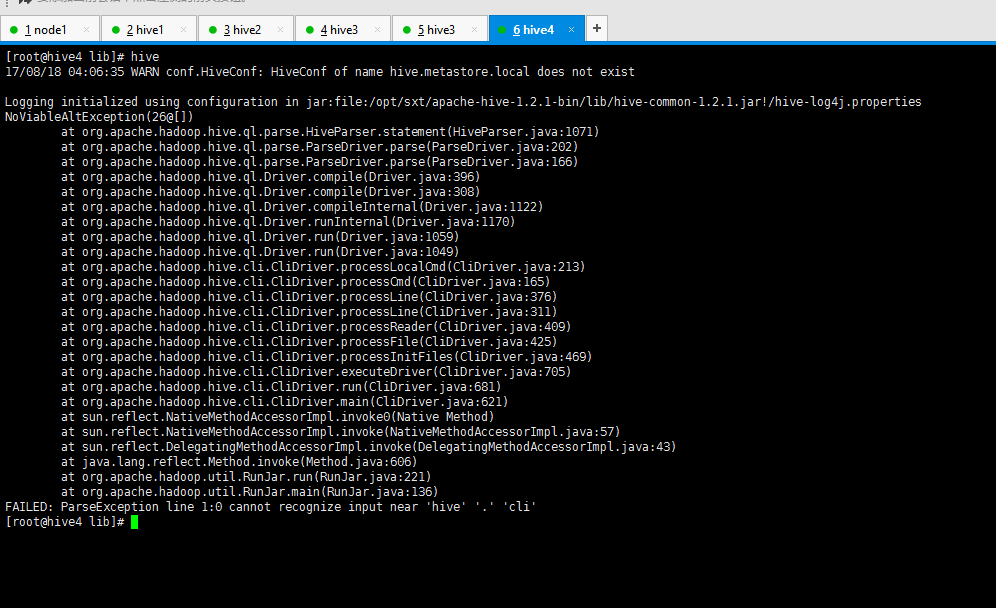
hadoop集群搭建好了,并且可以运行。之后按照教程将hive安装一遍,总是提示这个异常,看不懂,求大神们赐教
最近学习安装配置hadoop,然后在安装部署Hive时出错,网上搜了下,始终没能解决问题,请求大家帮助。 2015-09-30 13:04:38,765 ERROR : Datastore.Schem
先上报错信息:初步推测是文件配置的原因解决的方案:修改/etc/profile的hive文件配置,并source更新文件。最后在hive的bin目录下,启动hive的命令行成功!转载请注明来源链接!希...
来自: weixin_40594825的博客
文章目录Hive安装Hive元数据库Mysql的安装hive的安装Hive安装过程中的异常以及解决方法Hive安装Hive元数据库Mysql的安装(这儿展示Ubuntu系统安装Mysql)1. sud...
来自: weixin_42529806的博客
报错1:hive> CREATE TABLE dummy(value STRING);FAILED: Error in metadata: javax.jdo.JDOFatalInternalExce...
来自: 青春继续
首次安装hive-2.1.0,通过bin/hive登录hive shell命令行,报错如下:[hadoop@db03 hive-2.1.0]$ bin/hivewhich: no hbase in...
来自: weixin_30919429的博客
今天只是说一个问题,在hive启动的时候必须先启动hadoop的dfs和yarn的服务,否则会报错Exception in thread "main" java.lang.Runt...
来自: wumanxin2018的博客
点击上面↑「爱开发」关注我们每晚10点,捕获技术思考和创业资源洞察什么是ThreadLocalThreadLocal是一个本地线程副本变量工具类,各个线程都拥有一份线程私......
你知道的越多,你不知道的越多
点赞再看,养成习惯
GitHub上已经开源 https://github.com/JavaFamily 有一线大厂面试点脑图、个人联系方式和人才交流群,欢迎Sta...
我清晰的记得,刚买的macbook pro回到家,开机后第一件事情,就是上了淘宝网,花了500元钱,找了一个上门维修电脑的师傅,上门给我装了一个windows系统。。。。。。
表砍我。。。
当时买ma...
MyBatis 是一款优秀的持久层框架,它支持定制化 SQL、存储过程以及高级映射。MyBatis原本是apache的一个开源项目iBatis, 2010年该项目由apache software fo...
小编是一个理科生,不善长说一些废话。简单介绍下原理然后直接上代码。
使用的工具(Python+pycharm2019.3+selenium+xpath+chromedriver)其中要使用pycha...
爬虫,从本质上来说,就是利用程序在网上拿到对我们有价值的数据。
爬虫能做很多事,能做商业分析,也能做生活助手,比如:分析北京近两年二手房成交均价是多少?广州的Python工程师平均薪资是多少?北京哪...
CPU对每个程序员来说,是个既熟悉又陌生的东西?
如果你只知道CPU是中央处理器的话,那可能对你并没有什么用,那么作为程序员的我们,必须要搞懂的就是CPU这家伙是如何运行的,尤其要搞懂它里面的寄存器是...
1.Javascript 语法.用途
javascript 在前端网页中占有非常重要的地位,可以用于验证表单,制作特效等功能,它是一种描述语言,也是一种基于对象(Object)和事件驱动并具有安全性...
今天,群里白垩老师问如何用python画武汉肺炎疫情地图。白垩老师是研究海洋生态与地球生物的学者,国家重点实验室成员,于不惑之年学习python,实为我等学习楷模。先前我并没有关注武汉肺炎的具体数据,...
相信大家都已经收到国务院延长春节假期的消息,接下来,在家远程办公可能将会持续一段时间。
但是问题来了。远程办公不是人在电脑前就当坐班了,相反,对于沟通效率,文件协作,以及信息安全都有着极高的要求。有...
灰鸽子( Huigezi),原本该软件适用于公司和家庭管理,其功能十分强大,不但能监视摄像头、键盘记录、监控桌面、文件操作等。还提供了黑客专用功能,如:伪装系统图标、随意更换启动项名称和表...
目前每天各大平台,如腾讯、今日头条都会更新疫情每日数据,他们的数据源都是一样的,主要都是通过各地的卫健委官网通报。
以全国、湖北和上海为例,分别为以下三个网站:
国家卫健委官网:http://w...
哇说起B站,在小九眼里就是宝藏般的存在,放年假宅在家时一天刷6、7个小时不在话下,更别提今年的跨年晚会,我简直是跪着看完的!!
最早大家聚在在B站是为了追番,再后来我在上面刷欧美新歌和漂亮小姐姐的舞蹈...
Web播放器解决了在手机浏览器和PC浏览器上播放音视频数据的问题,让视音频内容可以不依赖用户安装App,就能进行播放以及在社交平台进行传播。在视频业务大数据平台中,播放数据的统计分析非常重要,所以We...
本文知识点较多,篇幅较长,请耐心学习
MySQL已经成为时下关系型数据库产品的中坚力量,备受互联网大厂的青睐,出门面试想进BAT,想拿高工资,不会点MySQL优化知识,拿offer的成功率会大大下降...
我本人因为高中沉迷于爱情,导致学业荒废,后来高考,毫无疑问进入了一所普普通通的大学,实在惭愧????
我又是那么好强,现在学历不行,没办法改变的事情了,所以,进入大学开始,我就下定决心,一定要让自己掌...
1.Matlab实现粒子群算法的程序代码:https://www.cnblogs.com/kexinxin/p/9858664.html
matlab代码求解函数最优值:https://blog.cs...
很多人知道爬虫,也很想利用爬虫去爬取自己想要的数据,那么爬虫到底怎么用呢?今天就教大家编写一个简单的爬虫。
下面以爬取笔者的个人博客网站为例获取第一篇文章的标题名称,教大家学会一个简单的爬虫。
第一步...
作者:隋顺意
一段时间前,自己制作了一个库 “sui-math”。这其实是math的翻版。做完后,python既然可以轻易的完成任何的数学计算,何不用python开发一个小程序专门用以计算呢?
现在我...
本篇博客大部分内容摘自埃里克·马瑟斯所著的《Python编程:从入门到实战》(入门类书籍),采用举例的方式进行知识点提要
关于Python学习书籍推荐文章 《学习Python必备的8本书》
Pytho...
明天就是情人节了。这个情人节,注定是一个不能约会的情人节,但不能约会不代表不能浪漫。古人比我们出生早,那些浪漫的诗词早都被他们挖掘一空,比诗词我们肯定没有机会了。好在我们还有Python,不然都不知道...
计算机考研指导建议背景开始备考时间学校选择复习计划学科复习考研资料和平台心得杂杂答疑
我是广东双非本科计算机类专业,大一高数没学好,英语在大四最后一次考试里过了6级,专业课掌握情况尚好。...
国内的普通开发者对于掌握一门新的技术不知道从哪里下手,看哪些书。为了获得相关知识会关注各种公众号、购买各种视频课程来学习,但由于这些内容本身有碎片化的特点,效果往往不太理想。以至于付出了大量的时间到最...
SSH无密钥登陆 与 配置公钥后仍...
weixin_45422852:两台备机可以无秘钥访问主机,但主机不能无秘钥访问备机,两台备机不能互访,这样怎么解决呢?配置文件也已经改了
SSH无密钥登陆 与 配置公钥后仍...
lady_killer9:不行


