


C#免注册调用大漠插件

免注册调用大漠插件,实际上是使用dmreg.dll 来配合实现,这个文件有 2 个导出接口
SetDllPathW和
SetDllPathA。
SetDllPathW对应 unicode,
SetDllPathA对应 ascii 接口。
一、下载大漠插件
下载地址: 大漠插件 解压完成后,如下图所示:

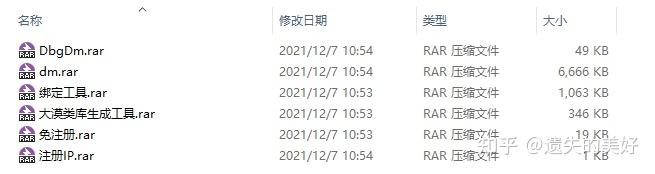
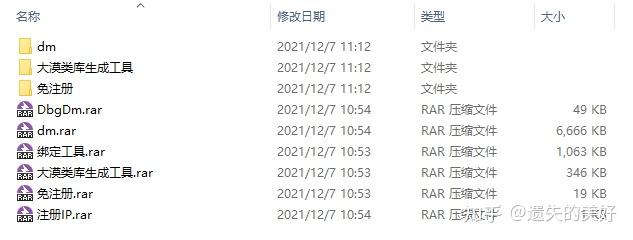
再解压 dm.rar、大漠类库生成工具.rar、免注册.rar,解压密码为:1234
解压完成后,如下图所示:

二、生成大漠类库 #
打开 大漠类库生成工具 文件夹,如下图所示:

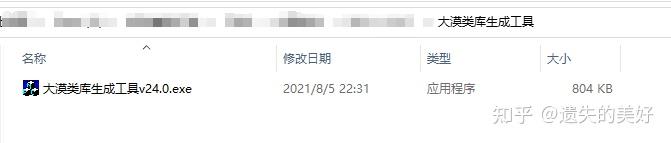
打开 大漠类库生成工具 v24.0.exe 文件,如下图所示:

将
dm\7.2149\dm.dll拖到 大漠类库生成工具 里面,如下图所示:

类名选择 使用自定义类名 ,指定类名输入 DmSoftCustomClassName (这里只是示例,你可以输入你喜欢的名字,如:abcde、aabbc、abab 等),如下图所示:

点击生成按钮,如下图所示:

打开
dm\7.2149\Output\C#文件夹,可以看到生成的结果,如下图所示:

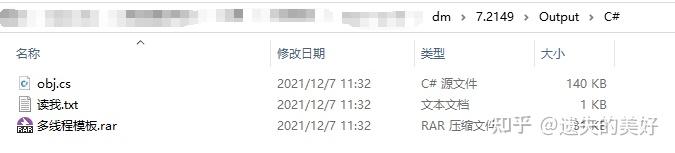
生成的 obj.cs 即是使用在 C# 平台下的类库封装,稍后在 C# 免注册调用大漠插件的示例中会用到。
三、创建控制台应用程序 #
我这里创建的是 .NET Core 3.1 的控制台应用程序,你也可以创建你喜欢的。
3.1 引入大漠插件 dll #
在项目中创建 libs 文件夹,用于放置大漠插件的 dll,如下图所示:

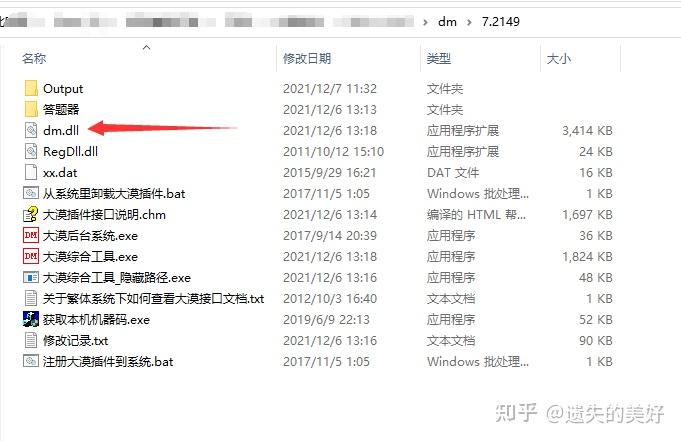
dm.dll 在
dm\7.2149文件夹下,如下图所示:

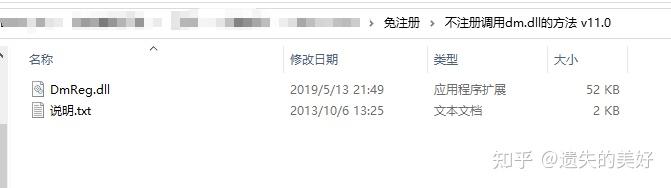
DmReg.dll 在
免注册\不注册调用dm.dll的方法 v11.0文件夹下,如下图所示:

设置 dll 属性 复制到输出目录 为 始终复制 :
- 在 dm.dll 上单击鼠标右键,选择 属性 ;
- 在属性面板中,“复制到输出目录”选项,选择“始终复制”;
- 在 DmReg.dll 也重复上面的操作。

3.2 引入大漠类库 #
在项目中创建 DmSoft 文件夹,用于放置大漠类库。
将之前生成的大漠类库(obj.cs)复制到项目中的 DmSoft 文件夹,并改名为 DmSoftCustomClassName(可以改名,也可以不改名,还可以改成任意名,你喜欢就好……),如下图所示:

3.3 创建 Resources 文件夹 #
在项目中创建 Resources 文件夹,用于放置大漠插件使用到的资源,比如图片、字库等,如下图所示:

3.4 创建大漠插件配置类 #
在项目中创建 Configs 文件夹,并在 Configs 中创建
DmConfig类,用于设置大漠插件用到的常量。
DmConfig.cs
namespace DmSoftTestConsoleApp.Configs
    /// <summary>
    /// 大漠插件配置
    /// </summary>
    public class DmConfig
        /// <summary>
        /// 大漠插件免注册 DmReg.dll 路径
        /// </summary>
        public const string DmRegDllPath = @"./libs/DmReg.dll";
        /// <summary>
        /// 大漠插件 dm.dll 路径
        /// </summary>
        public const string DmClassDllPath = @"./libs/dm.dll";
        /// <summary>
        /// 大漠插件注册码
        /// </summary>
        public const string DmRegCode = "";
        /// <summary>
        /// 大漠插件版本附加信息
        /// </summary>
        public const string DmVerInfo = "";
        /// <summary>
        /// 大漠插件全局路径,设置了此路径后,所有接口调用中,相关的文件都相对于此路径. 比如图片,字库等.
        /// </summary>
        public const string DmGlobalPath = @"./Resources";
### 3.5 创建 C# 免注册调用大漠插件类
```C#
    namespace DmSoftTestConsoleApp.Configs
        /// <summary>
        /// 大漠插件配置
        /// </summary>
        public class DmConfig
            /// <summary>
            /// 大漠插件免注册 DmReg.dll 路径
            /// </summary>
            public const string DmRegDllPath = @"./libs/DmReg.dll";
            /// <summary>
            /// 大漠插件 dm.dll 路径
            /// </summary>
            public const string DmClassDllPath = @"./libs/dm.dll";
            /// <summary>
            /// 大漠插件注册码
            /// </summary>
            public const string DmRegCode = "";
            /// <summary>
            /// 大漠插件版本附加信息
            /// </summary>
            public const string DmVerInfo = "";
            /// <summary>
            /// 大漠插件全局路径,设置了此路径后,所有接口调用中,相关的文件都相对于此路径. 比如图片,字库等.
            /// </summary>
            public const string DmGlobalPath = @"./Resources";
在 DmSoft 文件夹创建
RegisterDmSoft类,用于实现 C# 免注册调用大漠插件。
RegisterDmSoft.cs
using System.Runtime.InteropServices;
using DmSoftTestConsoleApp.Configs;
namespace DmSoftTestConsoleApp.DmSoft
    /// <summary>
    /// 免注册调用大漠插件
    /// </summary>
    public static class RegisterDmSoft
        // 不注册调用大漠插件,实际上是使用 dmreg.dll 来配合实现,这个文件有 2 个导出接口 SetDllPathW 和 SetDllPathA。 SetDllPathW 对应 unicode,SetDllPathA 对应 ascii 接口。
        [DllImport(DmConfig.DmRegDllPath)]
        private static extern int SetDllPathA(string path, int mode);
        /// <summary>
        /// 免注册调用大漠插件
        /// </summary>
        /// <returns></returns>
        public static bool RegisterDmSoftDll()
            var setDllPathResult = SetDllPathA(DmConfig.DmClassDllPath, 1);
            if (setDllPathResult == 0)
                // 加载 dm.dll 失败
                return false;
            return true;
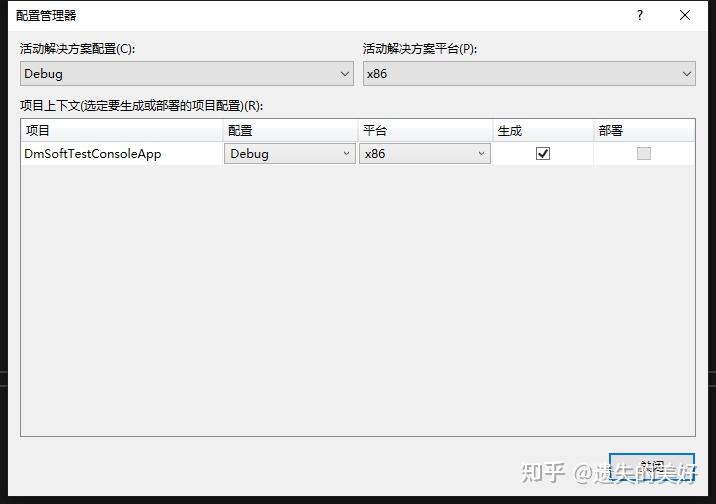
注意,在 .NET Core 中,无法使用 64 位进程加载 32 位 dll。解决方法是将程序设置为 32 位的。

四、测试 #
4.1 测试 C# 免注册调用大漠插件 #
在
Program类中编写测试代码。
Program.cs
using System;
using DmSoftTestConsoleApp.DmSoft;
namespace DmSoftTestConsoleApp
    class Program
        static void Main(string[] args)
            if (Environment.Is64BitProcess)
                Console.WriteLine("这是 64 位程序");
                Console.WriteLine("按任意键结束程序");
                Console.ReadKey();
                return;
            // 免注册调用大漠插件
            var registerDmSoftDllResult = RegisterDmSoft.RegisterDmSoftDll();
            Console.WriteLine($"免注册调用大漠插件返回:{registerDmSoftDllResult}");
            Console.WriteLine("按任意键结束程序");
            Console.ReadKey();
4.2 测试 Capture
方法
#
修改
Program类。
Program.cs
using System;
using System.IO;
using DmSoftTestConsoleApp.Configs;
using DmSoftTestConsoleApp.DmSoft;
namespace DmSoftTestConsoleApp
    class Program
        static void Main(string[] args)
            if (Environment.Is64BitProcess)
                Console.WriteLine("这是 64 位程序");
                Console.WriteLine("按任意键结束程序");
                Console.ReadKey();
                return;
            // 免注册调用大漠插件
            var registerDmSoftDllResult = RegisterDmSoft.RegisterDmSoftDll();
            Console.WriteLine($"免注册调用大漠插件返回:{registerDmSoftDllResult}");
            if (!registerDmSoftDllResult)
                throw new Exception("免注册调用大漠插件失败");
            // 创建对象
            DmSoftCustomClassName dmSoft = new DmSoftCustomClassName();
            // 收费注册
            var regResult = dmSoft.Reg(DmConfig.DmRegCode, DmConfig.DmVerInfo);
            Console.WriteLine($"收费注册返回:{regResult}");
            if (regResult != 1)
                throw new Exception("收费注册失败");
            // 判断 Resources 是否存在,不存在就创建
            if (!Directory.Exists(DmConfig.DmGlobalPath))
                Directory.CreateDirectory(DmConfig.DmGlobalPath);
            // 设置全局路径,设置了此路径后,所有接口调用中,相关的文件都相对于此路径. 比如图片,字库等
            dmSoft.SetPath(DmConfig.DmGlobalPath);
            // 抓取指定区域(x1, y1, x2, y2)的图像,保存为file(24位位图)
            var captureResult = dmSoft.Capture(0, 0, 2000, 2000, "screen.bmp");
            Console.WriteLine($"Capture 返回:{captureResult}");
            if (captureResult != 1)
                throw new Exception("Capture 失败");
            Console.WriteLine("按任意键结束程序");
            Console.ReadKey();