


国产大模型最好的新年礼物,深度推理模型 GLM-Zero 全面测评


2024 年 12 月 31 日是腊月初一,当大家忙着跨年并开始期待春节假期的时候,智谱给大模型爱好者们带来了最好的新年礼物——推理模型 GLM-Zero。
GLM-Zero 可以在智谱清言网页版或 App 端免费体验,也提供了 API 供开发者调用。本文将从数学、推理、编程以及模型 API 调用全面测评 GLM-Zero 各项能力。
模型数学、推理、编程能力测评
测评1: 行测考试真题
众所周知,传统大语言模型的数学能力很差,数不清单词中的字母,做不对初中数学,复杂的逻辑推理。
去年我拿了九套考试真题去测评过一次大模型的行测能力 [1] ,第一梯队的模型能达到 70-75 多分的水平,应该说这已经是非常不错的行测分数了。
但是如果去具体观察不同题型分类下的正确率,就会发现大模型更擅长常识和言语类题目,正确率可以达到0.85,但对于数学题最高也不过 0.52,推理题则大都是 0.6,也就是说传统的大语言模型是个语文优秀、数学不及格的偏科生。
而 GLM-Zero 推理模型相比于普通的大语言模型,其数学和编程能力都有大幅提升。
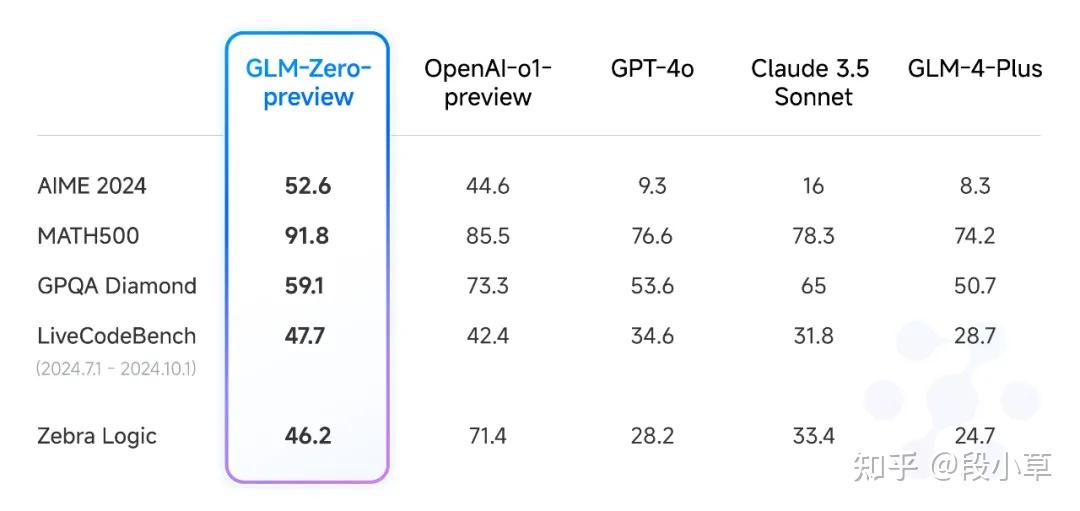
举个例子,我们可以拿一道行测的逻辑真题来测试 GLM-Zero:
|
学校计划开展暑期夏令营活动,就陈老师和林老师是否担任夏令营带队老师,几个家长纷纷猜测:
吴妈妈:如果陈老师没去带队,林老师肯定也没去; 李妈妈:陈老师是这个夏令营活动的策划者,她一定会去带队; 郑妈妈:你们等着看吧,陈老师和林老师至少有一个人会去; 张妈妈:我认为林老师会去带队,陈老师要回家探亲不会去。 结果发现其中两个妈妈猜对了,两个妈妈猜错了。请问猜对了的妈妈是? |
|---|
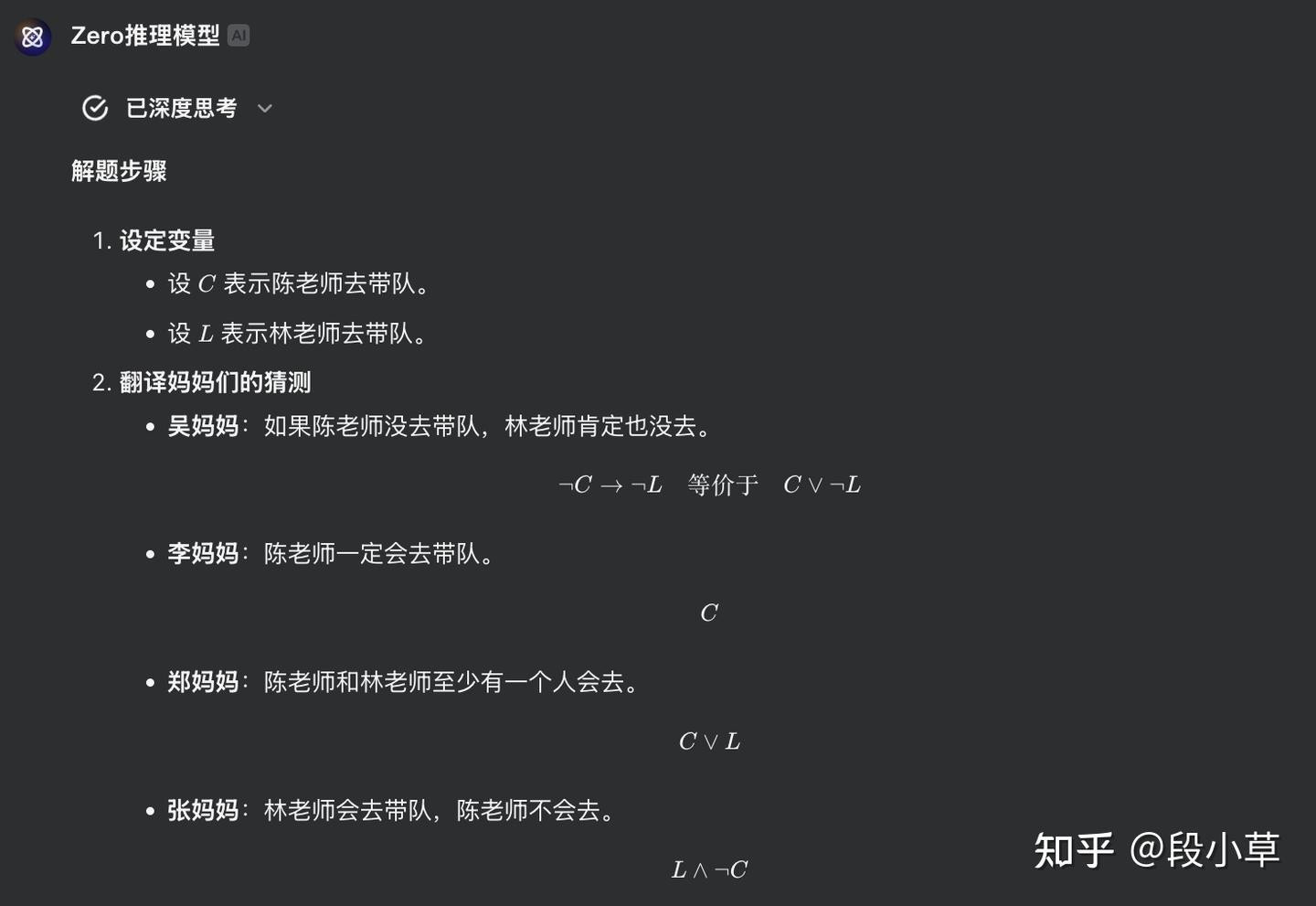
在解答过程中,GLM-Zero 先是以形式逻辑符号语言,将题干转化成逻辑公式:
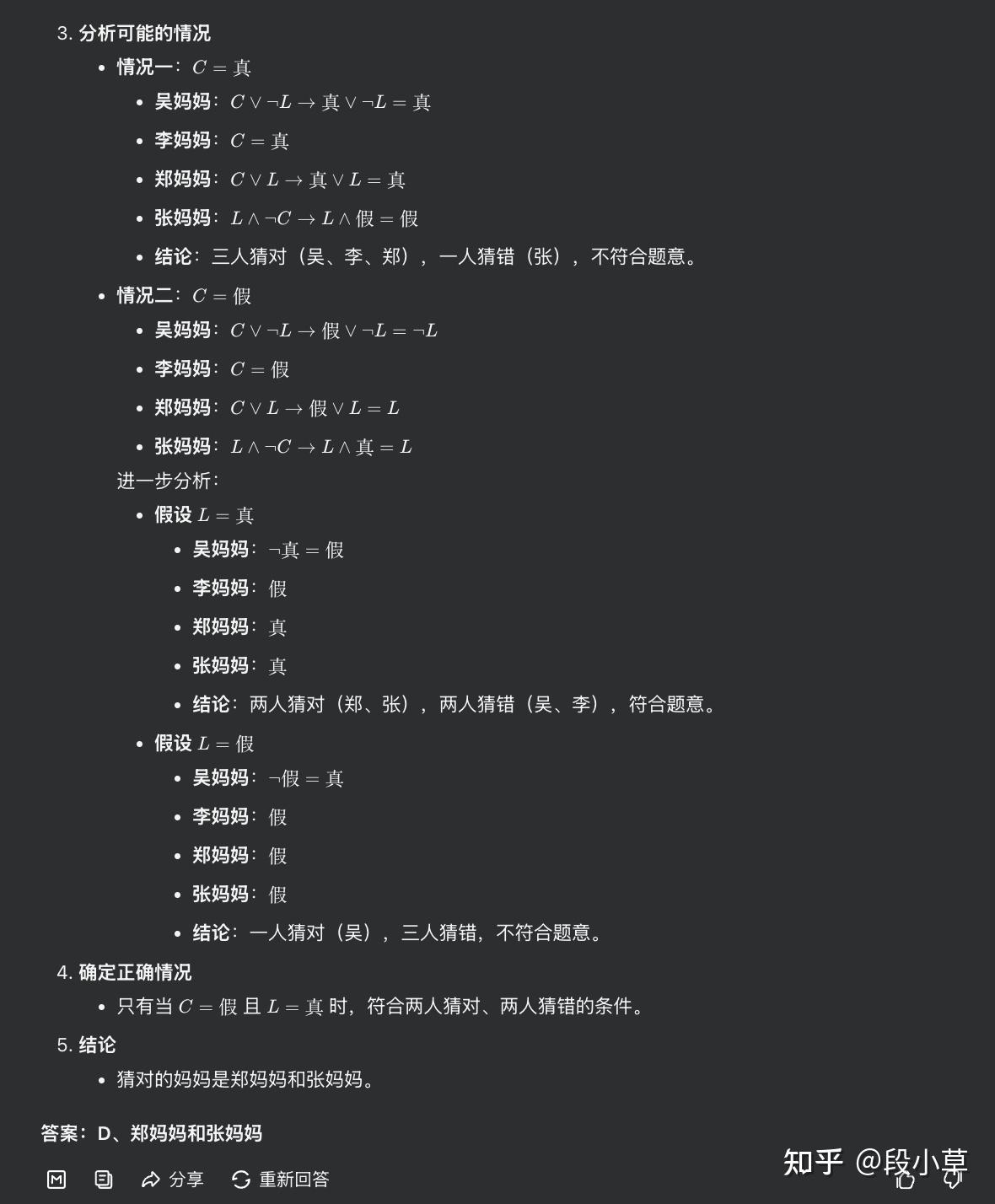
然后通过严谨的形式逻辑分析,分情况讨论不同可能性,最终给出正确答案:
再来看一道数学题目:
| 某旅游公司定制甲、乙两种纪念品,第一次共定制50个。试销后根据反馈,第二次定制两种纪念品共70个,其中乙纪念品个数是第一次的。已知甲纪念品单价为15元,第一次定制花费1150元,那么第二次定制花费多少元? |
|---|
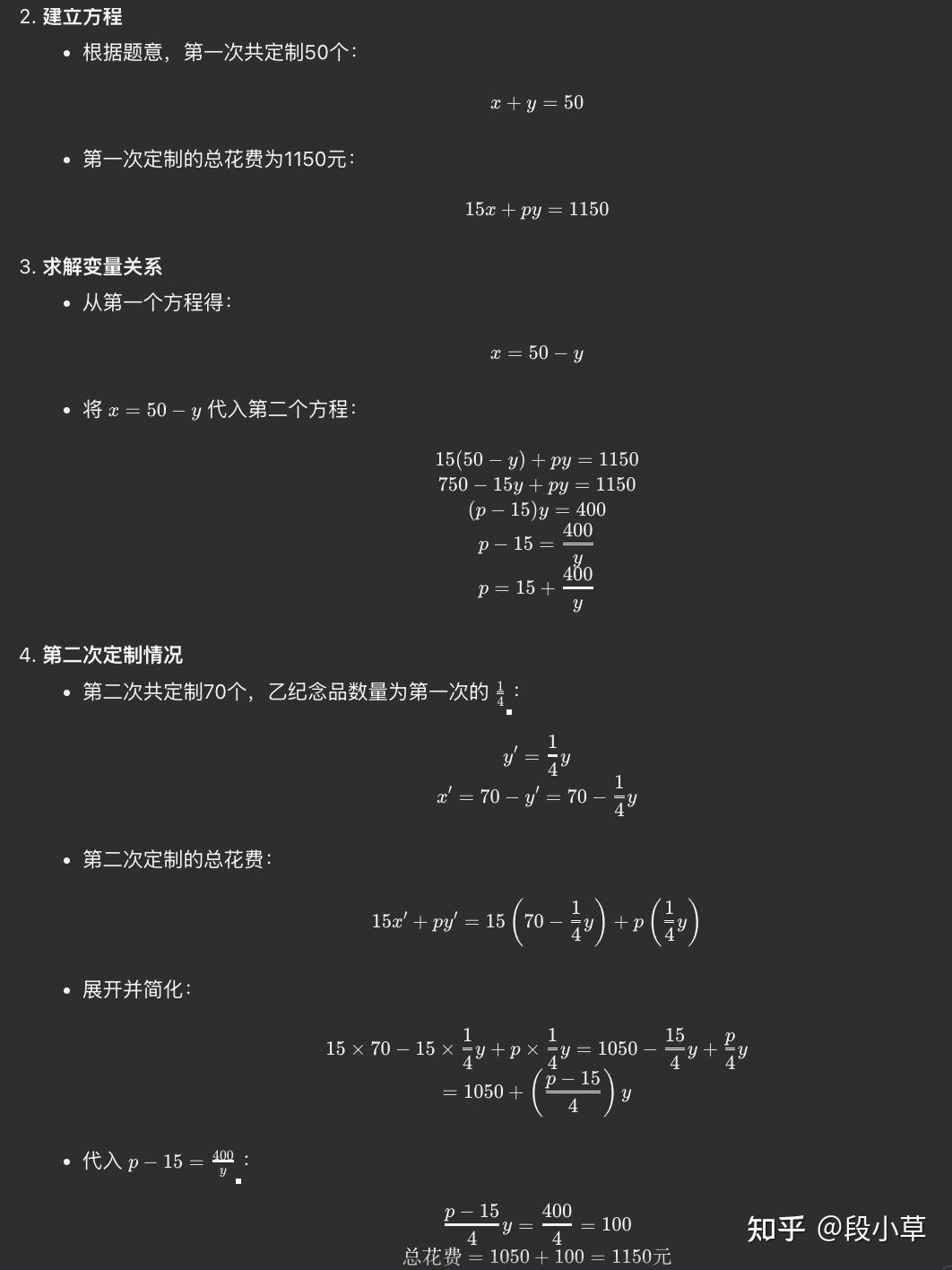
这道题目在我之前的模型评测中准确率很低,题目隐去了甲、乙的个数和乙的单价,有些模型就会陷入无穷的推测之中,偶尔有做对的也是用假设值代入进去算出来的。目前我测试的只有 o1 和 GLM-zero 可以用纯公式把答案推出来:
我花了亿点时间,用一整套行测试卷(2024 年陕西真题)测试了 GLM-zero,最终成绩如下:
| 模型 | glm-zero | claude-3.5-sonnet | gpt-4o | qwen2-72b |
| 得分 | 86.6 | 78.35 | 78.35 | 76.29 |
可以说推理模型用深度思考补全了大模型数学和推理最后的能力短板,在行测这个科目上超越了人类考生的表现。
测评2: Adventofcode2024 编程挑战
Adventofcode 是一个在线的编程挑战 [2] ,每年 12 月圣诞前作者都会以每天定时更新一题的方式连续给出 25 道题目,许多编程爱好者会在线蹲守这些题目并挑战榜单。
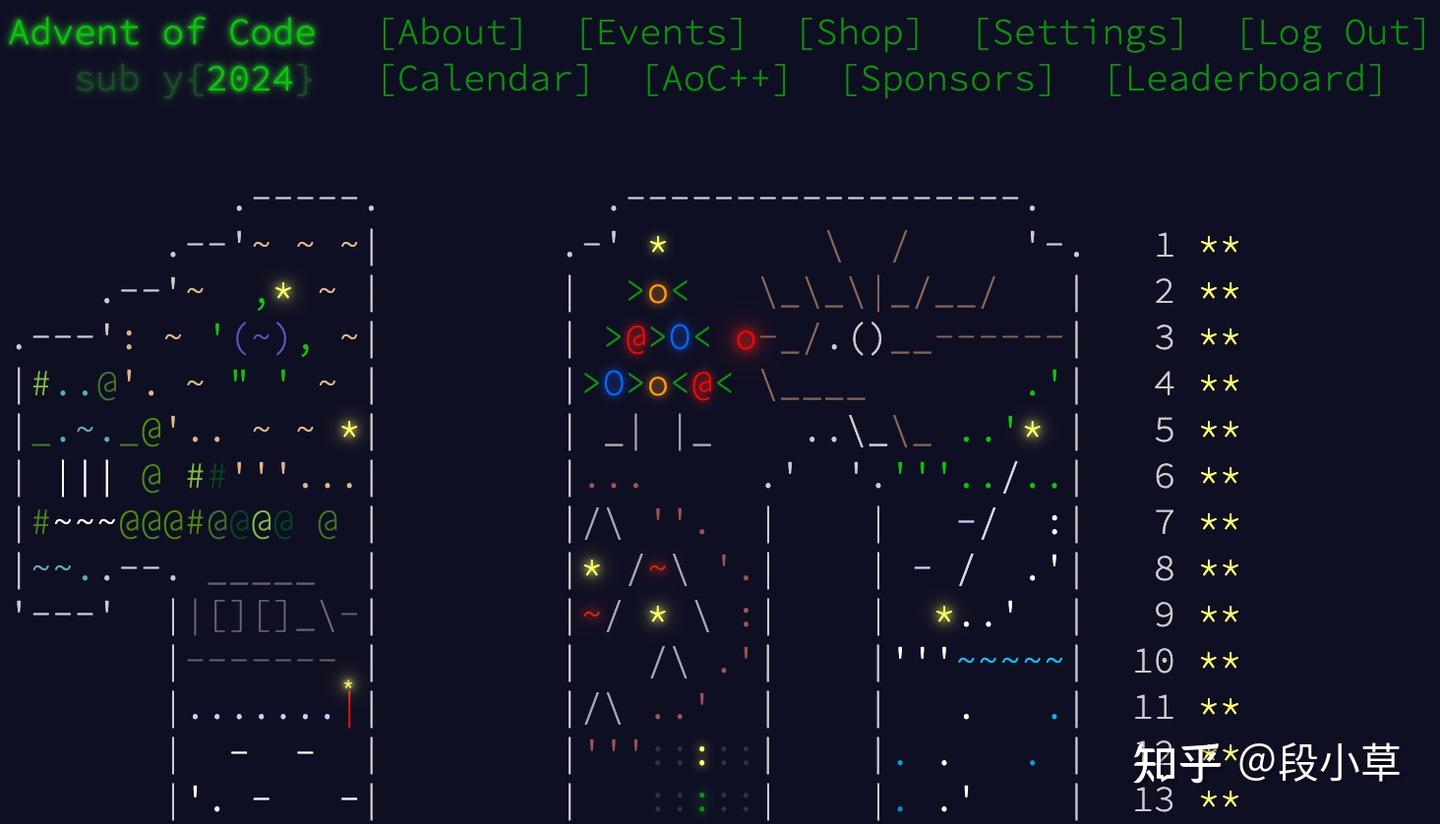
相比于其他在线 OJ 的题目,Adventofcode 算不上特别难,但题本里的背景设定特别长…主要是能保证原创新题,模型肯定没训练过。我这里用 2024 年第 6-10 天的 5 道中等难度题目对模型进行了测试,并和 o1、GPT-4o 进行了比较,结果如下:
| 模型 | o1 | glm-zero | gpt-4o |
|---|---|---|---|
| 得分 | 5 | 4.5 | 3.5 |
扣掉的 0.5 分是因为第 9 天的 Part2 题目中,模型直接最后输出阶段也没给出可以运行的代码…只能说推理也是双刃剑,模型有时候确实会过度反思,反复修正自己的思路。
以 Day10 的题目为例吧。这是一道迷宫遍历的问题,求起点到目标点的路径数量。由于题干太长,清言网页版上最多只能输入 1000 字符,所以我用智谱 AI 开放平台上的模型体验中心来测试 glm-zero-preivew 模型。
模型 API 在回答问题时,内容由 Thinking 和 Response 两部分组成。可以看到,模型首先会识别问题,然后比较 DFS 和 BFS 哪种算法更适合这道问题:
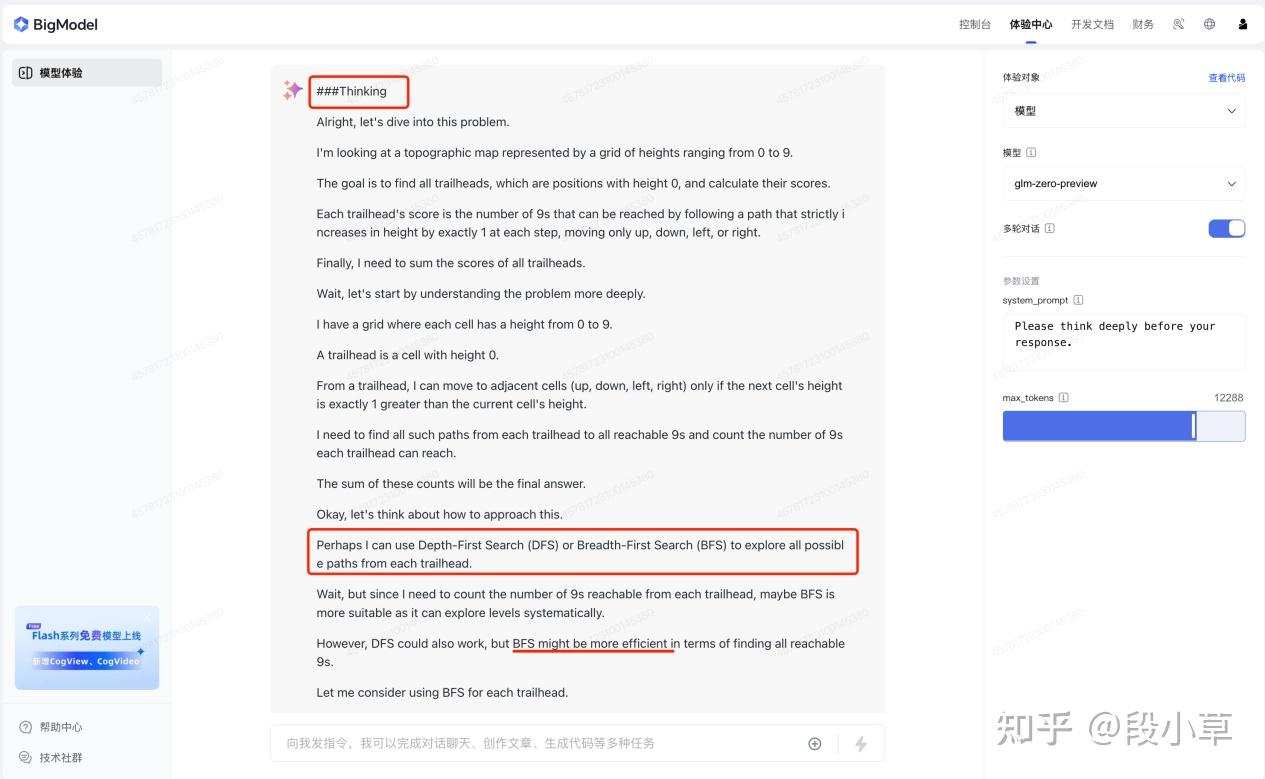
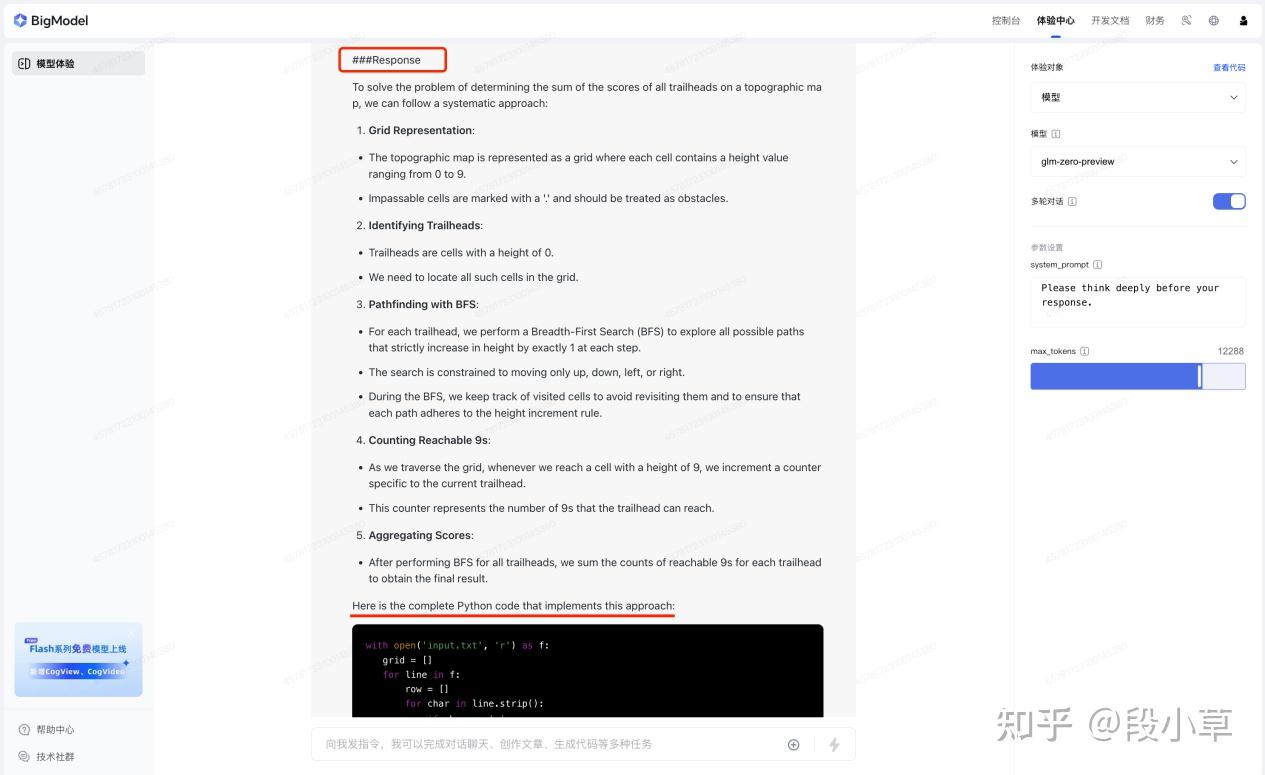
之后模型会进行极长的思考,反复地推理代码和输入输出。最后在 Response 中整理并解释其解题思路,然后给出最终代码:
with open('input.txt', 'r') as f:
   grid = []
   for line in f:
       row = []
       for char in line.strip():
           if char == '.':
               row.append(None)  # Represent impassable cells
           else:
               row.append(int(char))
       grid.append(row)
trailheads = []
for i in range(len(grid)):
   for j in range(len(grid[0])):
       if grid[i][j] == 0:
           trailheads.append((i, j))
from collections import deque
def bfs(grid, start):
   visited = [[False for _ in range(len(grid[0]))] for _ in range(len(grid))]
   queue = deque()
   queue.append(start)
   visited[start[0]][start[1]] = True
   count = 0
   while queue:
       x, y = queue.popleft()
       if grid[x][y] == 9:
           count += 1
       for dx, dy in [(-1,0), (1,0), (0,-1), (0,1)]:
           nx, ny = x + dx, y + dy
           if 0 <= nx < len(grid) and 0 <= ny < len(grid[0]):
               if grid[nx][ny] is None:
                   continue
               if not visited[nx][ny] and grid[nx][ny] == grid[x][y] + 1:
                   visited[nx][ny] = True
                   queue.append((nx, ny))
   return count
total_score = 0
for trailhead in trailheads:
   total_score += bfs(grid, trailhead)
print(total_score)
这段代码也的确使用了 BFS 算法来遍历网格,从每个起点出发,沿着递增的路径找到所有的目标点,最终统计这些路径的数量。实际测试这段代码的运行结果也是正确的。
调用 GLM-Zero 模型开发应用
上面的测试已经证明了 GLM-Zero 的能力,对于开发者来说,有了更强的模型,就能开发出更强的应用。接下来就演示一下模型 API 的调用。
第一步,注册智谱大模型开放平台。智谱大模型开放平台是 GLM 系列模型的官方网站,提供开箱即用的 AI 应用开发资源和解决方案:

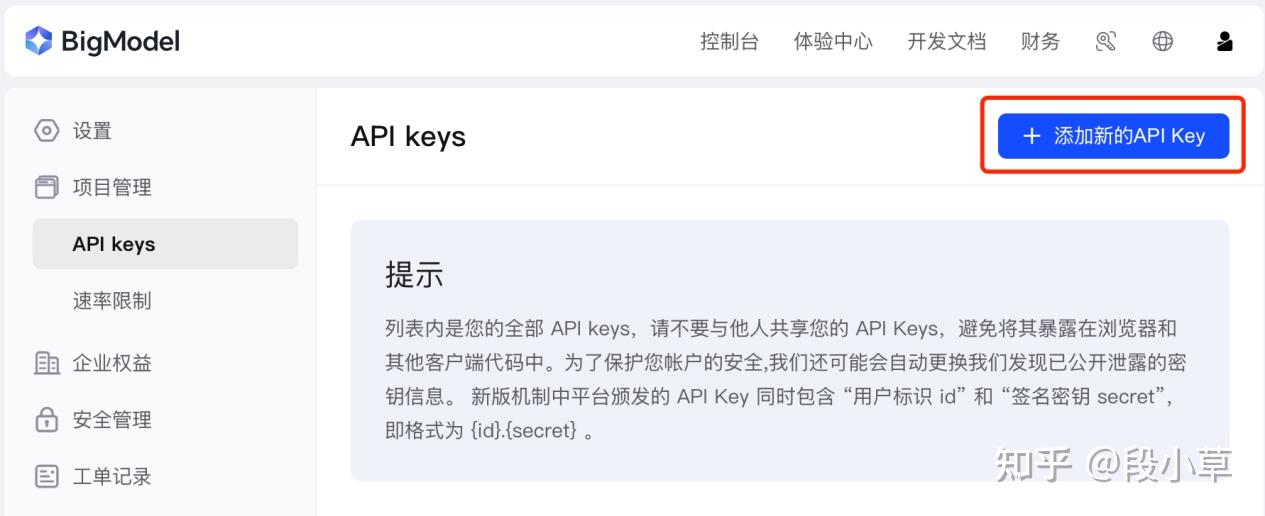
第二步,获取自己的 API Key,在个人设置中找到 API Keys 设置页面,点击「添加新的 API Key」,并妥善保存自己的密钥:
第三步,调用模型接口。智谱开放平台提供了多种调用方式,你可以使用最常用的网络请求方式调用 API,也可以安装 Python 或 Java SDK。GLM-Zero API 支持 16K 上下文,最长可输出 12K 内容。
我们不妨拿 o3 发布会同款套娃指令来测试一下 GLM-Zero。简单来说就是让 AI 自己写一段代码,实现一个本地的服务器,通过这个网页,你也可以输入一段指令,AI 会调用 API 写一段代码保存在桌面然后自动运行。
Prompt:
Write me a python script which launches a server locally for an htmlfile which has a big text box. When l enter text into that box and press submit, it should send that request for code to the glm-zero APl, take the resulting code, save it to a temporary file on the desktop, then execute that file in a newpython terminal. A few more details:
it can find my APl key in ~/api key
please add some extra prompting into the request to the api to specify that it should only return raw code without any formatting or markdown at all
you'll be executing on a mac laptop
GLM-Zero 较好地完成了这个任务:
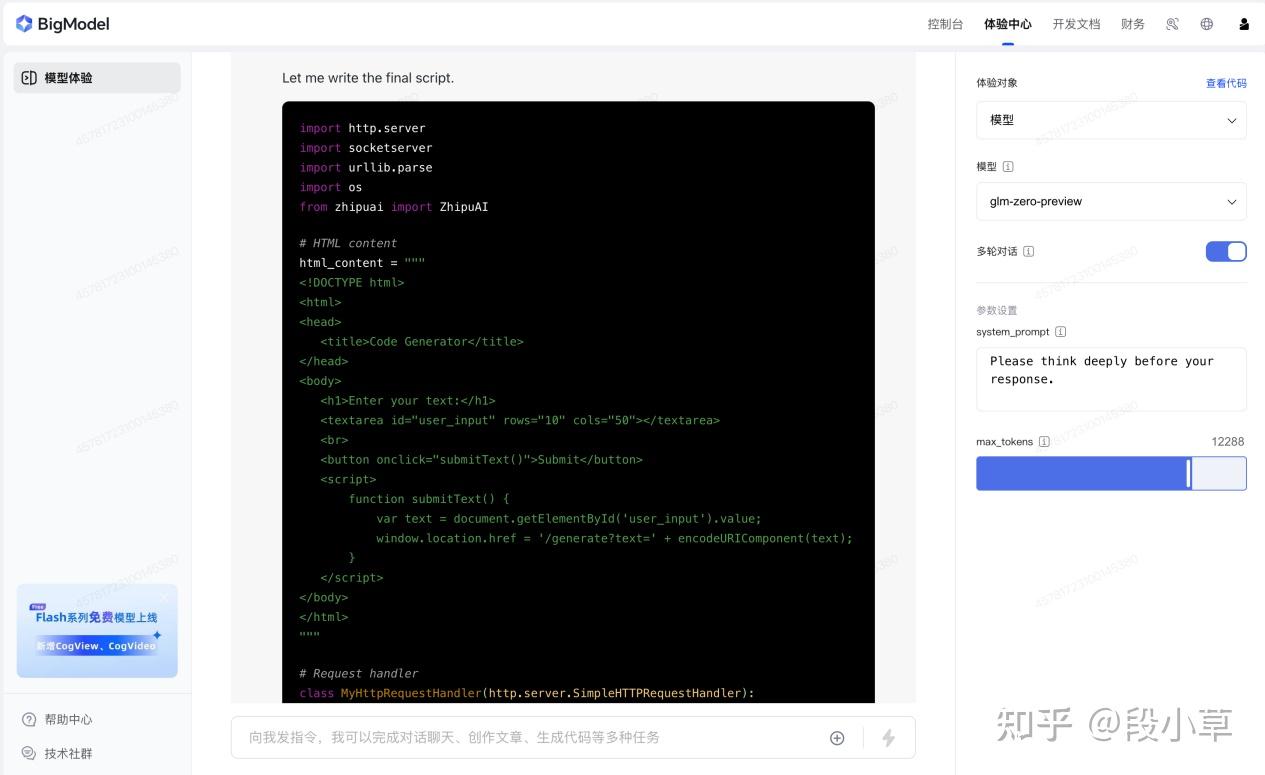
import http.server
import socketserver
import urllib.parse
import os
from zhipuai import ZhipuAI
# HTML content for the web page
html_content = """
<!DOCTYPE html>
   <title>Code Generator</title>
</head>
   <h1>Enter your text:</h1>
   <textarea id="user_input" rows="10" cols="50"></textarea>
   <button onclick="submitText()">Submit</button>
   <script>
       function submitText() {
           var text = document.getElementById('user_input').value;
           window.location.href = '/generate?text=' + encodeURIComponent(text);
   </script>
</body>
</html>
# Custom request handler
class MyHttpRequestHandler(http.server.SimpleHTTPRequestHandler):
   def do_GET(self):
       if self.path == '/':
           self.send_response(200)
           self.send_header('Content-type', 'text/html')
           self.end_headers()
           self.wfile.write(html_content.encode())
       elif self.path.startswith('/generate?'):
           query = urllib.parse.urlparse(self.path).query
           params = urllib.parse.parse_qs(query)
           user_text = params.get('text', [''])[0]
           print(user_text)
               response = client.chat.completions.create(
                #    model="glm-zero-preview",
                   model="glm-4-air",
                   messages=[
                           "role": "system",
                        #    "content": "Please think deeply before your response."
                           "content": "only return raw code, do not use markdown code block"
                           "role": "user",
                           "content": user_text
                   top_p=0.7,
                   temperature=0.9,
                   max_tokens=12288,
                   stream=False
               print(response)
               code = response.choices[0].message.content
               print(code)
               # Save the code to a temporary file on the desktop
               desktop_path = os.path.expanduser('~/Desktop')
               temp_file_path = os.path.join(desktop_path, 'temp_code.py')
               with open(temp_file_path, 'w') as file:
                   file.write(code)
               # Execute the file in a new Python terminal
               # 使用 AppleScript 打开新 Terminal 窗口并运行 Python 脚本
               apple_script = f'''
                tell application "Terminal"
                    activate
                    do script "python {temp_file_path}"
                end tell
               # 调用 osascript 执行 AppleScript
               os.system(f"osascript -e '{apple_script}'")
               self.send_response(200)
               self.send_header('Content-type', 'text/plain')
               self.end_headers()
               self.wfile.write(b'Code generated and executed.')
           except Exception as e:
               self.send_response(500)
               self.send_header('Content-type', 'text/plain')
               self.end_headers()
               self.wfile.write(f'Error: {str(e)}'.encode())
       else:
           self.send_response(404)
           self.end_headers()
# Read API key from file
api_key_path = os.path.expanduser('~/api_key')
if not os.path.exists(api_key_path):
   print("API key file not found at ~/api_key")
   exit()
with open(api_key_path, 'r') as file:
   api_key = file.read().strip()
# Initialize ZhipuAI client
client = ZhipuAI(api_key=api_key)
# Server configuration
PORT = 8000
handler = MyHttpRequestHandler
# Start the server
with socketserver.TCPServer(("", PORT), handler) as httpd:
   print(f"Server started at http://localhost:{PORT}")
   httpd.serve_forever()
我把里面的 API 接口改成了 glm4-air 做了测试,可以成功运行:

在 GLM-Zero 的帮助下,我还尝试做了一个自动批改数学题目的应用 demo,这个 demo 主要实现以下功能:
- 创建一个 web 服务;
- 支持上传数学题目的图片;
- 调用智谱 glm-4v-plus 模型,对图片进行 OCR,并展示出 OCR 后的内容(支持 LaTeX);
- 调用智谱 glm-zero-preview 模型,对 OCR 之后的题目和答案进行批改,并给出正确答案。
最终实现的效果如图:
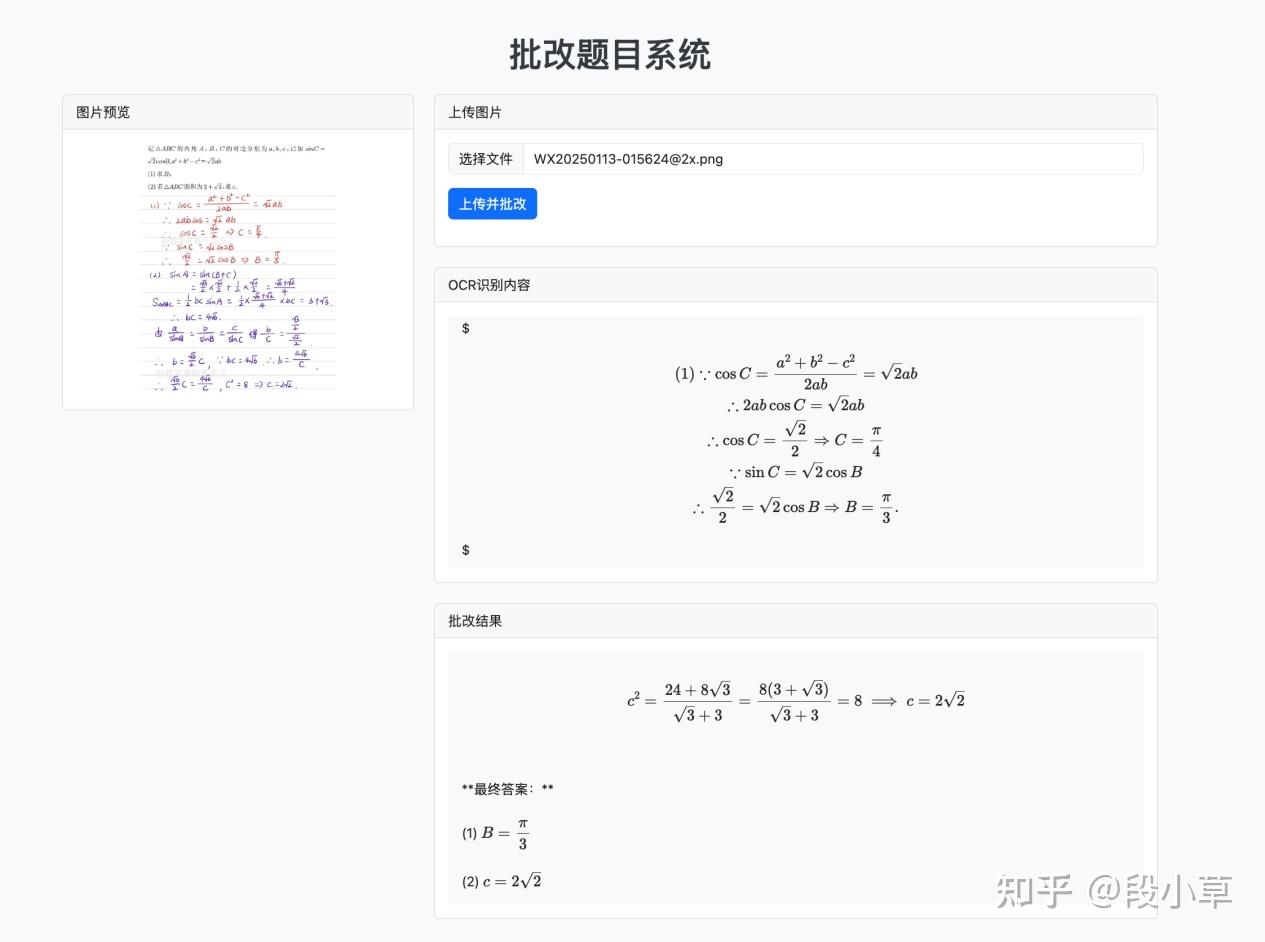
这里的核心代码自然是调用 API 的部分,至于前端的网页部分,在 AI 的帮助下很容易完成。
其中,glm-4v-plus 的调用代码为:
# 读取文件并编码为base64
img_bytes = file.read()
img_base = base64.b64encode(img_bytes).decode('utf-8')
# 调用OCR API
ocr_client = ZhipuAI(api_key=API_KEY)
ocr_response = ocr_client.chat.completions.create(
model="glm-4v-plus",
messages=[
        "role": "user",
        "content": [
                "type": "image_url",
                "image_url": {
                    "url": img_base
                "type": "text",
                "text": "请描述这个图片"
ocr_text = ocr_response.choices[0].message.content
Glm-zero-preview 的调用代码为:
# 调用批改API
grade_client = ZhipuAI(api_key=API_KEY)
grade_response = grade_client.chat.completions.create(
    model="glm-zero-preview",
    messages=[
        {"role": "system", "content": "Please think deeply before your response."},
        {"role": "user", "content": "请根据题目和作答内容进行批改:"+ocr_text}
    max_tokens=12000,
grade_result = grade_response.choices[0].message.content
response_index = grade_result.find("###Response")