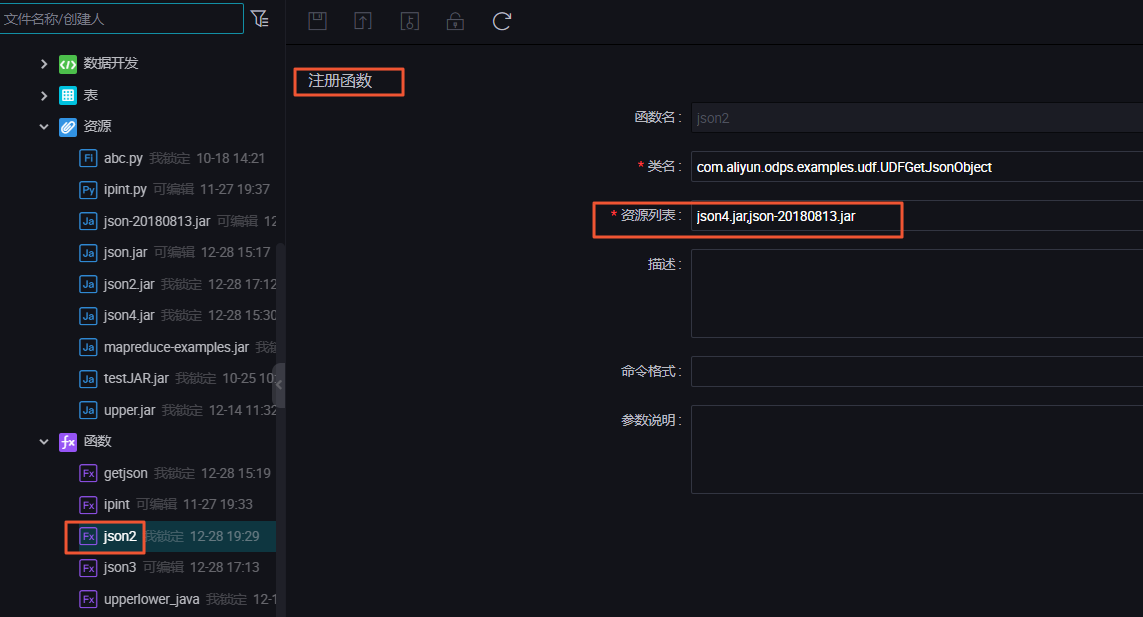
成功注册UDF后,执行如下命令测试。
select UDFGetJsonObject('{"grade":"一年级","persons":[{"age":"a1","name":"n1"},{"age":"a2","name":"n2"}]}', '$.persons[0].age');
执行结果为
a1
。
UDF代码示例
package com.aliyun.odps.examples.udf; //package名称,可以根据您的情况定义。
import org.json.JSONArray;
import org.json.JSONException;
import org.json.JSONObject;
import java.util.ArrayList;
import java.util.Iterator;
import java.util.LinkedHashMap;
import java.util.Map;
import java.util.regex.Matcher;
import java.util.regex.Pattern;
//阿里云UDF。
import com.aliyun.odps.udf.UDF;
public class UDFGetJsonObject extends UDF {
//声明私有不可变Pattern正则表达式模式。
private final Pattern patternKey = Pattern.compile("^([a-zA-Z0-9_\\-]+).*");
private final Pattern patternIndex = Pattern.compile("\\[([0-9]+|\\*)\\]");
// 使用链接哈希映射的LRU表缓存。
// 定义HashCache静态内部子类,继承LinkedHashMap。
static class HashCache<K, V> extends LinkedHashMap<K, V> {
private static final int CACHE_SIZE = 16;
private static final int INIT_SIZE = 32;
// 声明私有常量HashMap的LOAD_FACTOR装载因子。
private static final float LOAD_FACTOR = 0.6f;
HashCache() {
super(INIT_SIZE, LOAD_FACTOR);
private static final long serialVersionUID = 1;
// 重载LinkedHashMap方法,用于判断是否超过Cache大小并清理缓存。
@Override
protected boolean removeEldestEntry(Map.Entry<K, V> eldest) {
return size() > CACHE_SIZE;
//使用HashCache构造方法创建Map类型缓存区域。
static Map<String, Object> extractObjectCache = new HashCache<String, Object>();
static Map<String, String[]> pathExprCache = new HashCache<String, String[]>();
static Map<String, ArrayList<String>> indexListCache = new HashCache<String, ArrayList<String>>();
static Map<String, String> mKeyGroup1Cache = new HashCache<String, String>();
static Map<String, Boolean> mKeyMatchesCache = new HashCache<String, Boolean>();
String result = new String();
public UDFGetJsonObject() {
* Extract json object from a json string based on json path specified, and
* return json string of the extracted json object. It will return null if the
* input json string is invalid.
* A limited version of JSONPath supported: $ : Root object . : Child operator
* [] : Subscript operator for array * : Wildcard for []
* Syntax not supported that's worth noticing: '' : Zero length string as key
* .. : Recursive descent &#064; : Current object/element () : Script
* expression ?() : Filter (script) expression. [,] : Union operator
* [start:end:step] : array slice operator
* @param jsonString
* the json string.
* @param pathString
* the json path expression.
* @return json string or null when an error happens.
public String evaluate(String jsonString, String pathString) {
// 创建evaluate方法,与HIVE一样,MaxCompute的UDF通常使用evaluate方法,jsonString作为输入的JSON字符串,pathString作为输入的路径。
// 判断如果输入的JSON字符串路径为空则返回null。
if (jsonString == null || jsonString.equals("") || pathString == null
|| pathString.equals("")) {
return null;
try {
// Cache pathExpr
// 获取string数组类型的输入路径。
String[] pathExpr = pathExprCache.get(pathString);
if (pathExpr == null) {
// 用“.”作为分隔,获取输入路径的string数组pathExpr,-1表示如果最后几位是分隔符也会继续切割。
pathExpr = pathString.split("\\.", -1);
// 使用put方法将pathString、pathExpr缓存到pathExprCache。
pathExprCache.put(pathString, pathExpr);
// 如果path首位不为$,则返回null。
if (!pathExpr[0].equalsIgnoreCase("$")) {
return null;
// Cache extractObject
Object extractObject = extractObjectCache.get(jsonString);
if (extractObject == null) {
extractObject = new JSONObject(jsonString);
// 使用put方法缓存JSON字符串内容。
extractObjectCache.put(jsonString, extractObject);
for (int i = 1; i < pathExpr.length; i++) {
// 根据路径参数pathExpr使用extract方法取出JSON字符串。
extractObject = extract(extractObject, pathExpr[i]);
// 将获取的object类型的JSON字符串以string类型输出。
return extractObject.toString();
} catch (Exception e) {
// 发生异常时返回null。
return null;
private Object extract(Object json, String path) throws JSONException {
// Cache patternkey.matcher(path).matches()
Matcher mKey = null;
Boolean mKeyMatches = mKeyMatchesCache.get(path);
if (mKeyMatches == null) {
// 如果缓存中不存在path。
mKey = patternKey.matcher(path);
// 如果路径可以匹配到JSON字符串,返回True,如果无法匹配,返回False。
mKeyMatches = mKey.matches() ? Boolean.TRUE : Boolean.FALSE;
mKeyMatchesCache.put(path, mKeyMatches);
if (!mKeyMatches.booleanValue()) {
return null;
// Cache mkey.group(1)
// 根据path获取对应的JSON。
String mKeyGroup1 = mKeyGroup1Cache.get(path);
if (mKeyGroup1 == null) {
// 判断缓存中是否已存在JSON。
if (mKey == null) {
mKey = patternKey.matcher(path);
mKeyGroup1 = mKey.group(1);
// 根据path缓存对应的JSON。
mKeyGroup1Cache.put(path, mKeyGroup1);
// 获取JSON。
json = extract_json_withkey(json, mKeyGroup1);
// Cache indexList
// 根据获取对应的数组类型JSON。
ArrayList<String> indexList = indexListCache.get(path);
if (indexList == null) {
// 判断缓存中是否已存在数组类型JSON。
Matcher mIndex = patternIndex.matcher(path);
indexList = new ArrayList<String>();
while (mIndex.find()) {
indexList.add(mIndex.group(1));
indexListCache.put(path, indexList);
if (indexList.size() > 0) {
// 根据path缓存对应数组类型的JSON。
json = extract_json_withindex(json, indexList);
return json;
// 创建数组类型JSON对象。
ArrayList<Object> jsonList = new ArrayList<Object>();
// 创建获取数组类型JSON的方法。
private Object extract_json_withindex(Object json, ArrayList<String> indexList)
throws JSONException {
jsonList.clear();
jsonList.add(json);
Iterator<String> itr = indexList.iterator();
while (itr.hasNext()) {
String index = itr.next();
ArrayList<Object> tmp_jsonList = new ArrayList<Object>();
// 如果path路径中包含通配符,则获取所有通配符匹配的JSON。
if (index.equalsIgnoreCase("*")) {
for (int i = 0; i < (jsonList).size(); i++) {
try {
JSONArray array = (JSONArray) (jsonList).get(i);
for (int j = 0; j < array.length(); j++) {
tmp_jsonList.add(array.get(j));
} catch (Exception e) {
continue;
jsonList = tmp_jsonList;
} else {
// 如果不存在通配符,则遍历JSON。
for (int i = 0; i < (jsonList).size(); i++) {
try {
tmp_jsonList.add(((JSONArray) (jsonList).get(i)).get(Integer
.parseInt(index)));
} catch (ClassCastException e) {
continue;
} catch (JSONException e) {
return null;
jsonList = tmp_jsonList;
return (jsonList.size() > 1) ? new JSONArray(jsonList) : jsonList.get(0);
// 创建获取普通JSON的方法。
private Object extract_json_withkey(Object json, String path)
throws JSONException {
if (json.getClass() == org.json.JSONArray.class) {
JSONArray jsonArray = new JSONArray();
for (int i = 0; i < ((JSONArray) json).length(); i++) {
Object josn_elem = ((JSONArray) json).get(i);
try {
Object json_obj = ((JSONObject) josn_elem).get(path);
if (json_obj.getClass() == org.json.JSONArray.class) {
for (int j = 0; j < ((JSONArray) json_obj).length(); j++) {
jsonArray.put(((JSONArray) json_obj).get(j));
} else {
jsonArray.put(json_obj);
} catch (Exception e) {
continue;
return (jsonArray.length() == 0) ? null : jsonArray;
} else {
return ((JSONObject) json).get(path);