hello
everyone@nxp
I have re-installed MCUpressoIDE, python3, and sdk of JN8189, and imported the project JN-AN-1246, but failed to compile LTO,It has the following error
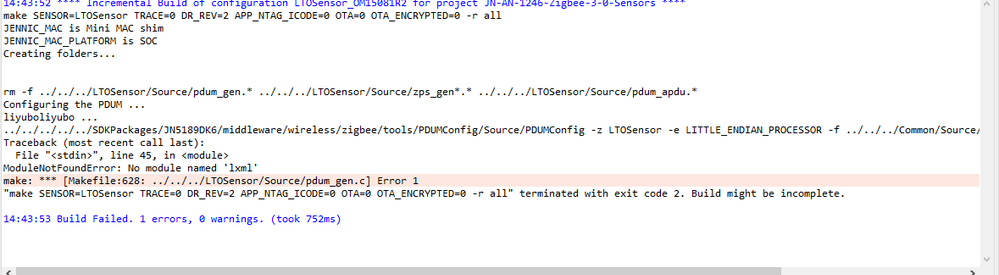
The ide version I am using is
MCUXpressoIDE 11.9.02144
SDK version:
SDK_2_6_12_JN5189
JN-AN-1246
:v2008
python is also
installed
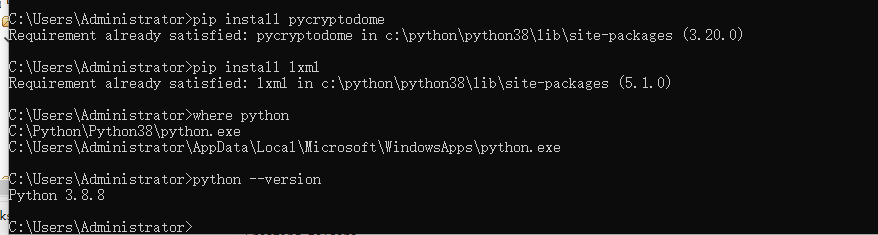
What is the reason for this error?
Please help solve it.
thank you
Hi,
@Tome-mbedded
Thanks for thinking of NXP products and hope you are doing well.
Can you please let me know the detailed steps on this case?
Firstly import the SDK then import the project or firstly import the project then install the SDK?
So that I can have a try to see whether I can reproduce is locally.
And also please unzip the project file before import to have a try.
Best regards,
Christine.
thank you
@Christine_Li
I first installed MCU Xpresso IDE, installed Python, installed sdk, and imported JN1426 project, but the compilation failed and the error message did not show lxml, but this has already been installed.
Is there something wrong with my installation environment?
I installed it according to this procedure
https://www.nxp.com.cn/document/guide/getting-started-with-jn5189:GS-JN5189
Hi,
@Tome-mbedded
I tried on my side and after installed lxml, this issue can be resolved.
Please help to try.
And also remind, please check and confirm you have add python into the environment variables PATH.
Best regards,
Christine.
Hi,
@Tome-mbedded
Did you check the python environment variables path?
Anything else I can do for you on this case?
Best regards,
Christine.
Hi,
@Tome-mbedded
I am so sorry about the inconvenience.
But according to my experience, this error is related to python environment variable path and lxml install.
Also, as you can see my attachment, I have reproduced this issue on my side, and after re-installed lxml, issue is resolved.
So please double check your python environment variable path and if still failed, then please re-try with a new environment.
I apologize for the inconvenience again.
Best regards,
Christine.


